concept WHERE in category postgis

This is an excerpt from Manning's book PostGIS in Action, Third Edition.
Select a connection, and then a table and the geometry column you want to display. You can filter the data with an optional
WHEREclause (see figure 5.5). Then click Finish.Figure 5.5. Datastore layer setup in OpenJUMP
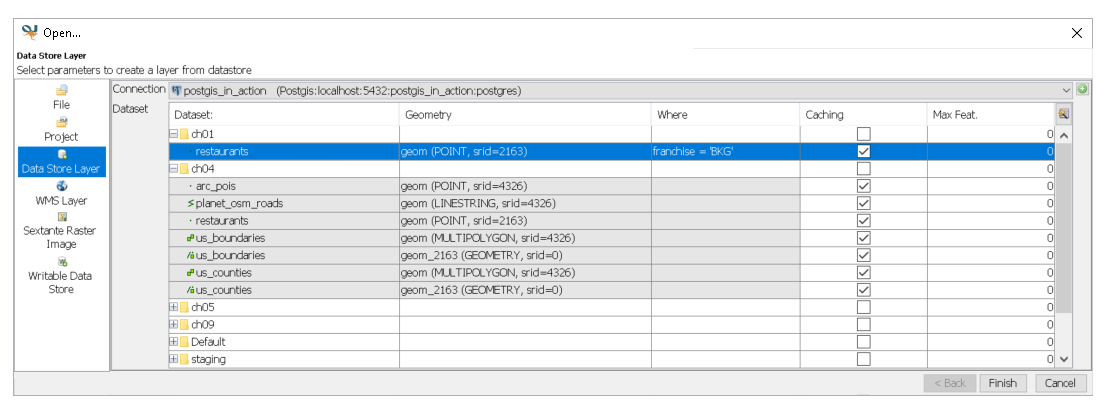
If nothing appears on the main display window after you click Finish, select the layer from Working group, right-click, and choose Zoom to Layer. OpenJUMP is finicky in that it considers the extent (the area that fully contains all the data) to always be the extent of all records in the table, even when a
WHEREclause has shrunk the extent.

This is an excerpt from Manning's book PostGIS in Action, Second Edition.
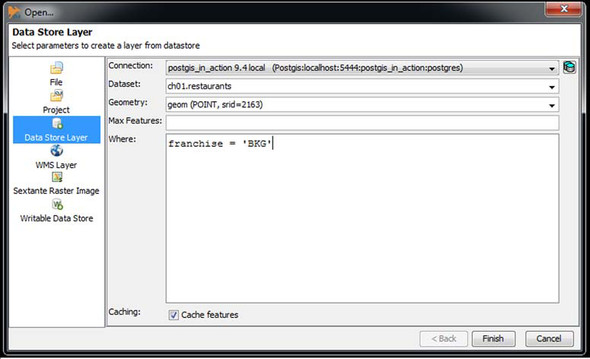
Select a connection, and then a table and the geometry column you want to display. You can filter the data with an optional WHERE clause (see figure 5.5). Then click OK.
If nothing appears on the main display window after you click OK, select the layer, right-click, and choose Zoom to Layer. OpenJUMP is finicky in that it considers the extent (the area that fully contains all the data) to always be the extent of all records in the table, even when a WHERE clause has shrunk the extent.
For accessing data, you use a SELECT statement, usually accompanied with a FROM and a WHERE clause. The SELECT part of the statement restricts the columns that will be returned, the FROM clause determines where the data comes from, and WHERE restricts the number of records to be returned.