concept certificate in category powershell
This is an excerpt from Manning's book Learn PowerShell Scripting in a Month of Lunches.
Signing your scripts entails getting a certificate, as we’ll cover later in this chapter. First, we need to discuss what a certificate is and does.
The purpose of a certificate is identity. It’s literally a digital ID card, and some commercial certificate issuers, called certification authorities (CAs), market them as such. They’re certifying your identity. Your identity is embedded in your certificate, so that anyone reading the certificate can see who you are and even figure out how to contact you.
Certificates are therefore all about trust. For example, if some fly-by-night CA issues a certificate allegedly for Bill Gates, and you download some code written by this alleged Bill, do you feel safe running that code? It comes down to trust: Do you trust that the CA did its due diligence and only issued a certificate to the really real Bill Gates? Or might they have done a rush job and issued it to some yahoo named Jason Helmick, who may have written terrible, malicious code? You see, if you trust the CA, then even if the code is malicious, you know you can track down the author through the CA.
Signing code is a big deal. Code can do a lot of harm, which is why CAs that issue code-signing certificates have a lot of trust on their shoulders. Getting one of these certificates from a commercial CA is a lot harder than getting an email encryption certificate. In fact, these Class 3 code-signing certificates are typically only issued to organizations, not to individuals; and CAs often check things like the organization’s Dun & Bradstreet credit record, the company’s organizing documents, and other evidence to make certain a certificate is issued only to the organization named in the certificate.
Of course, your company could also have an internal public key infrastructure (PKI), which means you run your own CA—and you set the rules for who gets certificates of any kind. If your code will run entirely within your organization, that’s probably all you need, and it’ll be a lot cheaper than buying a commercial code-signing certificate.
This is an excerpt from Manning's book PowerShell Deep Dives.
Unlike with commercial certificate providers (like VeriSign/Symantec, DigiCert, and others), private AD CS allows unlimited certificate issuance at minimal cost. The high level of security provided by digital certificates, coupled with a low price and automatic certificate distribution (through automatic enrollment), has allowed network administrators to use certificates to secure many internal (and, in some cases, external) services and applications.
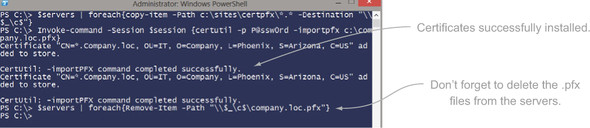
The following scenario is common if you’re an administrative web master, and here’s how it was delivered to me: “Deploy a highly available web farm (four servers) with a couple of websites, including certificates, for a new secure shopping site. Make sure to enable graphical remote management for IIS Manager so that other admins and developers can make changes; and, by the way, did we mention we’re moving to Windows Server 2012 Core?” (See figure 1.)