concept custom object in category powershell

This is an excerpt from Manning's book Windows PowerShell in Action, Third Edition.
To make this example work, you need to use a few features that we haven’t covered yet: the process keyword used in Update-Character, custom objects, and the $PSBoundParameters automatic variable. We’ll cover the process keyword later in this chapter and the $PSBoundParameters variable in chapter 7. This variable is key to making this example work because it lets you see which parameters were specified on the command line. Creating custom objects using the New-Object command is explored in chapter 10. Of these features, only the process keyword is available in PowerShell v1. The others are available only in PowerShell v2 and later.
In this example, the character data is stored in nested hashtables, making it easy to access by name. The Get-Character function retrieves characters from the table and emits custom objects for each character. The Set-Character data reverses this process and uses the inbound records to update the character table. The Update-Character function is where you see the use case for Boolean parameters mentioned in the previous section. Let’s apply this code to manage your character database. First, you’ll get a listing of all the characters in the table:
We’ll begin our investigation with a detailed discussion of PowerShell scriptblocks, which are at the center of most of the metaprogramming techniques. This discussion takes up the first part of this chapter and lays the groundwork for the rest of what we’ll discuss. With that material as context, we’ll look at how and where scriptblocks are used in PowerShell. We’ll look at the role scriptblocks play in the creation of custom objects and types and how they can be used to extend the PowerShell language. We’ll cover techniques like proxy functions, dynamic modules, and custom objects—all of which are examples of applied metaprogramming. Then we’ll move on, and you’ll see how you can use similar techniques with static languages like C# from within your scripts. But first you need to understand scriptblocks themselves.
There’s one more thing you can do with dynamic modules: provide a simpler way to build custom objects. This is a logical step because modules have private data and public members like objects. As modules, they’re intended to address a different type of problem than objects, but given the similarity between objects and modules, it would make sense to be able to construct an object from a dynamic module. This is done using the -AsCustomObject parameter on New-Module. You’ll use this mechanism to create a point object from a module.

This is an excerpt from Manning's book PowerShell in Depth, Second Edition.
In the code we get all the matches using the REGEX object. Each match is then processed using a nested ForEach-Object loop to get the corresponding named match. Each match is added to an ordered hash table that’s using the Name as the key and Match as the value. After processing all names, PowerShell writes a custom object to the pipeline using the hash table. Everything is saved to $data.
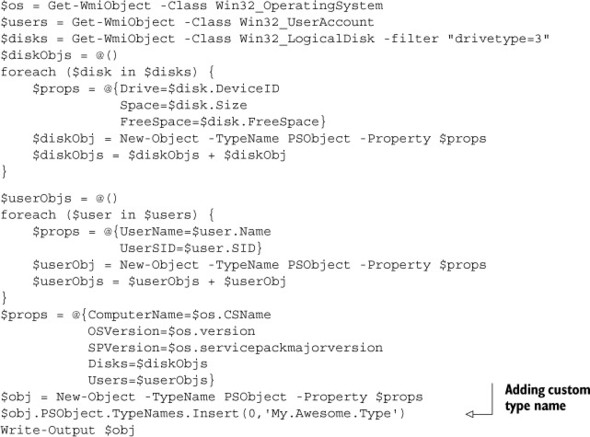
Creating output is possibly the most important thing many scripts and functions will do, and creating that output so that it can work with PowerShell’s other functionality is crucial to making a well-behaved, flexible, consistent unit of automation. Custom objects are the key, and by making them properly you’ll be assured of an overall consistent PowerShell environment.
We’ve often said that there are always multiple ways to do anything in PowerShell, and that’s certainly true for custom objects. We’ll show you all the major ways because you’re likely to run into them in the wild, and we want you to be able to recognize them and use them when you do.