concept dns in category powershell

This is an excerpt from Manning's book PowerShell in Practice.
All things considered, if DNS isn’t working properly, we’re definitely in the realm of “admins running around with their hair on fire” as one famous PowerShell speaker so vividly describes it.
The DNS records are the working end of the DNS system. Are the correct records in place? Do we need to create any records for specific purposes? Modern Windows OSs will register their own records in DNS, or DHCP can be configured to provide this service. These records are the standard forward lookup (A) and reverse lookup (PRT) records. But there are still occasions, for instance if we create a new web server or mail server, where we need to register a specific record.
We’ll look at how we can create a number of different record types. These are the records that we’re most likely to have to create. The records have different formats, so it’s a useful exercise to examine how to create multiple record types. Forward lookup (A) records and reverse lookup (PTR) records are the building blocks of DNS. We also need to consider IPv6 records (AAAA), mail server (MX), and alias (CNAME) records. This will cover the most common scenarios we’re likely to meet and give us a foundation for any other type of record that we may come across.
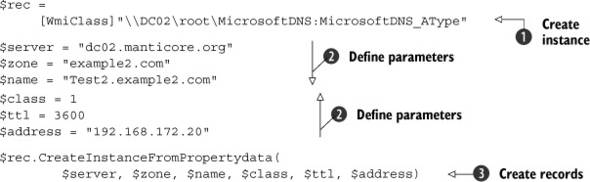
We want to create a DNS A record, so we use the MicrosoftDNS_AType class
. The starting point is to create a variable to represent our WMI class. We use [WMIClass] to define the path to the WMI class in the form \\computer_name\wmi_namespace:wmi_class.
ResultNumber : 1
ModelId      : Microsoft/Windows/DNSServer
RuleId       : 0
ResultId     : 2049755913
Severity     : Information
Category     : Other
Title        : DNS: IP addresses must be configured on Local Area
               Connection - Virtual Network
Problem      :
Impact       :
Resolution   :
Compliance   : The DNS Best Practices Analyzer scan has determined that you
               are in compliance with this best practice.
               For additional information about this best practice and its
               configuration steps, click the More information link.
Help         : http://go.microsoft.com/fwlink/?LinkId=121988
Excluded     : False