concept dynamic parameter in category powershell

This is an excerpt from Manning's book Windows PowerShell in Action, Third Edition.
Explicit or static parameters are defined as part of the source code for a script or function and are fixed when that script or function is compiled. But a script or function can also define parameters at runtime. These new parameters are added dynamically based on runtime conditions instead of statically at parse time. This allows you to write functions to specialize their interface (that is, their parameters) based on ambient conditions. The best example of this is a cmdlet like Set-Content. When Set-Content is used in a file system drive, it lets you specify file-specific parameters like -Encoding. In other providers where this parameter doesn’t make sense, it isn’t present in the cmdlet signature. Because these parameters are defined dynamically, they’re called (no surprise, we’re sure) dynamic parameters. Cmdlets have always had this capability, but PowerShell v2 made the facility available for scripts and functions as well.
If you want your scripts and functions to have dynamic parameters, you have to use the dynamicParam keyword. The syntax for this keyword is
dynamicParam { <statement-list> }Let’s work through the steps needed to implement dynamic parameters.
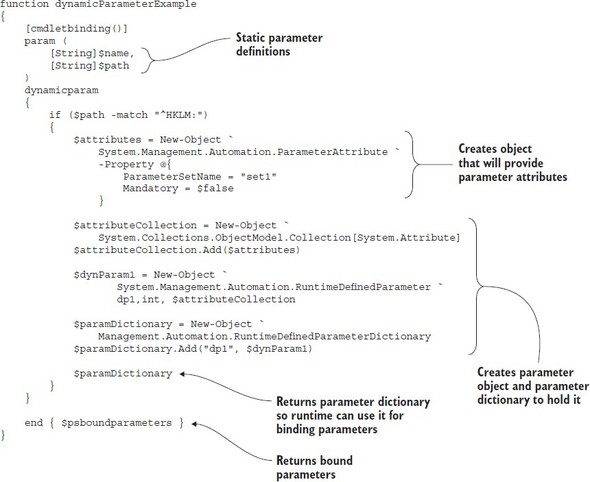
In the following example, you define a function with two static parameters—Name and Path—and an optional dynamic parameter named dp1. dp1 is in the set1 parameter set and has a type: [int]. The dynamic parameter is available only when the value of the Path parameter begins with HKLM:, indicating that it’s being used in the Registry drive. The complete function is shown in figure 7.6 (the code is available in the book’s download).