concept Name in category powershell

This is an excerpt from Manning's book Learn Windows PowerShell in a Month of Lunches, Third Edition.
Rather than comparing the two complete tables, Diff focuses on the Name, because we gave it the -property parameter. If we hadn’t, it would think that every process is different because the values of columns such as VM, CPU, and PM are always going to be different.
A lot of folks overthink what’s happening here, so let’s be clear on how simple the shell is being: It’s looking for property names that match parameter names. That’s it. Because the property Name is spelled the same as the parameter -Name, the shell tries to connect the two.
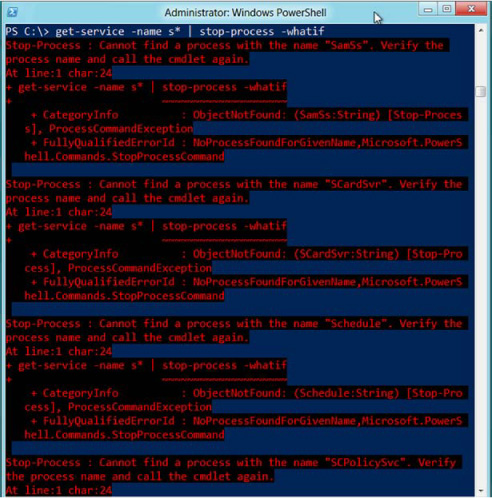
In this case, -Name does accept pipeline input ByPropertyName, so this connection works. Now, here’s the trick: Unlike ByValue, which involves only one parameter, ByPropertyName connects every matching property and parameter (provided each parameter has been designed to accept pipeline input ByPropertyName). In our current example, only Name and -Name match. The results? Examine figure 9.7.
We see a bunch of error messages. The problem is that services’ names are usually things like ShellHWDetection and SessionEnv, whereas the services’ executables might be things like svchost.exe. Stop-Process deals only with those executable names. But even though the Name property connects to the -Name parameter via the pipeline, the values inside the Name property don’t make sense to the -Name parameter, which leads to the errors.

This is an excerpt from Manning's book Learn Windows PowerShell 3 in a Month of Lunches, Second Edition.
Rather than comparing the two complete tables, Diff focuses on the Name, because we gave it the -property parameter. If we hadn’t, it would think that every process is different because the values of columns like VM, CPU, and PM are always going to be different.
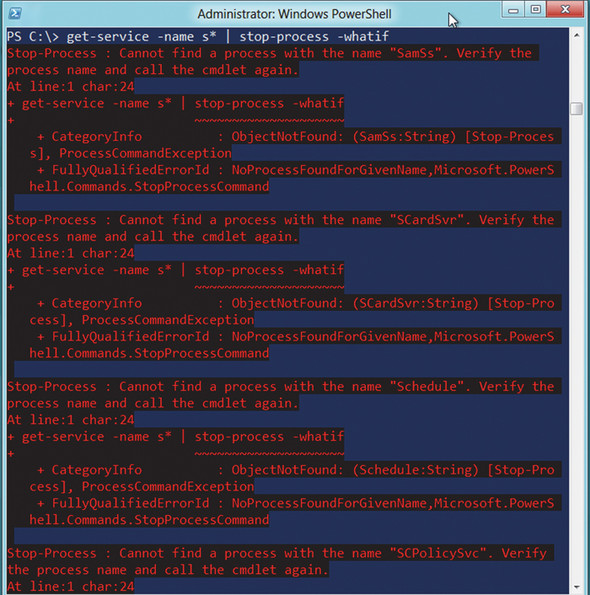
In the case of our current example, only Name and -Name match. The results? Examine figure 9.7.
A bunch of error messages. The problem is that services’ names are usually things like ShellHWDetection and SessionEnv, whereas the services’ executables might be things like svchost.exe. Stop-Process only deals with those executable names. But even though the Name property connects to the -Name parameter via the pipeline, the values inside the Name property don’t make sense to the -Name parameter, which leads to the errors.