concept registry in category powershell
This is an excerpt from Manning's book PowerShell in Practice.
We’re using the Registry provider to perform a dir on the Classes_Root portion of the registry. In our discussion on providers in chapter 1, I mentioned that HK_Local_ Machine and HK_Current_User are exposed as drives. The root of the Registry is available via cd REGISTRY::. For each path that ends in progid, we get the value of the default property, and in this case filter those that contain internet in the name.
The filesystem is an essential part of any server. We need to be able to work with files and the folder hierarchy irrespective of the applications in use. The registry is a repository of configuration information that we have to be able to access. We’ll see the registry provider in action. Now you can do a dir through the registry. Awesome!
The registry is the fundamental store for configuration information on a Windows system. Many applications follow the .NET approach and utilize XML configuration files, but the registry is still heavily used. A lot of the information in the registry would be useful if we could access it. Traditionally, we’ve used Regedit.exe to work with the registry. PowerShell provides an alternative in the shape of a registry provider.
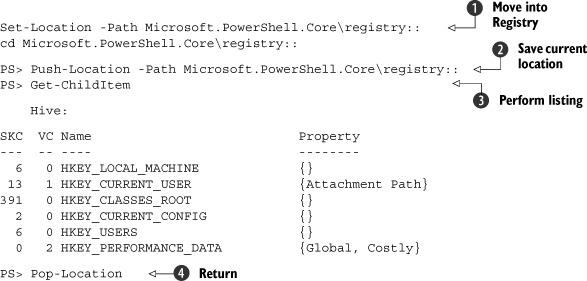
We can examine portions of the registry, in the same way we can dir through a folder hierarchy, for example:
Get-ChildItem -Path HKLM:\software\microsoft\powershell -RecurseThe next item on the agenda is learning how to create entries in the registry. This is fun.