concept time in category powershell
This is an excerpt from Manning's book Learn PowerShell in a Month of Lunches.
That’s about as clear as we can be. It’s a blunt statement, but it’s absolutely true. Imagine trying to figure out Azure Virtual Machines, or any other administrative portal, without the help of tooltips, menus, and context menus. Trying to learn to use PowerShell without taking the time to read and understand the help files is the same thing. It’s like trying to assemble that do-it-yourself furniture from the department store without reading the manual. Your experience will be frustrating, confusing, and ineffective. So why do it?
Unfortunately, we’ve run into situations where we have a cmdlet that can produce objects, but we know of no batch cmdlet to which we can pipe those objects to take some kind of action. We’ve also run into situations where a cmdlet doesn’t take any input from the pipeline. In either case, you can still perform whatever task you want to perform, but you’ll have to fall back to a more verbose-style approach of instructing the computer to enumerate the objects and perform your task against one object at a time. PowerShell offers two ways to accomplish this: one is using a cmdlet, and the other is using a scripting construct. We focus on the first technique in this chapter, and we save the second for chapter 21, which dives into PowerShell’s built-in scripting language.
This is an excerpt from Manning's book Learn PowerShell Scripting in a Month of Lunches.
Even something as simple as writing information to a CSV file is a single task (and PowerShell has a tool that does that). If you have a script that both produces new information and takes the time to format it as CSV and write it to a file, then you’re not only doing it wrong—you’re working too hard.
Even something as simple as writing information to a CSV file is a single task (and PowerShell has a tool that does that). If you have a script that both produces new information and takes the time to format it as CSV and write it to a file, then you’re not only doing it wrong—you’re working too hard.
A little further on is a comment for Collect Users, along with a new, empty array—presumably to store users in: This is a major red flag for us. It suggests that we’re going to do the pipeline’s job for it. That is, rather than emitting output objects to the pipeline one at a time, which is the PowerShell way, we’re going to amass them in a collection and do something with them later. In this case, because the proper output pipeline is already being used for verbose output, this makes sense. But if we moved the verbose output to the actual Verbose pipe, then we’d free up the real pipeline to receive output objects—rather than wasting memory by accumulating them in an array.#Collect Users $colUsers = @()

This is an excerpt from Manning's book Windows PowerShell in Action, Third Edition.
PS>  Start-DscConfiguration -CimSession $sl -Path .\MOF\ -Verbose -Wait

VERBOSE: Perform operation 'Invoke CimMethod' with following parameters,
   ''methodName' = SendConfigurationApply,'className' =
MSFT_DSCLocalConfigurationManager,'namespaceName' = root/Microsoft/Windows/
   DesiredStateConfiguration'.
VERBOSE: Operation 'Invoke CimMethod' complete.
VERBOSE: Time taken for configuration job to complete is 0.655 seconds

That said, unless you allow random people to install computers on your internal network, this shouldn’t introduce substantial risk most of the time. If you’re comfortable with knowing which machines you’ll be connecting to, you can put * in the TrustedHosts list, indicating that you’re implicitly trusting any computer you might be connecting to. As always, security is a principle tempered with pragmatics.
A final characteristic of a session instance is that you can run only one command (or command pipeline) in a session at one time. If you try to run more than one command at a time, a “session busy” error will be raised. But there’s some limited command queuing: if there’s a request to run a second command synchronously (one at a time), the command will wait up to four minutes for the first command to be completed before generating the “session busy” error. But if a second command is requested to run asynchronously—without waiting—the busy error will be generated immediately.
This is an excerpt from Manning's book PowerShell in Depth, Second Edition.
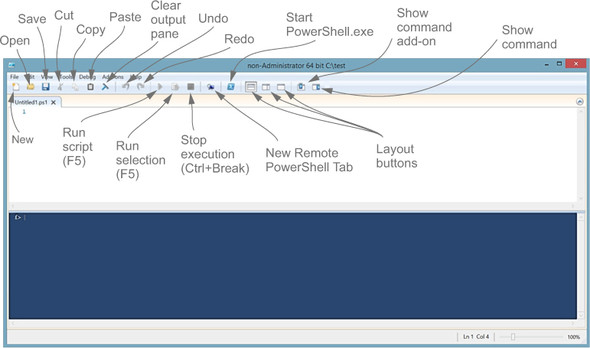
Let’s try something: In the ISE, select New PowerShell Tab from the File menu. (You’ll also see a New Remote PowerShell Tab option. We’ll discuss that in chapter 10 on Remoting.) What pops up is a whole new instance of PowerShell, called a runspace, which we mentioned earlier. Each tab has its own set of script file tabs, with each file tab representing a single script file. Each PowerShell tab also has its own output area and command-line pane. Each PowerShell tab is truly separate: If you load an extension into one, for example, it’s only available in that one. To load an extension into every open PowerShell tab, you have to manually load it into each one, one at a time. Figure 2.6 shows what the ISE looks like with two PowerShell tabs open and with several script files opened within one PowerShell tab.
This section is a PROCESS block. We expect that, when this function is given pipeline input, the PROCESS block will run once for each piped-in item. If there’s no pipeline input, then this entire PROCESS block will execute once. The ForEach block will enumerate through the contents of the $computerName parameter, taking one value at a time and putting it into the $computer variable. So if you ran Get-DiskInfo –comp SERVER1,SERVER2 –thresh 20, you’d expect the $computer variable to initially contain SERVER1. Take that blank sheet of paper and your pencil, and write that down:

This is an excerpt from Manning's book PowerShell Deep Dives.
CIM sessions provide a more robust, firewall-friendly way to access WMI on remote machines than using DCOM in the WMI cmdlets. Get to know them; they will save you work, time, and effort.
Richard Siddaway has worked with Microsoft technologies for 25 years and has spent time in most IT roles. He currently works for Kelway (UK) Ltd as an automation consultant. He has a longstanding interest in automation techniques, and PowerShell has been his primary automation tool since the early beta versions. Richard founded the UK PowerShell User Group in 2007 and is a PowerShell MVP. He frequently speaks at PowerShell user groups in the UK, Europe, the US, and elsewhere around the world, and judges the Microsoft Scripting Games. In addition to writing his blog (http://msmvps.com/blogs/RichardSiddaway/), Richard has authored two PowerShell books: PowerShell in Practice (Manning 2010) and PowerShell and WMI (Manning 2012), and co-authored PowerShell in Depth (Manning 2013) with Don Jones and Jeffery Hicks. Currently he is writing an introductory book for Active Directory administrators that features PowerShell.

This is an excerpt from Manning's book PowerShell in Practice.
Cmdlet names should always be singular, so use Get-Service rather than Get-Services. This is one of the most common mistakes when writing PowerShell commands and to prove that PowerShell was designed for you it has a solution for this problem. Tab completion (and the IntelliSense functionality built into the editors covered in chapter 4) makes entering PowerShell commands quicker, easier, and less-error prone. Having said that, I’ll give you one guess as to who still makes cmdlets plural from time to time.
Listing 4.7. Production-ready script to retrieve top four CPU using processes
## get-topcpu.ps1 ## Richard Siddaway ## 10 August 2008 ## ## Uses get-process and returns the top 4 cpu using ## processes with the time in minutes Get-Process | Sort-Object CPU -Descending | Select -First 4 | Format-Table Name, @{Label="CPU(Min)"; Expression={"{0:F3}" -f ($_.TotalProcessorTime.TotalMinutes)}} -AutoSize
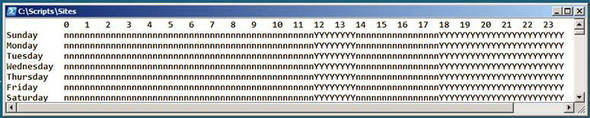
Repeated calls to New-Item enable us to create the required folders. It’s not elegant, but it works! When time is short, sometimes a brute-force approach is the best solution. There are no points for style and artistic interpretation in this game. Okay, I give up-here’s the elegant version:
We’ve looked at creating and controlling websites and application pools. It’s time to consider how we can put the two objects together.