concept type in category powershell

This is an excerpt from Manning's book Learn PowerShell Scripting in a Month of Lunches.
DEBUG: ParameterBinding Information: 0 : BIND NAMED cmd line args
[Get-Process]
DEBUG: ParameterBinding Information: 0 : BIND arg [o*] to parameter
[Name]
DEBUG: ParameterBinding Information: 0 : COERCE arg to [System.String[]]
DEBUG: ParameterBinding Information: 0 : Trying to convert
argument value from System.String to System.String[]
DEBUG: ParameterBinding Information: 0 : ENCODING arg into collection
DEBUG: ParameterBinding Information: 0 : Binding collection parameter Name:
argument type [String], parameter type
[System.String[]], collection type Array, element type [System.String],
coerceElementType
DEBUG: ParameterBinding Information: 0 : Creating array with element type
[System.String] and 1 elements
DEBUG: ParameterBinding Information: 0 : Argument type String is not IList,
treating this as scalar
DEBUG: ParameterBinding Information: 0 : COERCE arg to System.String]
DEBUG: ParameterBinding Information: 0 : Parameter and arg types the same,
no coercion is needed.
DEBUG: ParameterBinding Information: 0 : Adding scalar element of type
String to array position 0
DEBUG: ParameterBinding Information: 0 : Executing VALIDATION metadata:
[System.Management.Automation.ValidateNotNullOrEmptyAttribute]
DEBUG: ParameterBinding Information: 0 : BIND arg [System.String[]] to
param [Name] SUCCESSFUL

This is an excerpt from Manning's book Windows PowerShell in Action, Third Edition.
We’ve said PowerShell is for solving problems that involve writing code. By now you’re probably asking “Dude! Where’s my code?” Enough talk, let’s see some example code! First, we’ll revisit the Get-ChildItem example. This time, instead of displaying the directory listing, you’ll save it into a file using output redirection like in other shell environments. In the following example, you’ll use Get-ChildItem to get information about a file named somefile.txt in the root of the C: drive. Using redirection, you’ll direct the output into a new file, c:\foo.txt, and then use the type command to display what was saved. Here’s what this looks like:
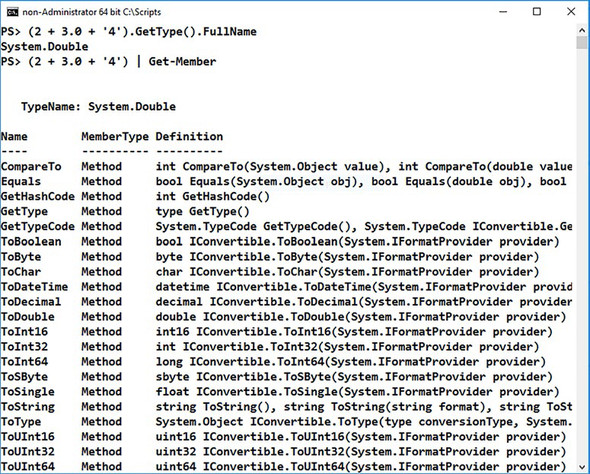
From these examples, you can see that although the PowerShell type-conversion system is aggressive in the types of conversions it performs, it’s also careful about how it does things.
Now that you have a sense of the importance of types in PowerShell, let’s look at how it all works.
Next you need to find the types in the AppDomain. Individual types (or classes as they’re sometimes called in this context) are organized into assemblies—modules similar to the PowerShell modules you’ll see in chapters 8 and 9. To get a list of assemblies, you use the GetAssemblies() method:
[System.AppDomain]::CurrentDomain.GetAssemblies()Once you have all the assemblies, you need to get a list of all the types in each assembly. You call the—wait for it—GetTypes() method. You have to do this once for each assembly returned by GetAssemblies(). You could use a foreach statement (see chapter 5) but instead here you’ll use one of the fallback methods. The type of fallback method you’re going to use is a bit unusual because it isn’t a specific method. One of the things the fallback method resolver does is, if the method isn’t found on the object but the object is a collection, it tries to see if the method exists on the members of the collection. It’s exactly what you need to call a method: GetTypes() on each member of the collection returned by GetAssemblies(). And so you get:
If we’re going to talk about types, it’s useful to have a common understanding of what a type is. There are many thick books in the fields of philosophy, science, and mathematics that try to address this question. We’ll ignore them all. Why? Because you already know what a type is! You look at an object and say “that’s a bird.” Well, what type of bird is it? It’s a robin. What properties do robins have? A red breast. What about its “parent class,” birds? What properties do birds have? Wings, feathers, a beak, and so on. What do birds do? They fly, eat worms, poop on your car. Now you’re an expert in object orientation along with everyone else on the planet. Computer people always like to make things more formal, so we’ll use specific words when we talk about types, as noted in table 2.1.
Table 2.1. Classes, types, and members defined
Term
Example
Notes
Type Robin, Bird A type is a description of an object—what it looks like and what it can do. That description is associated with the type name. The relationship between an object and its type is called an is-a relationship (though the PowerShell operator for this is -is, not is-a). Some examples of this relationship are Robin is-a bird or Mickey is-a mouse. In PowerShell the code would be Robin -is bird and Mickey -is mouse respectively. Class Robin, Bird Class is the keyword used in PowerShell v5 and later to define a new type. You’ll see the words “type” and “class” frequently used interchangeably but when we define a type we use the class keyword. See chapter 19. Property BreastColor, Size, Weight A property of an object is some piece of data describing the object. The property is defined on a class but only has value on an instance; for example, the class Bird defines a property Color but only an individual bird has a color. All Bird classes have the property Color. A crow has the property Color == black. Method StartFlying(), EatWorm(), Methods define behaviors on a class. In some object-oriented languages methods are called messages, because, for example, calling the StartFlying() method effectively sends a message to the bird to start flying. Member Size, EatWorm() Member is a general term that includes all aspects of a type, both methods and properties. Event OnButtonDown, PoopOnCar Events are a special kind of method except you don’t call them directly. The object invokes them as a consequence of some other action on the object. If you tell a bird to fly by calling the StartFlying() method, this might trigger the event PoopOnCar(). Generic type List<integer>, Dictionary<string, integer> A generic type contains instances of other types such as a List of Integers or a dictionary mapping a name to a number. See section 2.5.2 for more information about generics.

This is an excerpt from Manning's book PowerShell in Depth, Second Edition.
Next, return to PowerShell and display the contents of the file. You do this by running the Get-Content cmdlet, although you may be more familiar with the type or cat alias:
PowerShell keeps track of the type of object, or objects, contained within a variable. Whenever possible, PowerShell will elect to treat a type of data as a different type if doing so will make a particular operation make more sense. In programming, this is called coercing the variable, and it can lead to some odd results, such as
$data = @()
$file = "DotNetTypes.format.ps1xml"
$names = Select-Xml -Path $pshome\$file -XPath "Configuration/ViewDefinitions/View/Name" |
select -expand  Node |
select -ExpandProperty "#text"
$types = Select-Xml -Path $pshome\$file -XPath "Configuration/ViewDefinitions/View/ViewSelectedBy" |
select -expand Node |
select -ExpandProperty TypeName
If ($names.Count -eq $types.Count){
 for ($i=0; $i -le ($names.Count -1); $i++){
   $data += New-Object -TypeName PSobject -Property @{
    Name = $($names[$i])
    TypeName = $($types[$i])
   }
 }
}
else {
 Throw "Error - mismatch between number of names and types"
}
$data | sort TypeName | select Name, TypeName