concept Windows in category powershell

This is an excerpt from Manning's book Windows PowerShell in Action, Third Edition.
Appendix. PowerShell 6.0 for Windows, Linux, and macOS
The PowerShell community was stunned (not too dramatic a word) in August 2016 when Microsoft announced that the core of PowerShell was going to be open source. Not only that, but PowerShell would now be available on Linux and Apple operating systems as well as Windows. Jeffrey Snover had been hinting in presentations at the PowerShell Summit (https://powershell.org/summit/) and other venues for a few years that he’d like to see PowerShell as an open source project, but it wasn’t expected to happen so soon.
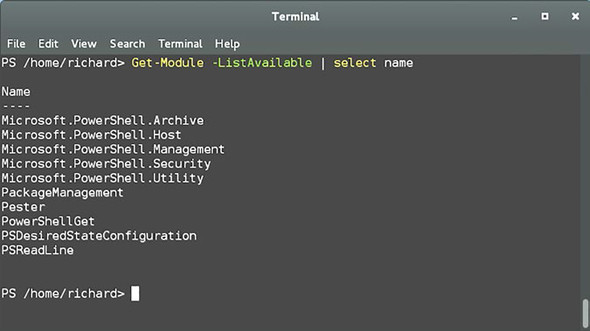
Using the PowerShell core language is essentially identical to the examples we’ve shown in the rest of the book. One obvious difference is the modules that are available. You saw the modules available for PowerShell on Windows earlier. Figure 3 shows the modules available to a new PowerShell on Linux installation.
A number of modules that are available in PowerShell for Windows aren’t available in PowerShell for Linux:
This is an excerpt from Manning's book PowerShell in Depth, Second Edition.
There is a PrintManagement module containing an Add-Printer cmdlet, but it’s part of Windows (specifically Windows 8/2012 and later) rather than PowerShell.
You could instantiate a Component Object Model (COM) object to accomplish the task from within PowerShell, but it has nothing to do with PowerShell. Instead, it’s the shell giving you a way to access completely external technologies. In these cases (which are becoming increasingly rare in the latest version of Windows), we’ll only say, “You can’t do that in PowerShell yet.” We know our statement isn’t 100% true, but we want to keep this book focused on what PowerShell is and what it does natively. If we turn this book into “everything you can do with PowerShell natively, plus all the external stuff like .NET and COM and so on that you can get to from PowerShell,” it’d grow to 7,000 pages in length and we’d never finish.
In the world of Windows, consider a service. What kinds of actions can a service take? You can stop them, start them, pause them (sometimes), resume them (from pause), and so on. Therefore, if you were looking at an object of the type Service, you might expect to find methods named Start, Stop, Pause, Resume, and so on.

This is an excerpt from Manning's book PowerShell Deep Dives.
The good news is that Windows embeds all the technologies that allow you to collect bunches of valuable data, from the global CPU, memory, network, and disk I/O usage data to detailed information like the resource consumption of a specific process.
Windows 8 and Windows Server 2012 come with a mass of new PowerShell functionality. Depending on the features installed the server version may have 2,500 or more new cmdlets! Did you know that of that of those 2,500 cmdlets, more than 60 percent are based on Windows Management Instrumentation (WMI)? This chapter explains how you can create your own WMI-based cmdlets.
Get-ApprovalAudit -Computername Boe-PC -Port 8530 -StartDate "09/10/2012"

Action            : Install
Deadline          : 12/31/9999 11:59:59 PM
CreationDate      : 9/29/2012 3:38:20 AM
TargetGroup       : All Computers
AdministratorName : WUS Server
GoLiveTime        : 9/29/2012 3:38:20 AM
Title             : Update for Windows 7 (KB2735855)

Action            : Install
Deadline          : 12/31/9999 11:59:59 PM
CreationDate      : 9/29/2012 3:41:32 AM
TargetGroup       : All Computers
AdministratorName : WUS Server
GoLiveTime        : 9/29/2012 3:41:32 AM
Title             : Update for Windows Server 2008 R2 for Itanium-based Systems (KB2735855)

Action            : Install
Deadline          : 12/31/9999 11:59:59 PM
CreationDate      : 9/29/2012 3:43:47 AM
TargetGroup       : All Computers
AdministratorName : WUS Server
GoLiveTime        : 9/29/2012 3:43:47 AM
Title             : Update for Windows Server 2008 R2 x64 Edition (KB2735855)
This is an excerpt from Manning's book PowerShell in Practice.
There’s a perception that the only way to administer Windows-based systems is through the GUI tools. In fact, Microsoft has been increasing the support for command-line administration through the various versions of Windows since Windows 2000. The use of command-line tools was emphasized at many technical events after the launch of Windows 2000. With each subsequent release, more command-line tools have been added. Microsoft has also promoted the use of scripting tools much more over the last five years or so.
Server Core is an install option for Windows Server 2008 (and R2). It’s a stripped down version without a GUI, which may seem an odd option for a Windows system. The command prompt is the only way to locally manage a Server Core machine, though GUI tools can be used from a remote machine. Once chosen, the only way to revert to a GUI-based version of Windows is to reinstall. Likewise, a GUI-based version of Windows can’t be converted to a Server Core version without reinstalling.
PowerShell must be started with elevated privileges to access the security logs. In Windows Vista/2008 and above when UAC is turned on, this means using Run as Administrator, and logging on using an account with administrator privileges on XP/2003.