concept xml document in category powershell

This is an excerpt from Manning's book Windows PowerShell in Action, Third Edition.
All the text so far in this chapter has been unstructured text where there’s no rigorously defined layout for that text. As a consequence, you’ve had to work fairly hard to extract the information you want out of this text. There are, however, large bodies of structured text, where the format is well defined in the form of XML documents.
XML (Extensible Markup Language) is used for everything from configuration files to log files to databases. PowerShell uses XML for its type and configuration files as well as for the help files. For PowerShell to be effective, it has to be able to process XML documents effectively. Let’s look at how XML is used and supported in PowerShell.
We’ll start with the simpler of the cmdlets: ConvertTo-Xml which takes an object as an argument or (more commonly) as pipeline input and generates an XML document from it. Let’s use it to produce XML from a list of Windows services. You’ll get the list using the Get-Service cmdlet, but you’ll limit the number of services you’ll work with to three for brevity’s sake:
PS> $doc = Get-Service | select -First 3 | ConvertTo-Xml
PS> $doc

xml                            Objects
---                            -------
version="1.0" encoding="utf-8" Objects
The collection of objects is rendered into an XML document with the top node Object, which, in turn, contains a collection of Object elements as shown:

This is an excerpt from Manning's book PowerShell Deep Dives.
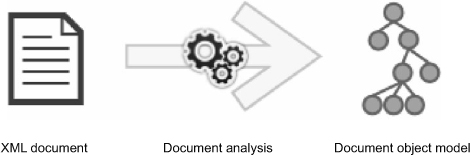
When data is retrieved into memory it isn’t typically stored as text, so before applications and scripts can work with an XML document a processor converts it into an appropriate in-memory model, as illustrated in figure 3. The in-memory version of an XML document is a hierarchical tree of items defined by the XML Document Object Model (DOM). Once the document has been converted into a DOM object applications and scripts can access its data and manipulate it.
In Microsoft .NET, instances of System.Xml.XmlReader and derived classes analyze and process XML documents, returning DOM-compatible representations of their nodes and contents. Instances of System.Xml.XmlDocument store these representations in memory and provide continuing read/write access to them. Utilities and APIs such as LINQ to XML, XPath navigation, and PowerShell’s XML facilities are built on top of these core elements.