concept Apply in category probabilistic programming

This is an excerpt from Manning's book Practical Probabilistic Programming.
There are two main kinds of element: atomic and compound. You can think of Figaro as providing a construction kit for building models. Atomic elements are the basic building blocks. Atomic elements represent basic probabilistic variables that don’t depend on any other elements. Section 2.3 discusses atomic elements and presents a variety of examples. Compound elements are the connectors. They depend on one or more elements to build up more-complex elements. You’ll learn about compound elements in section 2.4. Although Figaro provides a variety of compound elements, two are particularly important. These are called Apply and Chain, and you’ll learn how to use them in section 2.5.
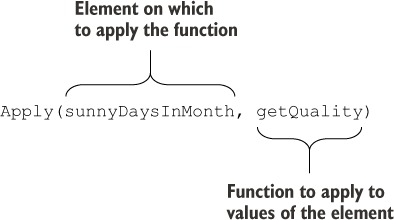
The fourth line defines monthQuality to be an Apply element. The structure of an Apply element is shown in figure 2.9. Apply takes two arguments. The first is an element; in this example, it’s sunnyDaysInMonth, an Element[Int]. The second argument is a function, where the type of the argument is the same as the value type of the element. In our example, the function getQuality takes an Integer argument, so it matches up. The function can return a value of any type; in our example, it returns a String.
Here’s how the Apply element defines a random process. It first generates a value for the first, element argument. In our example, it generates a particular number of sunny days in the month. Let’s say it generates 7. Then the process takes the second, function argument and applies it to the value that was generated. In our case, the process applies the function getQuality to 7 to obtain the result average. This becomes the value of the Apply element. You can see from this that the possible values of Apply have the same type as the return type of the function argument. In our case, the Apply element is an Element[String].
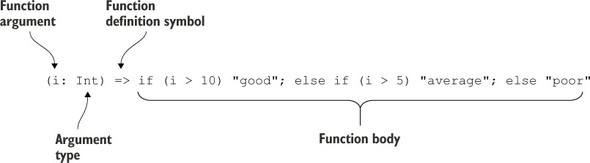
If you’re new to Scala, let me introduce you to anonymous functions. Having to define a separate function for each Apply element can be annoying when you’re going to use it in only one place, especially when it’s short like this one. Scala provides anonymous functions that can be defined directly in the place they’re used. Figure 2.10 shows the structure of an anonymous function that defines the same function as getQuality. The components of this structure are similar to the named function. There’s a function argument named i. It has the type Integer. The symbol => indicates that you’re defining an anonymous function. Finally, there’s the function body, which is the same as for getQuality.
You can define an Apply element equivalent to the previous element by using an anonymous function:
With Apply, you’re not restricted to Scala functions of only one argument. Apply in Figaro is defined for up to five arguments. Using Apply with more than one argument is a good way of bringing multiple elements together to bear on another element. For example, here’s an Apply of two arguments:
val teamWinsInMonth = Binomial(5, 0.4)
val monthQuality = Apply(sunnyDaysInMonth, teamWinsInMonth,
     (days: Int, wins: Int) => {
     val x = days * wins
     if (x > 20) "good"; else if (x > 10) "average"; else "poor"
     })
Here, the two element arguments to Apply are sunnyDaysInMonth and teamWins-InMonth, which are both Element[Int]s. The Apply’s function argument takes two Integer arguments named days and wins. This function creates a local variable named x whose value is equal to days * wins. Note that because days and wins are ordinary Scala Integers, x is also an ordinary Scala variable, not a Figaro element. In fact, everything inside the Apply’s function argument is ordinary Scala. Apply takes this ordinary Scala function that operates on ordinary Scala values and “lifts” it to a function that operates on Figaro elements.
Figaro provides two useful tools for building models, called Apply and Chain. Both are important kinds of elements. Apply lets you utilize the whole power of Scala in Figaro models by bringing Scala into Figaro. Chain lets you create dependencies between elements in limitless ways. The compound elements you’ve seen so far, such as If and compound Flip, let you create dependencies in specific predefined ways. Chain lets you go beyond these predefined dependencies to create any dependencies you want.