concept show() in category pyspark
appears as: show()

This is an excerpt from Manning's book Data Analysis with Python and PySpark.
Enter the
show()method.
The
show()method displays a sample of the data back to you. Nothing more, nothing less. WithprintSchema(), it will become one of your best friend to perform data exploration and validation. By default, it will show 20 rows and truncate long rows. The code in listing 2.7 shows the default behaviour of the method, applied to ourbookdata frame. For text data, the length limitation is limiting (pun intended). Fortunately,show()provides some options to display just what you need.Listing 2.7. Showing a little data using the
.show()method.book.show() # +--------------------+ # | value| # +--------------------+ # |The Project Guten...| # | | # |This eBook is for...| # |almost no restric...| # |re-use it under t...| # |with this eBook o...| # | | # | | # |Title: Pride and ...| # | | # | Author: Jane Austen| # | | # |Posting Date: Aug...| # |Release Date: Jun...| # |Last Updated: Mar...| # | | # | Language: English| # | | # |Character set enc...| # | | # +--------------------+ # only showing top 20 rowsThe
show()method takes three optional parameters.
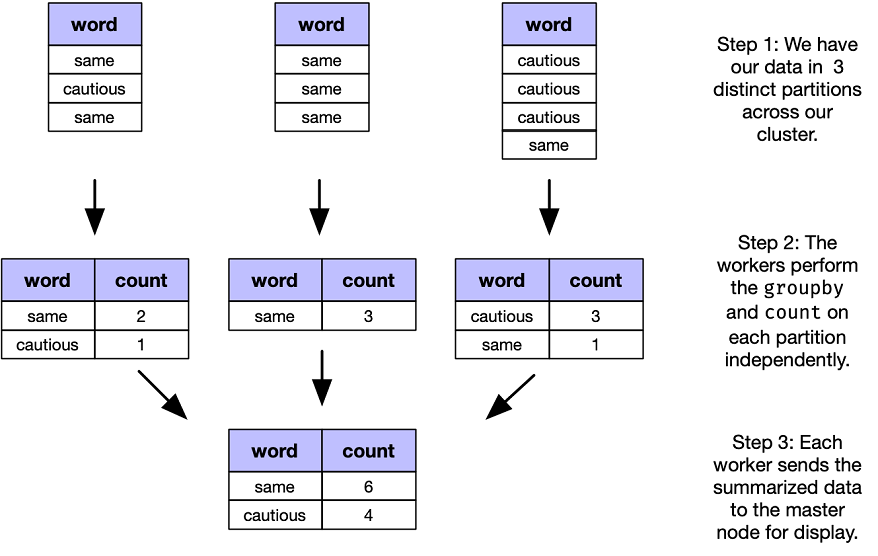
Figure 3.2. A distributed group by on our
words_nonulldata frame. The work is performed in a distributed fashion until we need to assemble the results in a cohesive display, viashow().