concept 3d in category python
This is an excerpt from Manning's book Math for Programmers: 3D graphics, machine learning, and simulations with Python.
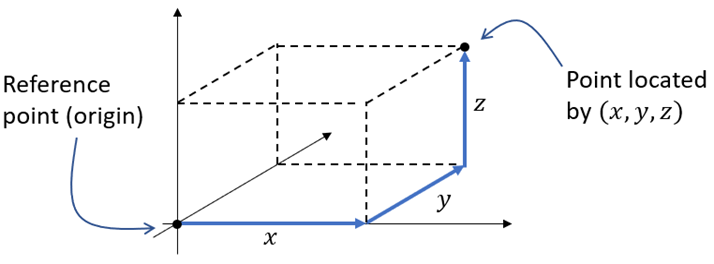
Figure 1.7: Labeling a point in 3D with a vector of three numbers, x, y, and z
The shading shows that light hits our sphere at a certain angle in 3D and gives it an illusion of depth. Our general strategy is not to draw a perfectly round sphere, but an approximation made up of polygons. Each polygon can be shaded according to the precise angle it makes with a light source. Believe it or not, figure 3.1 is not a picture of a round ball, but of 8,000 triangles in varying shades. Figure 3.2 shows another example with fewer triangles.
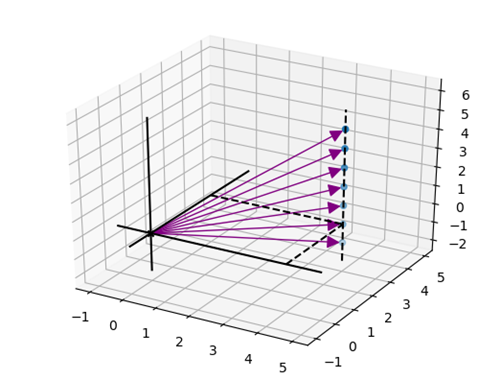
The pair of numbers (4, 3) is enough to specify a single point or arrow in 2D, but in 3D, there are numerous points with an x-coordinate of 4 and a y-coordinate of 3. In fact, as figure 3.7 shows, there is a whole line of points in 3D with these coordinates, each having different positions in the z (or depth) direction.
Figure 3.7: Several vectors with the same x- and y-coordinates but with different z-coordinates
To specify a unique point in 3D, we need three numbers in total. A triple of numbers like (4, 3, 5) are called the x-, y-, and z-coordinates for a vector in 3D. As before, we can read these as instructions to find the desired point. As shown in figure 3.8, to get to the point (4, 3, 5), we first go +4 units in the x direction, then go +3 units in the y direction, and then finally, go +5 units in the z direction.