concept Anaconda in category python
This is an excerpt from Manning's book Math for Programmers: 3D graphics, machine learning, and simulations with Python.
This appendix covers the basic steps to get Python and related tools installed so you can run the code examples in this book. The main thing to install is Anaconda, which is a popular Python distribution for mathematical programming and data science. Specifically, Anaconda comes with an interpreter that runs Python code, as well as a number of the most popular math and data science libraries and a coding interface called Jupyter. The steps are mostly the same on any Linux, Mac, or Windows machine. I’m going to show you the steps on my Mac.
I used the default installation location and didn’t add any optional features like the PyCharm IDE. Once the installation is complete, you should be able to open a fresh terminal. Type python to enter a Python 3 session with Anaconda (figure A.3).
Figure A.3: How the Python interactive session should look once you install Anaconda. Notice the Python 3.7.3 and the Anaconda, Inc. labels that appear.
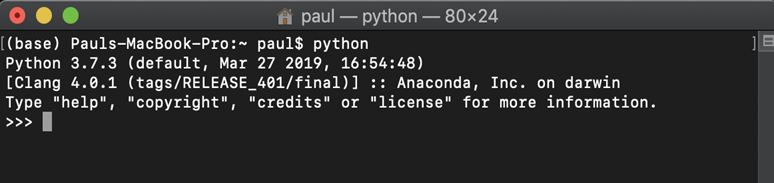
If you don’t see a Python version starting with the number 3 and the word Anaconda, it probably means you’re stuck on the previous Python installation on your system. You need to edit your PATH environment variables so that your terminal knows which Python version you want when you type python in a terminal window. Hopefully, you won’t run into this problem, but if so, you can search online for a fix. You can also type python3 instead of python to explicitly use your Python 3 installation.

This is an excerpt from Manning's book Practices of the Python Pro.
If you’re in the scientific computing community, you may be familiar with Anaconda (www.anaconda.com). Anaconda is a suite of tools that includes Python. As of this writing, Anaconda can be installed with either Python 2 or Python 3. Check which you have, and make sure you’ve got the Python 3 version.
Using Anaconda’s conda command, you can install most versions of Python using conda install python=3.7.3, as an example. Read the official documentation to understand the installation process for your system.