concept circle in category python
This is an excerpt from Manning's book Hello World! Third Edition.
Not surprisingly, the pygame.draw.circle() function draws a circle. You have to tell it five things:
On what surface to draw the circle. (In this case, it’s on the surface we defined in line 3, called screen, which is the display surface.)
We made our window 640 pixels wide by 480 pixels high. If we wanted to put the circle in the middle of the window, we’d need to draw it at [320, 240]. That’s 320 pixels over from the left-hand edge and 240 pixels down from the top edge.
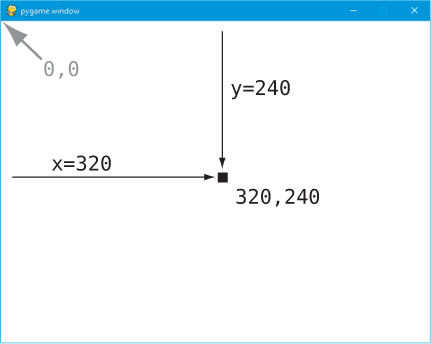
Listing 16.4. Putting the circle in the middle of the window
import pygame, sys
pygame.init()
screen = pygame.display.set_mode([640,480])
screen.fill([255, 255, 255])
pygame.draw.circle(screen, [255,0,0],[320,240], 30, 0)   #1
pygame.display.flip()
running = True
while running:
    for event in pygame.event.get():
        if event.type == pygame.QUIT:
            running = False
pygame.quit()
The location [320, 240] is used as the center of the circle. Compare the results of running listing 16.3 to the results you saw when you ran listing 16.4 to see the difference.
This is an excerpt from Manning's book Get Programming: Learn to code with Python.
Write a class for a queue, in a similar way as that for the stack. Recall that items added to a queue are added to one end, and items removed from the queue are removed from the other end: