concept dictionary in category python
This is an excerpt from Manning's book Tiny Python Projects: Learn coding and testing with puzzles and games.
Use Python data structures like strings, lists, and dictionaries
You will need some way to inspect each character in the input text to identify the numbers--you will learn how to use a
forloop for this. Then you’ll see how aforloop can be rewritten as a “list comprehension.” You’ll need some way to associate a number like 1 with the number 9, and so on for all the numbers--you’ll learn about a data structure in Python called a dictionary that will allow you to do exactly that.
Dictionaries actually provide quite a bit more information about words, such as pronunciation, part of speech, derived words, history, synonyms, alternate spellings, etymology, first known use, and so on. (I really love dictionaries.) Each of those attributes has a value, so we could also think of the dictionary entry for a word as itself being another “dictionary” (see figure 4.2).

This is an excerpt from Manning's book Hello World! Third Edition.
Now, the whole reason we created a dictionary was so we could look things up. In this case, we want to look something up by name. You do that like this:
>>> print(phoneNumbers["Mary"])
555-6789
Notice that you use square brackets to specify which key you want within the dictionary. But the dictionary as a whole is enclosed in curly brackets.
A dictionary is somewhat like a list, but there are a couple of main differences. Both types are collections; that is, they are a way of collecting together other types.
This is an excerpt from Manning's book Get Programming: Learn to code with Python.
Figure 27.1 takes the grocery list metaphor from the previous lesson and shows you one way to apply it to dictionaries. In a list, your grocery items are enumerated; the first item is on the first line, and so on. You can think of a list as mapping the numbers 0, 1, 2, and so on, in that order, to each item in your list. With a dictionary, you get additional flexibility in what you can map, and to what. In figure 27.1, the grocery dictionary now maps an item to its quantity.
Figure 27.1. A list puts the first item at position 0, the second item at position 1, and the third at position 2. A dictionary doesn’t have positions, but rather maps one object to another; here it maps a grocery item to its quantity.

You can think of a list as a structure that maps an integer (index 0, 1, 2, 3 ...) to an object; a list can be indexed only by an integer. A dictionary is a data structure that can map any object, not just an integer, to any other object; indexing using any object is more useful in situations when you have pairs of data. Like lists, dictionaries are mutable so that when you make a change to a dictionary object, the object itself changes without having to make a copy of it.
You can also create a dictionary with items already in it. In your grocery list, you map a grocery item to its quantity. In other words, the keys to grocery will be strings representing the grocery items, and the values to grocery will be integers representing the quantity:
grocery = {"milk": 1, "eggs": 12, "bread": 2}This line creates a dictionary with three items, as shown in figure 27.2. Each item in a dictionary is separated by a comma. The keys and values for an item are separated by a colon. The key is to the left of the colon, and the value for that key is to the right of the colon.
Figure 27.2. A dictionary initialized with three entries. Entries are separated by commas. Each entry has a key to the left of a colon, and the key’s corresponding value to the right of the colon.

Both keys and values to a dictionary are single objects. A dictionary entry can’t have more than one object as its key or more than one object as its value. If you’d like to store more than one object as the value, you could store all the objects inside a tuple, because a tuple is one object. For example, your grocery list could have the string key "eggs" and the tuple value (1, "carton") or (12, "individual"). Notice that the values in both situations are one Python object, a tuple.

This is an excerpt from Manning's book Hello! Python.
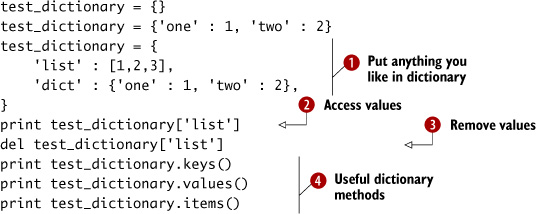
You can think of dictionaries as a bag of data. You put data in, give it a name, and then, later, when you want the data back, you give the dictionary its name, and the dictionary will return the data. In Python’s terminology, the name is called a key and the data is called the value for that key. Let’s see how you use a dictionary by taking a look at the following listing.
Dictionaries are fairly similar to lists, except that you use curly braces instead of square brackets, and you separate keys and their values with a colon.
The other similarity to lists is that you can include anything that you like as a value
, including lists, dictionaries, and other objects. You’re not limited to storing simple types like strings or numbers, or one type of thing. The only constraint is on the key: it can only be something that isn’t modifiable, like a string or number.
To get your value back once you’ve put it in the dictionary, use the dictionary’s name with the key after it in square brackets
. If you’re finished with a value, it’s easy to remove it by using del followed by the dictionary and the key that you want to delete
.
Dictionaries are objects, so they have some useful methods
as well as direct access. keys() returns all of the keys in a dictionary, values() will return its values, and items() returns both the keys and values. Typically, you’ll use it in a for loop, like this:
for key, value in test_dictionary.items(): ...When deciding what keys and values to use for a dictionary, the best option is to use something unique for the key, and the data you’ll need in your program as the value. You might need to convert the data somehow when building your dictionary, but it normally makes your code easier to write and easier to understand. For your dictionary, you’ll use the path to the file as the key, and the checksum you’ve generated as the value.
Now that you know about hashes and dictionaries, let’s put your program together.