concept index in category python

This is an excerpt from Manning's book Tiny Python Projects: Learn coding and testing with puzzles and games.
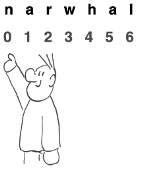
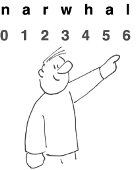
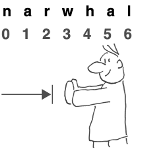
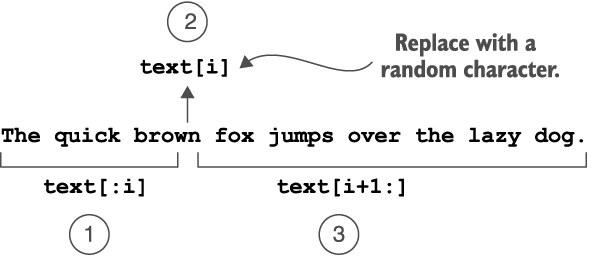
In Python, we can use square brackets and an index to get an individual character from a string. The index is the numeric position of an element in a sequence, and we must remember that indexing starts at
0.
>>> items[0]
'soda'
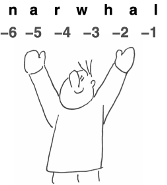
If the index is negative, Python starts counting backwards from the end of the
list. The index-1is the last element of thelist:>>> items[-1] 'ice cream'

This is an excerpt from Manning's book Hello World! Third Edition.
You can use the index to change one of the list items:
>>> print(letters)
['a', 'b', 'c', 'd', 'e']
>>> letters[2] = 'z'
>>> print(letters)
['a', 'b', 'z', 'd', 'e']
But you can’t use the index to add new items to the list. Right now, there are five items in the list, with indices from 0 to 4. So you could not do something like this:
Here, we added the letter z at index 2. Index 2 is the third position in the list (because indices start at 0). The letter that used to be in the third position, c, got bumped over by one place, to the fourth position. Every other item in the list also got bumped one position.

This is an excerpt from Manning's book Get Programming: Learn to code with Python.
You’re trying to access an index in the string that’s beyond the size of the string.
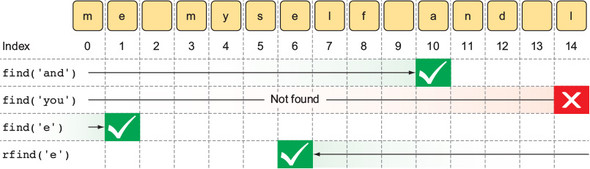
A list is a collection of any object type; it’s like a tuple, which you’ve seen and worked with already. A tuple and a list both have an order to them, in that the first element in the collection is at index 0, the second element is at index 1, and so on. The main difference is that lists are mutable objects, whereas tuples aren’t. You can add elements to, remove elements from, and modify elements in the same list object. With a tuple, every time you do an operation, you create a new tuple object whose value is the changed tuple.
L[-1] = L[0] (Recall how negative indices work from lesson 7.)
menu = []1. Write one or more commands that mutate the list, so that the list menu contains
["pizza", "beer", "fries", "wings", "salad"].2. Continuing on, write one or more commands that mutate the list to contain
["salad", "fries", "wings", "pizza"].