concept number in category python

This is an excerpt from Manning's book Tiny Python Projects: Learn coding and testing with puzzles and games.
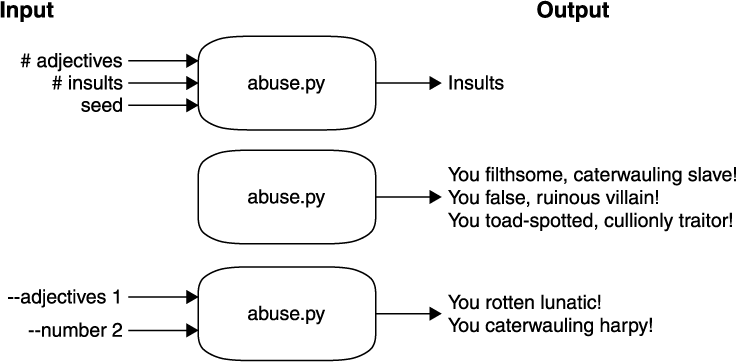
Use typeto force the user to provide values like numbers or files

This is an excerpt from Manning's book Math for Programmers: 3D graphics, machine learning, and simulations with Python.
In mathematics, objects you can describe with ordered lists of numbers are called vectors, and there is a whole field (called linear algebra) dedicated to studying them. For example, a used car might correspond to a four-dimensional vector, meaning a four-tuple of numbers:
Like numbers, vectors have their own kind of arithmetic; we can combine vectors with operations to make new vectors. The difference with vectors is that we can visualize the results. Operations from vector arithmetic all accomplish useful geometric transformations, not just algebraic ones. We’ll start with the most basic operation: vector addition.
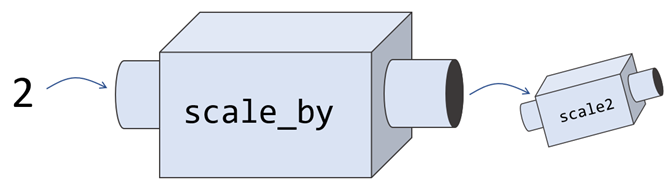
Figure 4.9: A function machine that takes numbers as inputs and produces new function machines as outputs

This is an excerpt from Manning's book Python Workout: 50 ten-minute exercises.
Whether you’re calculating salaries, bank interest, or cellular frequencies, it’s hard to imagine a program that doesn’t use numbers in one way or another. Python has three different numeric types:
int,float, andcomplex. For most of us, it’s enough to know about (and work with)int(for whole numbers) andfloat(for numbers with a fractional component).Numbers are not only fundamental to programming, but also give us a good introduction to how a programming language operates. Understanding how variable assignment and function arguments work with integers and floats will help you to reason about more complex types, such as strings, tuples, and dicts.
def mysum(*numbers):
   output = 0
   for number in numbers:
           output += number
   return output

print(mysum(10, 20, 30, 40))

This is an excerpt from Manning's book Practices of the Python Pro.
Listing 2.2. Code with extracted functions
import random

OPTIONS = ['rock', 'paper', 'scissors']


def get_computer_choice():
    return random.choice(OPTIONS)


def get_human_choice():
    choice_number = int(input('Enter the number of your choice: '))
    return OPTIONS[choice_number - 1]


def print_options():
    print('\n'.join(f'({i}) {option.title()}' for i,
 option in enumerate(OPTIONS)))


def print_choices(human_choice, computer_choice):
    print(f'You chose {human_choice}')
    print(f'The computer chose {computer_choice}')


def print_win_lose(human_choice, computer_choice, human_beats,
 human_loses_to):
    if computer_choice == human_loses_to:
        print(f'Sorry, {computer_choice} beats {human_choice}')
    elif computer_choice == human_beats:
        print(f'Yes, {human_choice} beats {computer_choice}!')


def print_result(human_choice, computer_choice):
    if human_choice == computer_choice:
        print('Draw!')
    if human_choice == 'rock':
        print_win_lose('rock', computer_choice, 'scissors', 'paper')
    elif human_choice == 'paper':
        print_win_lose('paper', computer_choice, 'rock', 'scissors')
    elif human_choice == 'scissors':
        print_win_lose('scissors', computer_choice, 'paper', 'rock')


print_options()
human_choice = get_human_choice()
computer_choice = get_computer_choice()
print_choices(human_choice, computer_choice)
print_result(human_choice, computer_choice)
This is an excerpt from Manning's book Mastering Large Datasets with Python: Parallelize and Distribute Your Python Code.
Consider one small step in our hypothetical game: improving the AI. Say we have an AI opponent against which all the players compete, and we want the AI to improve every 1,000 matches. At first, we’ll be able to update our AI on a single machine. After all, we only have 1,000 matches, and it’s trivial to process them. Even as the number of players picks up, we’ll only have to run this improvement every few hours. Eventually, however, if our game gets popular enough, we’ll have to dedicate several machines to this task—the amount of information they’ll need to process will be larger (there will be more matches in the match history), and they’ll need to process the information faster (because the rate of plays will be faster). This would be an excellent application for a map and reduce style because we could easily modify our code to be parallel, allowing us to scale our AI improvements up to any number of users.
It’s worth taking a look at a small example of map in action now because of how fundamental it is to what we’ll be doing throughout this book. Let’s imagine we want to add seven to a sequence of four numbers: –1, 0, 1, and 2. To do this, we write a small function called add_seven that takes a number n and returns n+7. To do this for our sequence of numbers, we’d simply call map on add_seven and our sequence (figure 1.5).
We can do distributed computing a number of ways, including using the Apache Hadoop and Apache Spark libraries.
Listing 2.1. Formatting phone numbers with a for loop
import re

phone_numbers = [
    "(123) 456-7890",
    "1234567890",
    "123.456.7890",
    "+1 123 456-7890"
]

new_numbers = []

R = re.compile(r"\d")                         #1

for number in phone_numbers:                  #2
  digits = R.findall(number)


  area_code = "".join(digits[-10:-7])         #3
  first_3 = "".join(digits[-7:-4])
  last_4 = "".join(digits[-4:len(digits)])

  pretty_format = "({}) {}-{}".format(area_code,first_3,last_4)
  new_numbers.append(correct_format)          #4

This is an excerpt from Manning's book Hello World! Third Edition.
In pretty much all computer programs and languages, the * symbol is used for multiplication. That character is called an asterisk or star. If you’re used to writing “5 times 3” as “5 x 3” in math class, you’ll have to get used to using * for multiplication in Python instead. (It’s the symbol above the number 8 on most keyboards.)
Getting numbers to look right is important for many programs.
Just now, we printed 12.67 in integer format, and Python printed 12. But the value of the variable number has not been changed. Check it and see:
>>> print(number)
12.67
The value of number hasn’t changed. We just made it print differently using the format string.

This is an excerpt from Manning's book Natural Language Processing in Action: Understanding, analyzing, and generating text with Python.
Think of all the ratings we could give statements. We could put these ratings in order and “compute” them for each statement to compile a “vector” for each statement. The list of ratings or dimensions we could give a set of statements should be much smaller than the number of possible statements. And statements that mean the same thing should have similar values for all our questions.
The next step in your adventure is to turn the words of chapter 2 into continuous numbers rather than just integers representing word counts or binary “bit vectors” that detect the presence or absence of particular words. With representations of words in a continuous space, you can operate on their representation with more exciting math. Your goal is to find numerical representation of words that somehow capture the importance or information content of the words they represent. You’ll have to wait until chapter 4 to see how to turn this information content into numbers that represent the meaning of words.
You then looked at an even more useful vector representation that counts the number of occurrences, or frequency, of each word in the given text. As a first approximation, you assume that the more times a word occurs, the more meaning it must contribute to that document. A document that refers to “wings” and “rudder” frequently may be more relevant to a problem involving jet airplanes or air travel, than say a document that refers frequently to “cats” and “gravity.” Or if you have classified some words as expressing positive emotions—words like “good,” “best,” “joy,” and “fantastic”—the more a document that contains those words is likely to have positive “sentiment.” You can imagine though how an algorithm that relied on these simple rules might be mistaken or led astray.

This is an excerpt from Manning's book Get Programming: Learn to code with Python.
To set up the input, you need to initialize a variable with a value. Your variable name should be descriptive, and the number of minutes should be an integer. For example,
In the given task, you’ll divide the minutes by 60 and convert the result to an integer to give you the number of whole hours, like so:
minutes_to_convert = 123
hours_decimal = minutes_to_convert/60
hours_part = int(hours_decimal)
At this point, your hours_part variable holds the number of hours converted from the input.
Thinking about the given task and dividing it into a few smaller tasks

This is an excerpt from Manning's book Geoprocessing with Python.
Using digital data, you have the advantage of attaching multiple attribute values to each feature, whether you plan to display the information on a map or not. For each road, you can store information such as its name, speed limit, number of lanes, or anything else you can think of. Figure 1.2 shows an example of data you might store with each country in a dataset.
In many ways this example is similar to listing 9.4, except that the numbers of output rows and columns are halved instead of doubled, and the pixel size is doubled instead of halved. Notice that in this case you need to ensure that the numbers of rows and columns are integers, because the result of the division might be floating-point, and the dataset creation function doesn’t like that.
The NumPy empty function creates an array that hasn’t been initialized with any values, so it contains garbage until you fill it somehow. The first parameter to the function is a tuple containing the dimensions of the array to create. If it’s a two-dimensional array, the tuple contains the number of rows and then the number of columns. The dtype parameter is optional and specifies the type of data that the array will hold. If not provided, the array will hold floating-point numbers.
You can probably figure out what’s happening at the beginning of this example. You open the dataset and get information about the band, including the size of its blocks and its NoData value. After creating the output dataset, you start looping through the blocks in the horizontal (x) direction. You start at column 0 and go up to the last column, represented with index xsize. The twist is that each time through the loop, you increment x by the number of columns in a block (the third argument to range is the amount to increment by), so you skip from the beginning of one block to the beginning of the next. Then you store the number of columns to read in a variable called cols. If there’s a full block’s worth of columns left to read, this variable is set to the number of columns in a block. But if there aren’t enough columns, as would be the case when x is equal to 10 in figure 9.10, the number of remaining columns (three in the figure) is used instead. You need to do this because you’ll get an error if you try to read more rows or columns than exist.
Figure 9.10. A small example image with a block size of five rows and five columns. Alternating blocks are shaded to make it easy to see. The upper-left pixel has offset 0,0.
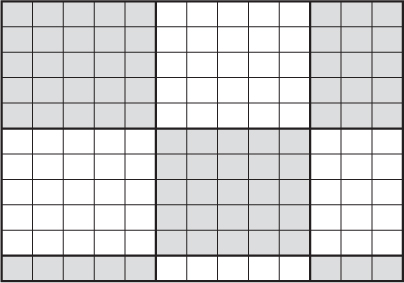
After computing the number of columns to read, you repeat the process for the number of rows. As shown in figure 9.10, the first two times through that second loop you read five rows, but the third time there’s only one row left to read. After processing the first five columns of all rows, you go to the next iteration of the outer loop and process the next five columns, and then the last three columns.

This is an excerpt from Manning's book Hello App Inventor!: Android programming for kids and the rest of us.
Block drawer
Blocks you’ll find in there
Explanation and example
Control Decision blocks that tell the program what to do next based on some kind of test Loops, which are a powerful way of repeating tasks Decision: If you clicked the Happy button, the phone sends a tweet. If you clicked Sad, it sends a
tweet. Loop: When you text a group of contacts, the phone executes a loop from the first contact to the last, sending a single text each time. Doing this manually would be tedious!
Logic The logic values True and False Logical tests: AND, OR, NOT, = True and False can set properties. For example, setting a button’s Visible property to False makes the button disappear. Logical tests are used for more complicated Decision blocks. For example, you might want to make sure the user’s age is more than 8 AND less than 12. Math Blocks that create and compare numbers, plus all the functions you would find on a calculator For example, in a game you could use Math blocks to add up the number of coins collected and convert this to a score. You could also use Math blocks to work out whether this score was greater than the current high score. Text Blocks that create, change, add, join, split, replace, and compare text Any piece of text you want to display is created in a Text block. For example, you could join the name a user typed and a text message—something like, “Hello Amy, how are you today?” Lists Blocks that store, display, and work with lists of things For example you might want to give the user a menu of choices that they can click. Colors A choice of standard colors to use[a] You can set or change the color of anything you see on screen, like text, a button, or the background. Variables Blocks to create variables A variable is a named storage space for a small piece of data like your name or age or a game score. Procedures Blocks to create and run procedures A procedure is a kind of mini program that other blocks can start. For example, you might have a procedure that resets the screen whenever a game is over.
Computer programs do comparison by using comparison operators. You probably recognize most of them from mathematics lessons. The following tables shows the most useful comparison operators; each comparison block gives (or returns) either a True or False answer. The tables include comparison operators that can be used for text or numbers, and the first table applies to both. In each case, we have listed when each block returns True; for all other cases, it will automatically report False.
Text and number comparison operators
Comparison operator
Block
What does it do?
Equals 
Answers True if the two numbers or pieces of text plugged into the sockets are the same Does not equal 
The opposite of equals—answers True if two numbers or pieces of text aren’t the same Greater than 
Answers True if the number in the left socket is larger than the number in the right socket Less than 
Answers True if the number in the left socket is smaller than the number in the right socket Greater than or equal to 
Answers True if the number in the left socket is larger than or the same as the number in the right socket Less than or equal to 
Answers True if the number in the left socket is smaller than or the same as the number in the right socket Is a number? 
Answers True if the item in the socket is a number

This is an excerpt from Manning's book Hello! Python.
But, like most definitions, this is a drastic oversimplification. Like chess, learning the initial rules of programming is easy; but putting them together in a useful way and mastering them is much harder. Programming touches on most areas of human endeavor these days—if you want to create something meaningful with a computer, it’s really hard to do so without having to program in some sense—and it’s just as much about design and ideas and personal expression as it is about numbers and calculation.
number = "42"
print "Guess my number..."
guess = raw_input(">")
if guess == number:
    print "Yes! that's it!"
else:
    print "No - it's", number

raw_input("hit enter to continue")
Another design point is that, up until now, you’ve favored composition over inheritance. Inheritance is normally referred to as an “is/a” relationship: a player is an actor, a monster is an actor, too. Composition, on the other hand, is a “has/a” relationship: a cave has a player in it, a player has a number of items. Composition tends to couple your objects less tightly—they have to interact via method calls and inspecting each other’s values—unlike inheritance, which automatically inserts the methods of one object into the other. Most of the time, you’ll want to use composition; but when used in the right situation, inheritance can make a big difference. Figure 6.3 shows the difference between composition and inheritance in your game so far.