concept program in category python

This is an excerpt from Manning's book The Well-Grounded Python Developer.
Putting Artificial Intelligence aside for the moment, computers are exceptionally inert devices. Programs are a way for humans to express what we want a computer to do in a language we can read and write, and the computer can understand. The trick is being exact enough to get the computer to do what's intended, rather than something else.
When an exception occurs in a program, Python will stop executing your program code and start working its way back up the call stack, looking for an exception handler.
The code shows Python encountering an exception in func_c() when it tries to divide 12.2 by 0, then going back up the call stack to func_b() and then to func_a() looking for a handler to intercept the exception. Since there isn't a handler, Python exits the program, prints the exception raised, and prints the stack trace that caused the application to crash.
Another possible exception the program can raise happens if the user enters a string at either of the two prompts that can't be converted to a floating-point value. Here is an example of running the program raising that exception:
Enter a dividend value: Python
Traceback (most recent call last):
  File "/Users/dfarrell/GoogleDrive/projects/manning_publishing/becoming_a_pythonista/code/project/CH_05/example_01.py", line 20, in <module>
    func_a()
  File "/Users/dfarrell/GoogleDrive/projects/manning_publishing/becoming_a_pythonista/code/project/CH_05/example_01.py", line 6, in func_a
    dividend = float(input("Enter a dividend value: "))
ValueError: could not convert string to float: 'Python'
In this example, the stack trace only shows func_a() because the ValueError exception was raised within that function when the program tried to convert the string "Python" to a floating-point value.
This is an excerpt from Manning's book Tiny Python Projects: Learn coding and testing with puzzles and games.
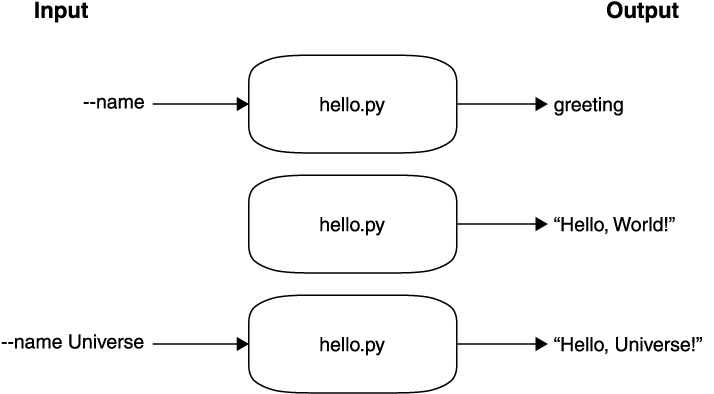
$ ./hello.py                      #1
Hello, World!
$ ./hello.py --name Universe      #2
Hello, Universe!


$ chmod +x hello.py #1
This is an excerpt from Manning's book Python Workout: 50 ten-minute exercises.
Whether you’re calculating salaries, bank interest, or cellular frequencies, it’s hard to imagine a program that doesn’t use numbers in one way or another. Python has three different numeric types:
int,float, andcomplex. For most of us, it’s enough to know about (and work with)int(for whole numbers) andfloat(for numbers with a fractional component).
This is an excerpt from Manning's book Hello World! Third Edition.
The examples we’ve looked at so far are single instructions to Python in interactive mode. Although that’s great for checking out some of the things Python can do, those examples aren’t really programs. As I mentioned before, a program is a number of instructions collected together. So let’s make our first Python program.
First, you need a way to type in the program. If you just type it in the interactive window, Python won’t “remember” it. You need to use a text editor (like Notepad for Windows, TextEdit for macOS, or vi for Linux) that can save the program to the hard drive in your computer. IDLE comes with a text editor that is much better for what you need than Notepad. To find it, select File > New File from IDLE’s menus.
We have talked several times about how programs have three main aspects: input, processing, and output. Up until now, the input has mostly come directly from the user, from the keyboard and mouse. The output has been sent directly to the screen (or the speakers, in the case of sound). But sometimes you need to use input that comes from other sources. Quite often, programs need to use input that’s stored somewhere, rather than entered when the program is running. Some programs need to get their input from a file on the computer’s hard drive.
For example, if you made a game of Hangman, your program would need a word list from which to choose the secret word. That list of words would have to be stored somewhere, probably in a “word list” file that goes with the program. The program would need to open this file, read the word list, and pick a word to use.
The same thing is true for output. Sometimes the output of a program needs to be stored. All the variables that a program uses are temporary—they’re lost when the program stops running. If you want to save some of the information to use later, you have to store it somewhere more permanent, like on the hard drive. For example, if you want to keep a list of high scores for a game, you need to store them in a file so that, next time the program runs, it can read the file and display the scores.
If you stored your program in E:/programs and ran the program, that program would start with E:/programs as its working directory. If you have a sound file stored in the same folder, your program only needs the filename to use that file. It doesn’t need a path to get there, because it’s already there. So you can just do this:
my_sound = pygame.mixer.Sound("splat.wav")Notice that you don’t need to use the full pathname of the sound file (which would be E:/programs/splat.wav). You just use the filename without the path because the file is in the same folder as the program that’s using it.
This is an excerpt from Manning's book Get Programming: Learn to code with Python.
Figure A.1. Flowchart for program in listing 13.3

When you write a program, you write lines of code. Each line of code is called a statement. You’ve been writing linear code, which means that when you run your program, every line of code is executed in the order that you wrote it; none of the lines are executed more than once, and none of the lines are skipped. This is equivalent to going through life without being allowed to make any decisions; this would be a constraining way to experience the world. You react to different stimuli in the world to make decisions, which leads to much more interesting experiences.
This is an excerpt from Manning's book Deep Learning with Python.
Machine learning is a specific subfield of AI that aims at automatically developing programs (called models) purely from exposure to training data. This process of turning data into a program is called learning. Although machine learning has been around for a long time, it only started to take off in the 1990s.
What path could make this happen? Consider a well-known type of network: RNNs. It’s important to note that RNNs have slightly fewer limitations than feedforward networks. That’s because RNNs are a bit more than mere geometric transformations: they’re geometric transformations repeatedly applied inside a for loop. The temporal for loop is itself hardcoded by human developers: it’s a built-in assumption of the network. Naturally, RNNs are still extremely limited in what they can represent, primarily because each step they perform is a differentiable geometric transformation, and they carry information from step to step via points in a continuous geometric space (state vectors). Now imagine a neural network that’s augmented in a similar way with programming primitives—but instead of a single hardcoded for loop with hardcoded geometric memory, the network includes a large set of programming primitives that the model is free to manipulate to expand its processing function, such as if branches, while statements, variable creation, disk storage for long-term memory, sorting operators, advanced data structures (such as lists, graphs, and hash tables), and many more. The space of programs that such a network could represent would be far broader than what can be represented with current deep-learning models, and some of these programs could achieve superior generalization power.

This is an excerpt from Manning's book Hello App Inventor!: Android programming for kids and the rest of us.
Adding a button to the Hello World! program is simple, but before you get to that, it would be a good idea to save a new version of the Hello World! app. That way, you can always go back to the original version if you need to. Learning about saving projects now will save you from getting in a tangle later on.

This is an excerpt from Manning's book Hello! Python.
“Good artists borrow, great artists steal.” Because of the size of the Python developer community, there are a lot of programs to beg, borrow and steal, regardless of what type of program you’re writing. Once you have some Python experience, reading other people’s programs is an excellent way to learn more.
As you progress through the chapter, you’ll add features to your game, building on the initial version. This is how most programmers (including the author) learned to program: learn just enough about the language to be able to write a simple program, and then build up from there. In order to do that, you need more knowledge—but you only need to learn a little bit more to be able to make small additions to your program. Repeat the process of adding small features a few more times, and you’ll have a program that you couldn’t have created in one sitting. Along the way, you’ll have learned a lot about the programming language.
What’s happened is that there’s a bug in the program. There’s a statement in listing 2.1 that Python doesn’t know how to run. Rather than guess what you meant, it will stop and refuse to go any further until you’ve fixed it.
Luckily, the problem is easy to fix: Python tells you what line is at fault and the type of error that’s been triggered, and it provides a rough description of the problem. In this case, it’s line 10, and the error is NameError: name 'caves' is not defined. Oops—the program tried to access the variable caves instead of cave_numbers. If you change line 10 so that it reads
print "You can see", len(cave_numbers), "caves"then the program should run.