concept snowball in category python
appears as: snowball, snowballs, The snowballs, The snowball

This is an excerpt from Manning's book Hello App Inventor!: Android programming for kids and the rest of us.
As long as these three conditions are all true, you’ll move the snowball to Gentoo’s current position, make it visible, and set its heading toward the point the user touched. The snowball already has speed (you set that in properties), so it fires immediately. Here’s the code to throw the snowball, update the number of snowballs remaining, and play a “whoosh” sound:
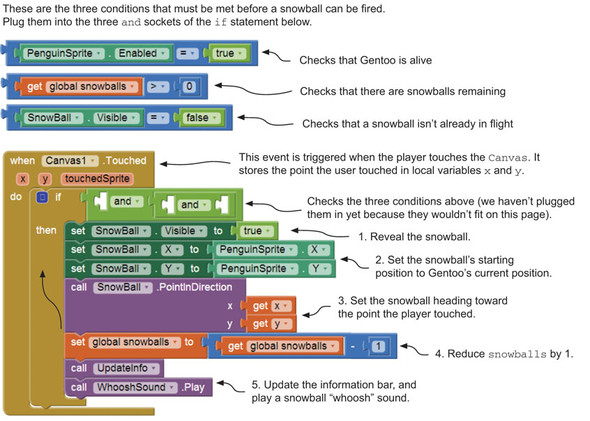
The snowball misses the Yeti and reaches the edge of the screen. You can detect that as an event and make the snowball invisible. Here are the blocks: The snowball collides with the Yeti (which you can detect with a SnowBall.Collided- With event). When this is triggered, you’ll hide the snowball and switch off the Yeti animation, replacing it with a single image of a Yeti with snow on his face. The Yeti will be disabled so Gentoo can touch him without being frozen. You’ll also update the player’s score and then set a timer to wait 6 seconds before you let the Yeti be enabled and start moving again.