concept sound in category python
This is an excerpt from Manning's book Math for Programmers: 3D graphics, machine learning, and simulations with Python.
For a lot of part 2, we’ve focused on using calculus to simulate moving objects. In this chapter, I’ll show you a completely different application: working with audio data. Digital audio data is a computer representation of sound waves, which are repeating changes of pressure in the air that our ears perceive as sound. We’ll think of sound waves as functions that we can add and scale as vectors, and then we can use integrals to understand what kinds of sounds they represent. As a result, our exploration of sound waves combines a lot of what you’ve learned about both linear algebra and calculus in earlier chapters.
I won’t go too deep into the physics of sound waves, but it’s useful to understand how they work at a basic level. What we perceive as sound isn’t air pressure itself, but rather rapid changes in air pressure that cause our eardrums to vibrate. For instance, if you play a violin, you drag the bow across one of the strings and cause the string to vibrate. The vibrating string causes the air around it to rapidly change pressure, and the changes in pressure propagate through the air as sound waves until they reach your ear. At that point, your eardrum vibrates at the same rate, and you perceive a sound (figure 13.1).
Figure 13.1: Schematic diagram of the sound of a violin reaching an eardrum

The sound we played with the square wave was a recognizable musical note, but it wasn’t very natural sounding. That’s because in nature, things don’t usually vibrate in square waves. More often, vibrations are sinusoidal, meaning if we measure and graph these, we get results that look like the graphs of the sine or cosine functions. These functions turn out to be mathematically natural as well, so we can use them as the building blocks for the music we’re going to make. After sampling the notes and passing them to PyGame, you’ll be able to hear the difference between a square wave and a sinusoidal wave.
Equipped with the following function, you can hear the sound of a 441 Hz sinusoidal wave:
sinusoid = make_sinusoid(441,8000)
  arr = sample(sinusoid, 0, 1, 44100)
  sound = pygame.sndarray.make_sound(arr)
  sound.play()
If you play this alongside the 441 Hz square wave, you’ll notice that it plays the same note; in other words, it has the same pitch. However, the quality of the sound is much different; the sinusoidal wave plays a much smoother sound. It sounds almost like it could be coming out of a flute rather than out of an old-school video game. This quality of sound is called timbre (pronounced TAM-ber).
This is an excerpt from Manning's book Hello World! Third Edition.
Here’s another example of a program that has all three elements: in a video game, the input is the signals from the joystick or game controller; the processing is the program figuring out whether you have shot the alien, dodged the ball of fire, completed the level, or whatever; and the output is the graphics on the screen and the sound from the speakers or headphones.
In the last chapter, we made our first graphical game, PyPong, using what we have learned about graphics, sprites, collisions, animation, and events. In this chapter, we’ll add another piece of the puzzle: sound. Every video game and many other programs use sound to make them more interesting and enjoyable.
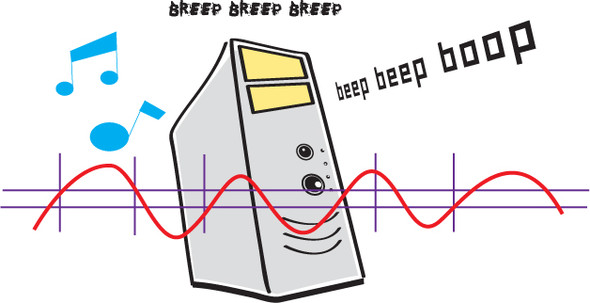
Sound can be both an input and an output. As an input, you’d connect a microphone or other sound source to the computer, and the program would record the sound or do something else with it (maybe send it over the Internet). But sound is much more common as an output, and that’s what we’ll cover in this book. You’ll learn how to play sounds like music or sound effects and add them to your programs, like PyPong.
Just like in the other programs we’ve written with Pygame so far, we’ll need to import and initialize Pygame before we can play sounds:
import pygame
pygame.init()
Now we’re ready to play some sounds. There are two main types of sounds you’ll use in your programs. The first is sound effects or sound clips. These are usually short, and we’ll use .wav files to store them. For these kinds of sounds, pygame.mixer uses a Sound object, like this:
splat = pygame.mixer.Sound("splat.wav")
splat.play()
The other kind of sound you’ll use a lot is music. Music is most commonly stored in .mp3, .wma, or .ogg files. To play these, Pygame uses a module within mixer called music. You use it like this:

This is an excerpt from Manning's book Hello App Inventor!: Android programming for kids and the rest of us.
The first step in creating an app is to set up a new project and then design it. Designing means both laying out what the app looks like and also deciding which small components you need to make the app work—things like buttons and labels and sounds (more on this in chapter 2). The place to do both of these jobs is the App Inventor Designer.
A sound is a nonvisible component—you don’t see it on the screen. Other nonvisible components include input devices like the camera, the barcode scanner, and the accelerometer and orientation sensors that detect movement and direction (shaking or tipping the phone). When you design your UI, drag over the desired components and drop them onto the screen. You’ll see them appear in the Non-Visible Components section beneath the Viewer screen.
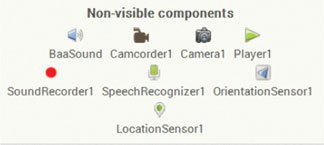
That’s it! Your UI has all the elements you need to make the basic version of the Getting to Know Ewe app. You’ve chosen and added all the objects, attached media to them (images and sound), and set some of their other properties like Size and Text. The finished UI should look like this: