concept space in category python

This is an excerpt from Manning's book Tiny Python Projects: Learn coding and testing with puzzles and games.
This is an excerpt from Manning's book Math for Programmers: 3D graphics, machine learning, and simulations with Python.
Any 3D object from a clownfish in Finding Nemo to an aircraft carrier in Call of Duty can be defined for a computer as a collection of 3D vectors. In code, each of these objects looks like a list of triples of float values. With three triples of floats, we have three points in space that can define a triangle (figure 1.8). For instance,
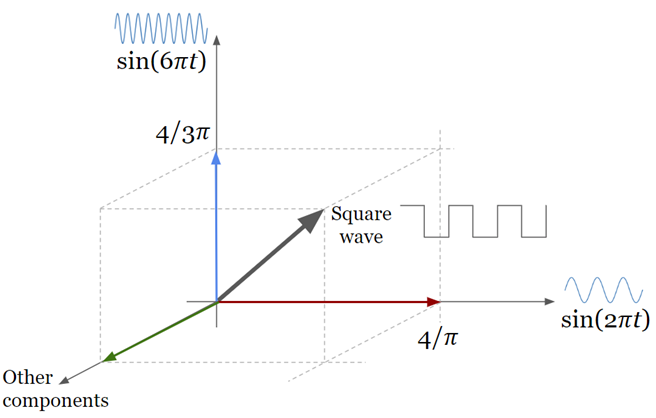
Figure 13.25: You can think of the square wave as a vector in the space of functions with a component length of 4/𝜋 in the sin(2𝜋t) direction and component length of 4/3𝜋 in the sin(6𝜋t) direction. The square wave has infinitely many more components beyond these two.

This is an excerpt from Manning's book Practices of the Python Pro.

Time and space complexity are measurements of how much more execution time, memory, or disk storage your software needs as its inputs grow. The faster your software consumes time or space, the higher its complexity.
This is an excerpt from Manning's book Get Programming: Learn to code with Python.
Now you’ll save the first and last names into variables to use later. Figure 12.2 shows how to split the full name.
You should store the first and last names so that you can work with them later. Listing 12.2 shows how to do this. You use the find operation on strings to get the index location of the space character.
Knowing this location, you can take all letters from the start of the full name (starting from index 0) until the space character index and store that substring as the first name. Recall that indexing into a string with some_string[a:b] means that you take all letters from index a to index b - 1. To get the last name, you start at one character past the space character index and take all letters until the end of the full name (up to and including the index of the last character in the string).
Listing 12.2. Storing the first and last names in variables
space = name1.find(" ")                              #1
name1_first = name1[0:space]                         #2
name1_last = name1[space+1:len(name1)]               #3
space = name2.find(" ")                              #4
name2_first = name2[0:space]                         #4
name2_last = name2[space+1:len(name2)]               #4
At this point, you have the two first names and the two last names stored in variables.