concept tuple in category python
This is an excerpt from Manning's book Tiny Python Projects: Learn coding and testing with puzzles and games.
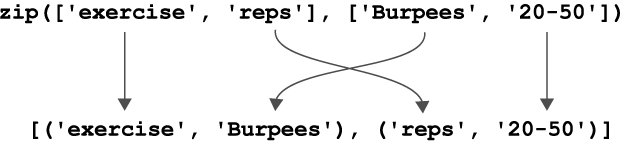
We’ve encountered tuples throughout the exercises. They’ve been returned by something like
match.groups()when a regular expression contains capturing parentheses, like in chapters 14 and 17; when usingzipto combine two lists, like in chapter 19; or when usingenumerate()to get a list of index values and elements from alist. Atupleis an immutablelist, and we’ll explore how that immutability can prevent us from introducing subtle bugs into our programs.
>>> state[0]
1
>>> state[1]
'X'
This is an excerpt from Manning's book Math for Programmers: 3D graphics, machine learning, and simulations with Python.
Tuples of numbers (called vectors) represent multidimensional data. Specifically, 3D vectors are triples of numbers and can represent points in space. You can build complex 3D graphics by assembling triangles specified by vectors.
A matrix lets us compute a given linear transformation using the data of what that transformation does to standard basis vectors. All of the notation in this chapter serves to organize that process, which we covered in section 4.2, not to introduce any unfamiliar ideas. I know it can feel like a pain to learn a new and complicated notation, but I promise, it will pay off. We are better off being able to think of vectors as geometric objects or as tuples of numbers. Likewise, we’ll expand our mental model by thinking of linear transformations as matrices of numbers.
There are a few ways we could write our matrix multiplication function, but I prefer using the dot product trick. Because the result of matrix multiplication should be a tuple of tuples, we can write it as a nested comprehension. It takes in two nested tuples as well, called a and b, representing our input matrices A and B. The input matrix a is already a tuple of rows of the first matrix, and we can pair these up with zip(*b), which is a tuple of columns of the second matrix. Finally, for each pair, we should take the dot product and yield it in the inner comprehension. Here’s the implementation:
from vectors import *

  def matrix_multiply(a,b):
      return tuple(
          tuple(dot(row,col) for col in zip(*b))
          for row in a
      )
This is an excerpt from Manning's book Python Workout: 50 ten-minute exercises.
Even if no arguments are passed to our function,
numberswill still be a tuple. It’ll be an empty tuple, but a tuple nonetheless.The splat operator is especially useful when you want to receive an unknown number of arguments. Typically, you’ll expect that all of the arguments will be of the same type, although Python doesn’t enforce such a rule. In my experience, you’ll then take the tuple (
numbers, in this case) and iterate over each element with either aforloop or a list comprehension.
These are such common tasks that every programming language supports collections, data structures designed for handling such cases. Lists and tuples are Python’s built-in collections. Technically, they differ in that lists are mutable, whereas tuples are immutable. But in practice, lists are meant to be used for sequences of the same type, whereas tuples are meant for sequences of different types.
For example, a series of documents, users, or IP addresses would be best stored in a list--because we have many objects of the same type. A record containing someone’s name and birth date would be best stored in a tuple, because the name and birth date are of different types. A bunch of such name-birth date tuples, however, could be stored in a list, because it would contain a sequence of tuples--and the tuples all would be of the same type.
Because they’re mutable, lists support many more methods and operators. After all, there’s not much you can do with a tuple other than pass it, retrieve its elements, and make some queries about its contents. Lists, by contrast, can be extended, contracted, and modified, as well as searched, sorted, and replaced. So you can’t add a person’s shoe size to the name-birth date tuple you’ve created for them. But you can add a bunch of additional name-birth date tuples to the list you’ve created, as well as remove elements from that list if they’re no longer students in the school.
Learning to distinguish between when you would use lists versus when you would use tuples can take some time. If the distinction isn’t totally clear to you just yet, it’s not your fault!
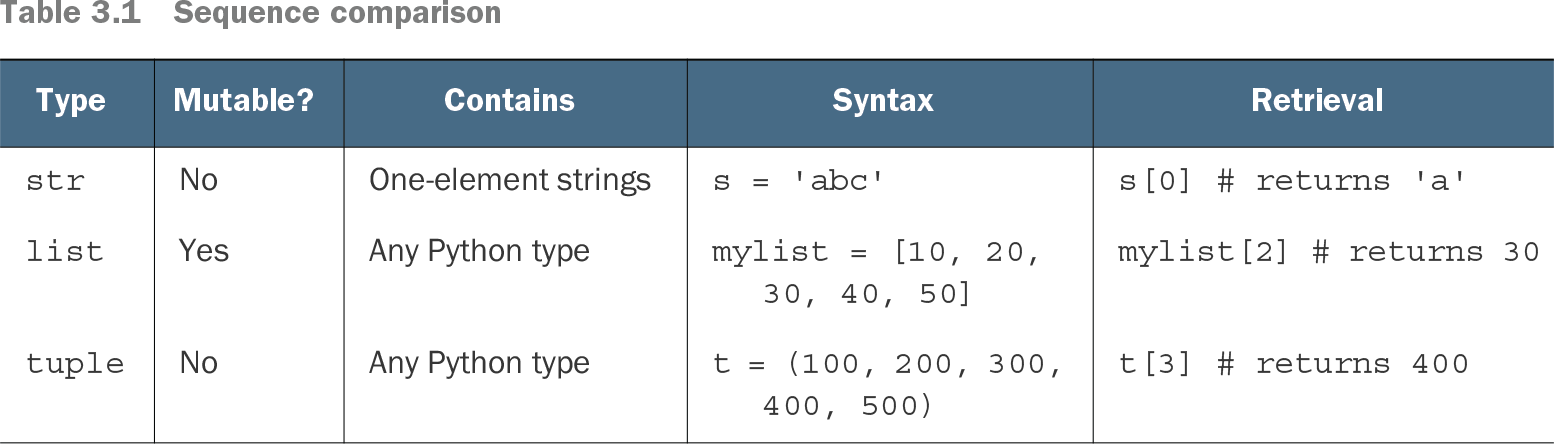
Lists and tuples are both Python sequences, which means that we can run
forloops on them, search using theinoperator, and retrieve from them, both using individual indexes and with slices. The third sequence type in Python is the string, which we looked at in the previous chapter. I find it useful to think of the sequences in this way.Table 3.1 Sequence comparison (view table figure)
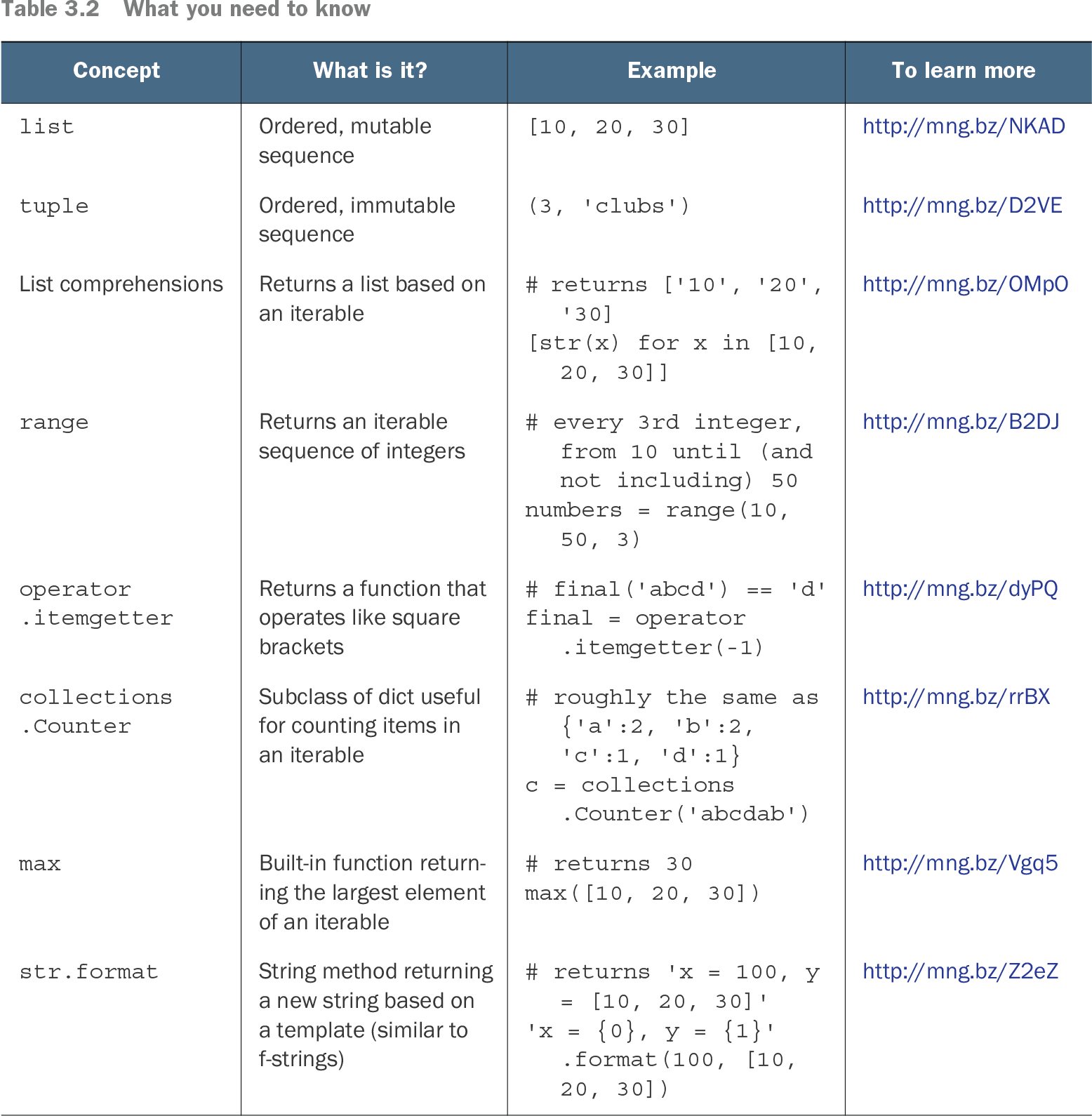
In this chapter, we’ll practice working with lists and tuples. We’ll see how to create them, modify them (in the case of lists), and use them to keep track of our data. We’ll also use list comprehensions, a syntax that’s confusing to many but which allows us to take one Python iterable and create a new list based on it. We’ll talk about comprehensions quite a bit in this chapter and the following ones; if you’re not familiar or comfortable with them, look at the references provided in table 3.2.
Table 3.2 What you need to know (view table figure)
This is an excerpt from Manning's book Mastering Large Datasets with Python: Parallelize and Distribute Your Python Code.
With the problem posed like this, we know we can solve it with map. The question, then, becomes: How can we get a list of all these URLs? Python has a handy datetime library for solving problems like this. Here, we create a generator function that takes start and end date tuples in (YYYY,MM,DD) format and produces a list of dates between them. We use a generator instead of a normal loop because this prevents us from storing all the numbers in memory in advance. The keyword yield in the following listing distinguishes this as a generator, instead of a traditional function that uses return.
Now we want to represent each of these page objects as the edges between pages. What is this going to look like? A good representation of this will be a tuple, with the object in first position representing the page doing the linking and the object in second position representing the page being linked to. If Parallel_computing links to Python, we’ll want a tuple like this: ("Parallel_computing", "Python").
To create these, we’ll need another function. This function will turn each page dict into a list of these edge tuples.
def page_to_edges(page):
    a = [(page['title'],p) for p in page['out-links']]
    b = [(p,page['title']) for p in page['in-links']]
    return a+b
This function loops through each page in a page’s network, creating a list of tuples for all the pages in the out-links, of the form (page,out-link), and for all the pages in the in-links, of the form (in-link,page). We’ll then add these two lists together and return them.
map statements are an excellent way to transform a sequence of data (such as data in a list or a tuple) into a sequence of data of some other type.
This is an excerpt from Manning's book Get Programming: Learn to code with Python.
Tuples are a more general version of strings, because every item in the tuple is a separate object. Many operations on tuples are the same as on strings.
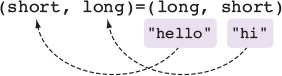
In this lesson, my objective was to teach you about tuples and how they behave in a similar way to strings. You learned how to get elements at each position by indexing into a tuple and how to slice a tuple to get at elements inside it; these elements can be primitive objects or might even be tuples themselves. Unlike strings, an object inside a tuple can be another tuple, effectively nesting tuples inside tuples. Lastly, you can use tuples to swap the values of two variables. Here are the major takeaways:
Tuples are sequences of any kind of object, even other tuples. You can index into multiple levels of tuples. You can use tuples to swap the values of variables.
word_string = """art
hue
ink
"""
set start and end to 0
set empty tuple to store all valid words
for letter in word_string:
    if letter is a newline:
        save word from start to ends in tuple for all valid words
        reset start and end to 1 past the newline character
    else:
        increment end
This is an excerpt from Manning's book Geoprocessing with Python.
Other values can also resolve to True or False when value testing and performing Boolean operations. For example, 0, the None keyword, blank strings, and empty lists, tuples, sets, and dictionaries all resolve to False when used in Boolean expressions. Anything else resolves to True. You’ll see examples of this in section 2.5.
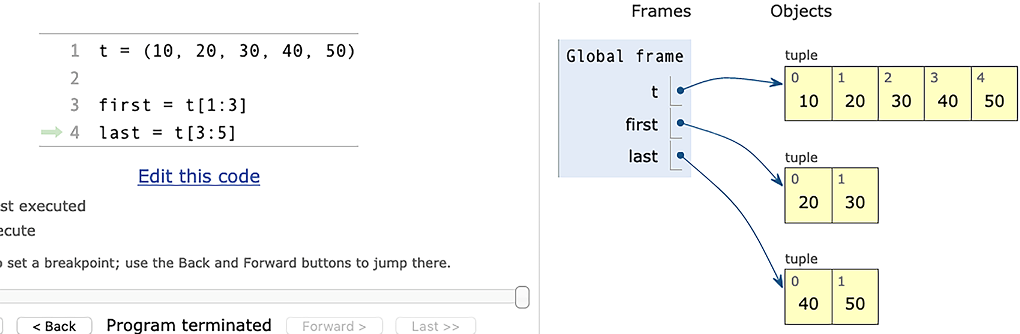
Tuples are also ordered collections of items, but they can’t be changed once created. Instead of brackets, tuples are surrounded by parentheses. You can access items and test for existence the same as with lists:
>>> data = (5, 'Bob', 'yellow', -43, 'cat')
>>> data[1:3]
('Bob', 'yellow')
>>> len(data)
5
>>> 'Bob' in data
True
Like I said, you’re not allowed to change a tuple once it has been created:
>>> data[0] = 10
Traceback (most recent call last):
  File "<stdin>", line 1, in <module>
TypeError: 'tuple' object does not support item assignment
Because of this, use lists instead of tuples when it’s possible that the data will change.