concept regular expression in category R

This is an excerpt from Manning's book Exploring Data with R.
What is a regular expression? It can be thought of as a search string, but it’s more like a separate language that undergoes its own interpretation. Regular expression (or regex) patterns, however, are super-powerful and so they’re really worth the time and effort it takes to learn them.
Think of a search you might do in a word processor. The search facility allows you to find simple matches with a simple string, showing you all of the exact matches of the search string to the text content. A regular expression can do this too. However, it goes so much further. You can match using higher-order patterns, such as two letters followed by two digits, or, words starting with a specified set of letters. We can make regex patterns that match phone numbers, words with similar but alternate spellings, email addresses, and much more.
Listing 8.15 Opening up the RegExplain gadget for experimenting with regular expressions
```{r open_regexplain}
edr_regexplain_gadget()
```

This is an excerpt from Manning's book Beyond Spreadsheets with R.
Regular expression (regex) refers to a pattern specified by a system of (possibly escaped) characters in order to capture text matches.
This topic is somewhat advanced, but it will be useful enough for you to be able to recognize when you need regular expressions, and I’ll show you some easy examples. You can extract or replace any single digit in a string with individual replacements easily enough if you know which digit you’re looking for:
sub(pattern = "3", replacement = "z", x = "xy3")
#> [1] "xyz"
But what if there’s a general case where the digit could be any of
0,1, ...,9? In that case, use a regular expression that matches to any digit. There are several ways to specify this: using\d(an escapedd, discussed in section 2.1.2, where the backslash itself will need to be escaped), or using the grouping of digits[0123456789](square brackets in a regular expression means “any of these”), using a shorthand notation for that group[0-9], or the named digit class[[:digit:]]. Even if you don’t know exactly which digit you need to replace, the following will still work fine:
Figure 6.2 Using the
rexpackage to build up a regular expression that can be used instr_view()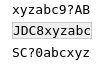
Once you become familiar with regular expressions, you’ll find they become extremely powerful when working with text. Until now, though, you’ve been selecting parts of strings from either one or several strings. To be able to work with data in general, you’ll need to be able to do similar things with the data structures you create.
Regular expressions (even those not involving special selectors) are case sensitive.