concept SQL in category R

This is an excerpt from Manning's book Practical Data Science with R, Second Edition.
In this chapter, we’ve worked through the basics of how to initially extract, transform, and load data for analysis. For smaller datasets, we perform the transformations using R and in memory. For larger datasets, we advise using a SQL database or even a big data system such as Spark (via the sparklyr package plus SQL, dplyr, or rquery). In any case, we save all the transformation steps as code (either in SQL or in R) that can be reused in the event of a data refresh. The intent of this chapter was to prepare for the actual interesting work in our next chapters: exploring, managing, correcting, and modeling data.
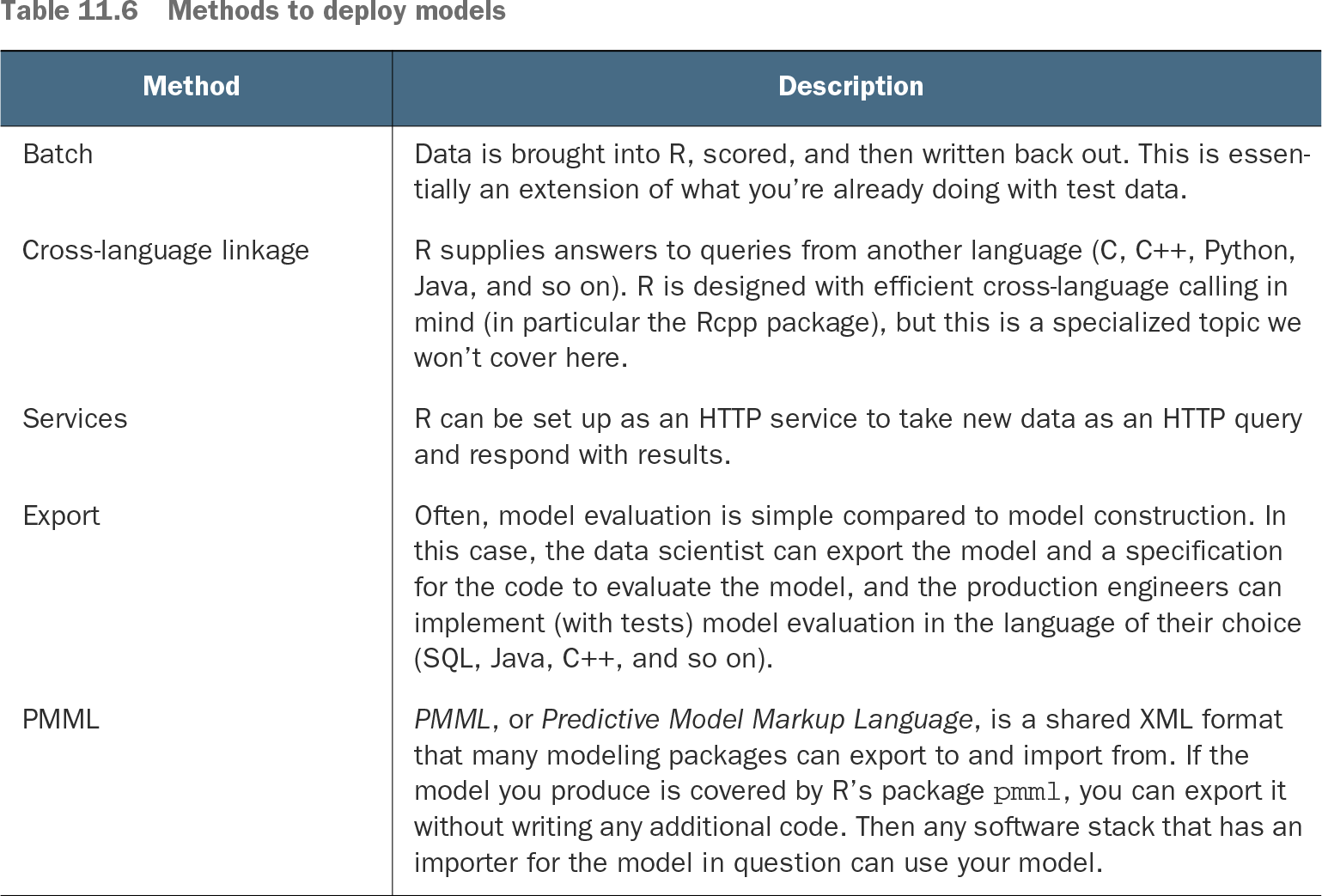
Table 11.6. Methods to deploy models (view table figure)
Method
Description
Batch Data is brought into R, scored, and then written back out. This is essentially an extension of what you’re already doing with test data. Cross-language linkage R supplies answers to queries from another language (C, C++, Python, Java, and so on). R is designed with efficient cross-language calling in mind (in particular the Rcpp package), but this is a specialized topic we won’t cover here. Services R can be set up as an HTTP service to take new data as an HTTP query and respond with results. Export Often, model evaluation is simple compared to model construction. In this case, the data scientist can export the model and a specification for the code to evaluate the model, and the production engineers can implement (with tests) model evaluation in the language of their choice (SQL, Java, C++, and so on). PMML PMML, or Predictive Model Markup Language, is a shared XML format that many modeling packages can export to and import from. If the model you produce is covered by R’s package pmml, you can export it without writing any additional code. Then any software stack that has an importer for the model in question can use your model.
Exercise: Run our random forest model in SQL
Now let’s look at the model that tidypredict converted to SQL. The conversion was performed in the R markdown file PDSwR2/Buzz/model_export.Rmd, which produces the rendered result PDSwR2/Buzz/model_export.md. We won’t show the code here, but instead show the first few lines of the what the first random forest tree is translated into:
CASE
 WHEN (`num.displays_06` >= 1517.5 AND
       `avg.auths.per.disc_00` < 2.25 AND
       `num.displays_06` < 2075.0) THEN ('0')
 WHEN (`num.displays_03` >= 1114.5 AND
       `atomic.containers_01` < 9.5 AND
       `avg.auths.per.disc_00` >= 2.25 AND
       `num.displays_06` < 2075.0) THEN ('0')
 WHEN ...
The preceding code is enumerating each path from the root of the tree down. Remember that decision trees are just huge nested if/else blocks, and SQL writes if/else as CASE/WHEN. Each SQL WHEN clause is a path in the original decision tree. This is made clearer in figure 11.16.
In the SQL export, each tree is written as a series of WHEN cases over all of its paths, allowing the tree calculation to be performed in SQL. As a user, we would evaluate a tree by tracing down from the root node and moving down nodes, and left/right depending on the node conditions. The SQL code instead evaluates all paths from the roots to the leaves and keeps the result from the unique path for which all the conditions are met. It is an odd way to evaluate a tree, but it converts everything into an all-at-once formula that can be exported to SQL.