concept middleware in category rails

This is an excerpt from Manning's book Rails 4 in Action: Revised Edition of Rails 3 in Action.
You can’t stub like this in feature tests because you don’t have direct access to the controller instances that you’re using. If you did, then you wouldn’t use Warden’s own login_as helper to sign in. You also couldn’t use login_as in a controller spec, because Warden’s proxy object isn’t available in controller tests at all. This is because the Warden middleware doesn’t come into play at all during controller tests; the tests hit the controllers themselves without going through the layers of middleware.
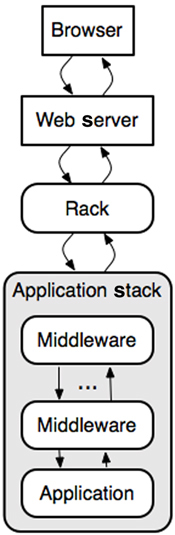
Rack then determines where to route this request, and in this case it’s chosen to route to a specific application stack. The request passes through a series of pieces called middleware (covered in the final section of this chapter) before arriving at the application itself. The application will then generate a response and pass it back up through the stack to Rack, and then Rack will pass it back to the server, which will finally pass it back to the browser. All of this happens in lightning-quick fashion.
When a request comes into a Rack application, it doesn’t go straight to a single place that serves the request. Instead, it goes through a series of pieces known as middleware, which may process the request before it gets to the end of the stack (your application) or may modify it and pass it onward, as shown in figure 15.3.
You can run bundle exec rake middleware within your Rails application’s directory to see the list of middleware currently in use by your Rails application.
The config.middleware.use method will add your middleware to the end of the middleware stack, making it the last piece of middleware to be processed before a request hits your application.

This is an excerpt from Manning's book Rails 3 in Action.
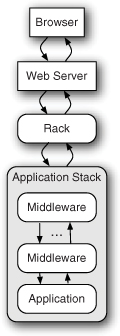
To understand how engines are routed, you must understand the concept of middleware within a Rails application.[14] Middleware is the term used for code that sits between the receiving server and the application; middleware can do a number of things, such as serve static assets and set flash messages. Rails 3 applications run on Rack, which uses a stack-based architecture to accomplish a request. A basic stack is shown in figure 17.2.
14 Additional information about middleware can be found in chapter 18.
In this picture, a basic request cycle for a Rails application is shown. A request comes from a client and hits Rack first, which then goes through all of the middleware. If a middleware returns a 404 (“Not Found”) HTTP status code, then Rack moves on to the next one, going all the way through each part of the stack, moving on to the next every time the current part returns a 404 until it hits the application. The application is the final stop of this request, and so whatever it returns goes. In this case, the application returns a 200 (“OK”) request, which is then passed back to the client through Rack.

Rack then determines where to route this request, and in this case it has chosen to route to a specific application stack. The request passes through a series of pieces called middleware (covered in the final section of this chapter) before arriving at the application itself. The application will then generate a response and pass it back up through the stack to Rack, and then Rack will pass it back to the server, which will finally pass it back to the browser. All of this happens in a lightning quick fashion.
When a request comes into a Rack application, it doesn’t go straight to a single place that serves the request. Instead, it goes through a series of pieces known as middleware, which may process the request before it gets to the end of the stack (your application) or modify it and pass it onward, as shown in figure 18.3.
If this file exists, then the middleware sets env["PATH_INFO"] to be this path so that the Rack::File instance knows what’s being requested, and then it makes a call to the @fileserver.call method and returns the response it gives back.
If everything fails and there’s no file at the path you’ve requested, the middleware gives up and passes the request to the next piece of middleware by using this line:
@app.call(env)The request then continues on down the chain of middleware until it hits a middleware that serves that request or the Ticketee::Application.routes endpoint. Either way, the browser (or whatever makes the request) is basically guaranteed to get a response from a piece of middleware or the application itself. For the first situation, a middleware can return a response itself:
Soon you’ll have your own piece of middleware that you can put into the middleware stack of a Rails or Rack application. This middleware will allow the request to run all the way down the chain to the application and then will modify the body, replacing specific letters in the text for links with other, equally specific letters. Create a new file for your middleware at lib/link_jumbler.rb and fill it with the content shown in the following listing.