concept page in category rails

This is an excerpt from Manning's book Rails 4 in Action: Revised Edition of Rails 3 in Action.
This page is the result of rendering the new action in the PurchasesController controller. What you see on the page comes from the view located at app/views/purchases/new.html.erb, and it looks like the following listing.
Listing 1.2. app/views/purchases/new.html.erb
<h1>New Purchase</h1> <%= render 'form' %> <%= link_to 'Back', purchases_path %>This is an ERB file, which allows you to mix HTML and Ruby code to generate dynamic pages. The <%= beginning of an ERB tag indicates that the result of the code inside the tag will be output to the page. If you want the code to be evaluated but not output, you use the <% tag, like this:
When a user clicks on a tag, they’ll be taken to a page where they can see all tickets with that particular tag. The actions of adding and removing a tag will both need to be added to your permission-checking.
$ git add .
$ git commit -m "Users can now click a tag's name to go to a page
  showing all tickets for it"
$ git push
You’re removing a tag’s association from a ticket, but you’re not yet showing people that it has happened on the page. You’re making the request to remove the tag asynchronously via JavaScript, so you can use JavaScript to hook into the lifecycle of that request and perform certain actions depending on the response.

This is an excerpt from Manning's book Rails 3 in Action.
In figure 1.3, you see two inputs for the fields you generated. This page is the result of the new action from thePurchasesController controller. What you see on the page comes from the view located at app/views/purchases/new.html.erb, and it looks like the following listing.
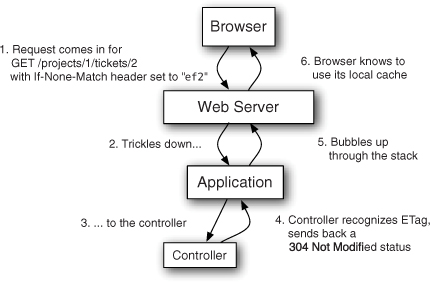
The next time the page is requested, the browser will send a request with the ETag it received on the first request to the server, this time in a If-None-Match header. The server then regenerates the ETag for the page that’s been requested and compares it against the If-None-Match incoming header. If these two match, then the server will send back a 304 Not Modified header, telling the browser to use its cached copy. This means that, rather than having the server re-render the view and its pieces, the client does all the hard work of just re-showing the initial page. This whole process is shown in figure 16.11.
Even though this goes through the same series of events both times, what happens in the controller is the clincher: by returning a 304 Not Modified, you can respond with a lightweight response and get the user’s browser to render the page, rather than having your application do it again.
For your ticket page, you’re going to want your application to send back this status only when your ticket hasn’t been updated. When a ticket’s information such as the title or description is updated, or when a comment is posted to the ticket, you’d want to send back a proper response rather than the 304 Not Modified header. It’s this timestamp that you’re going to be using to determine if a page is either fresh or stale. A fresh page is one that’s been recently updated, with a stale page being one that hasn’t been.
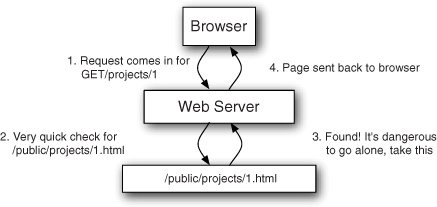
You’re going to cache the page that’s rendered when a user looks at ProjectsController’s show action. By caching this particular page, Rails will serve the first request to this file and then save the output of the request to a new file at public/projects/:id.html. This public/projects directory will be created by Rails automatically. This process is shown in figure 16.4.
One of the downsides of this is that it will not cache the GET parameter on the request, like your page numbers. Earlier, when you used rails server to use your pagination, the URL became http://localhost:3000/projects/1?page=2. The page that’s cached doesn’t have this parameter at the end, and so it will always display the first page, because that’s what will be stored at public/projects/:id.html.
Write page /.../ticketee/public/projects/1.html (0.3ms)