concept user in category raspberry pi
This is an excerpt from Manning's book Hello Raspberry Pi!: Python programming for kids and other beginners.
Ask users to input (or type in) information and save it using variables
Collect input from the user Use if statements to respond to users in different ways
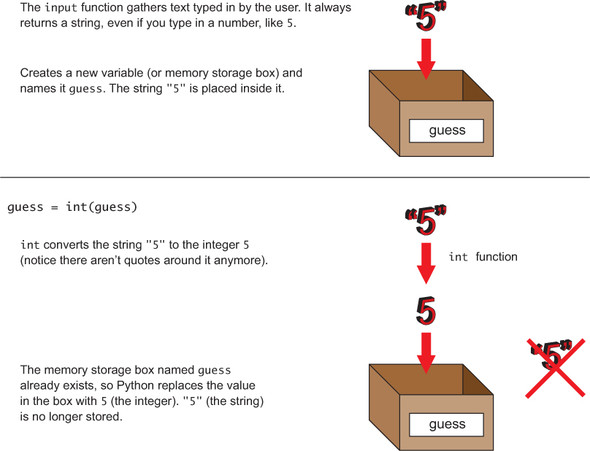
Next let’s get the user’s first guess. Use Python’s input function (like you did in chapter 2) to collect input from the user and store it in a variable named guess. Give the input function a message that clearly prompts the game player to enter an appropriate value. You don’t want them typing in 50 when you’re expecting a number between 1 and 20. In this case, you want them to guess a number from 1 to 20.
After gathering input from the user, you need to convert the value from a string (for example, “5”) into an integer (simply the integer 5). By default, anything input by the game player is stored as a string (even if what they type in is a number). Figure 4.8 shows this graphically: you’re gathering input from the user and then converting it to an integer. The int function takes the value in the guess variable, converts it to an integer, and then stores it back in the guess variable.