concept list in category ravendb

This is an excerpt from Manning's book RavenDB in Action.
What is LINQ? LINQ is a collection of extension methods that act on lists, where a list is any .NET data structure implementing the IEnumerable interface. These methods filter lists, sort lists, and in many other ways help manipulate the individual items in a list.
For example, if you had a list of strings and wanted to keep only elements longer than five characters, you could do it with the following simple LINQ statement:
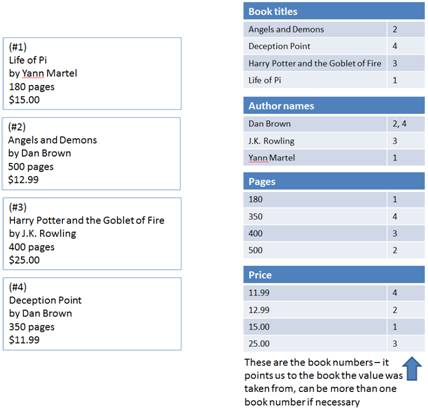
Figure 3.3 A list of books (left) and lists of all possible searchable values, grouped by context
The first step of any Analysis process is splitting the text into individual tokens. We say tokens and not words because a token doesn’t have to be a word – it really all depends on the logic of the Tokenizer being used. This transforms a text field of a RavenDB document into a list of token.
Here’s a list of notable analyzers that are available from Lucene. For those analyzers it’s enough to put the class name alone for RavenDB to locate them:
The quick brown fox jumped over the lazy dogs, bob@hotmail.com 123432. #A KeywordAnalyzer: [The quick brown fox jumped over the lazy dogs, bob@hotmail.com 123432.] WhitespaceAnalyzer: [The] [quick] [brown] [fox] [jumped] [over] [the] [lazy] [dogs,] [bob@hotmail.com] [123432.] SimpleAnalyzer: [the] [quick] [brown] [fox] [jumped] [over] [the] [lazy] [dogs] [bob] [hotmail] [com] StopAnalyzer: [quick] [brown] [fox] [jumped] [over] [lazy] [dogs] [bob] [hotmail] [com] StandardAnalyzer: [quick] [brown] [fox] [jumped] [over] [lazy] [dog] [bob@hotmail.com] [123432] #A - given this sentence, the following demonstrates the list of tokens each analyzer generates