concept Management Studio in category ravendb

This is an excerpt from Manning's book RavenDB in Action.
To easily view and manage the documents, collections, and indexes in a RavenDB instance, you can access the RavenDB Management Studio bundled with the server. The Management Studio is a Silverlight application served by the RavenDB server instance when accessed using a browser. Let’s take a short tour.
To start, hit the URL RavenDB is listening on using your favorite browser—it’s the URL that appears in the debug console and usually is http://localhost:8080/. You’ll be served with the Management Studio, which is an in-browser Silverlight application. If you don’t have Silverlight installed, you will be asked to install it.
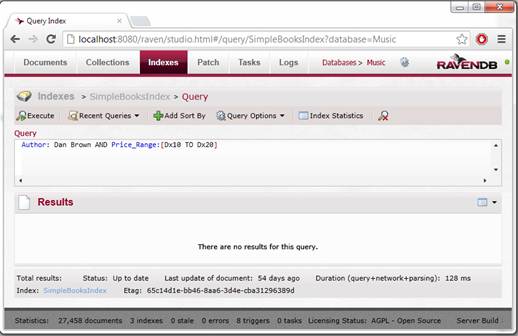
You can use the Lucene Query Language to query indexes directly via Management Studio, by going to the Indexes tab and clicking the index to query. Let’s query the index you just created to try to find all books with price between 10 to 20 bucks, whose author is Dan Brown, as shown in figure 3.7.
Figure 3.7 Querying an index with the Lucene query language using Management Studio