concept method in category react native

This is an excerpt from Manning's book React Native in Action.
When a React Native class is created, methods are instantiated that you can hook into. These methods are called lifecycle methods, and we’ll cover them in depth in chapter 2. The methods in listing 1.1 are
constructor,componentDidMount, andrender, but there are a few more, and they all have their own use cases.
But a method is available in React that can force an update once a state variable has been changed as in the previous snippet. This method is called
forceUpdate; see listing 2.4. CallingforceUpdatecausesrenderto be called on the component, triggering a rerendering of the UI. UsingforceUpdateisn’t usually necessary or recommended, but it’s good to know about in case you run into it in examples or documentation. Most of the time, this rerendering can be handled using other methods such as callingsetStateor passing in new props.
Listing 3.8 Creating the
inputChangefunction... import Heading from './Heading' import Input from './Input' class App extends Component { constructor() { … } inputChange(inputValue) { #1 console.log(' Input Value: ' , inputValue) #2 this.setState({ inputValue }) #3 } render() { const { inputValue } = this.state return ( <View style={styles.container}> <ScrollView keyboardShouldPersistTaps='always' style={styles.content}> <Heading /> <Input inputValue={inputValue} #4 inputChange={(text) => this.inputChange(text)} /> #5 </ScrollView> </View> ) }} #1 Creates the inputChange method, which takes inputValue as an argument #2 Logs out the inputValue value to make sure the method is working #3 Sets the state with the new value—same as this.setState({inputValue: inputValue}) #4 Passes inputValue as a property to the Input component #5 Passes inputChange as a property to the Input component
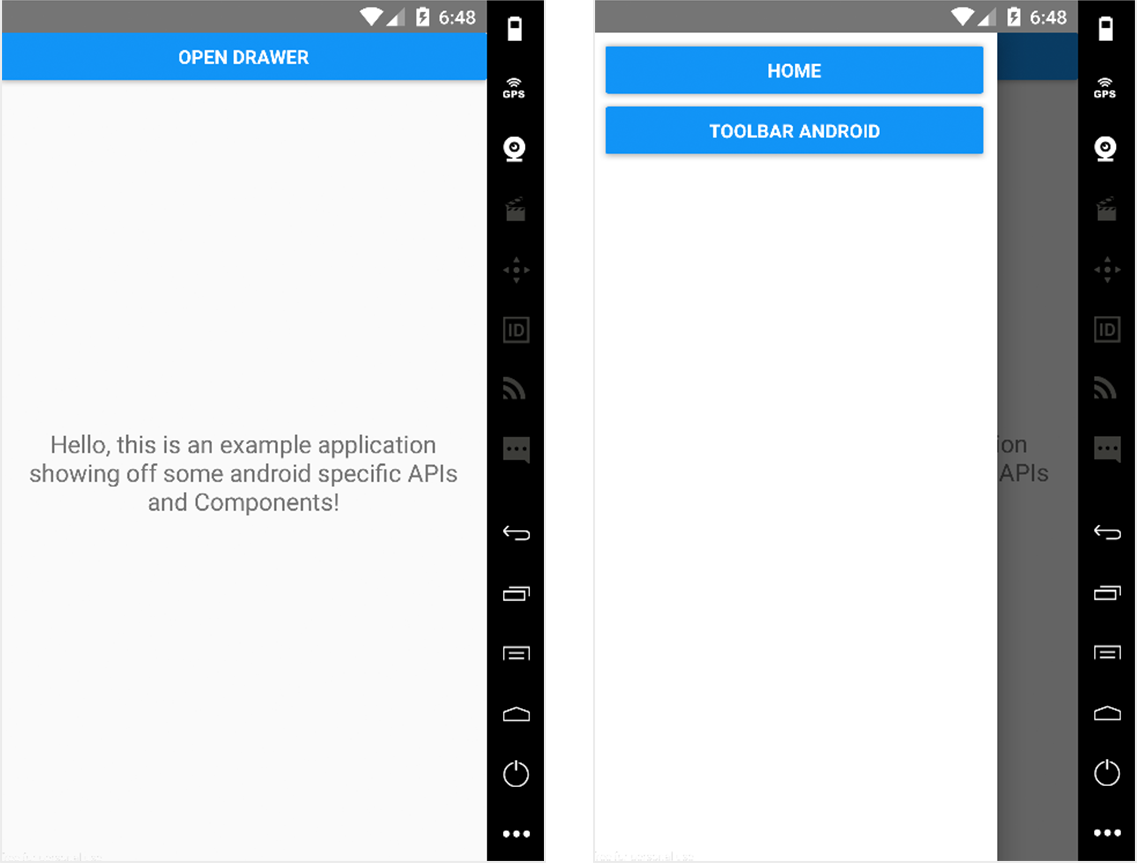
Figure 11.1 Initial layout of the application using
DrawerLayoutAndroid. The button at the top in the first screen, Open Drawer, will call a method that opens the drawer. The second screen is the opened drawer.