concept view in category react native
This is an excerpt from Manning's book React Native in Action.
As I’ve said, the core of React Native is the concept of components. Components are collections of data and UI elements that make up views and, ultimately, applications. React Native has built-in components that are described as native components in this book, but you can also build custom components using the framework. We’ll go into depth on how to build, create, and use components.
Next, you’ll create a new example page and component using
ViewPagerAndroid. This component allows you to easily swipe left and right between views. Every child ofViewPagerAndroidis treated as its own separate, swipeable view (see figure 11.3).
Figure 11.4
DatePickerAndroidwith a button that opens the date picker and then shows the selected date in the view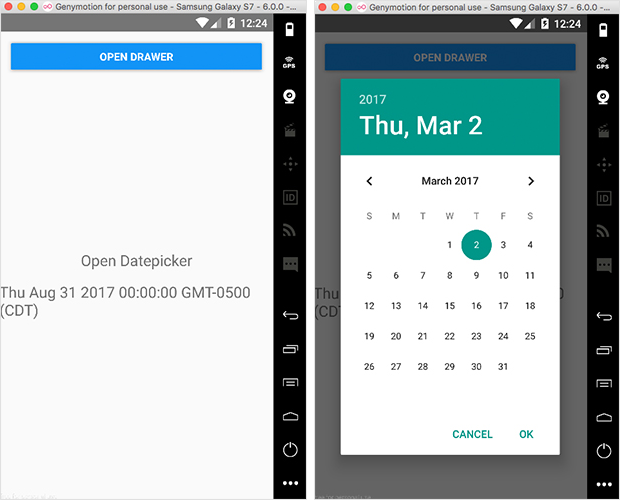
Listing 11.9 Implementing a
DatePickercomponentimport React, { Component } from 'react' import { DatePickerAndroid, View, Text } from 'react-native' #1 let styles class DatePicker extends Component { constructor() { super() this.state = { #2 date: new Date() } this.openDatePicker = this.openDatePicker.bind(this) } openDatePicker () { #3 DatePickerAndroid.open({ date: this.state.date }) .then((date) => { const { year, month, day, action } = date #4 if (action === 'dateSetAction') { #5 this.setState({ date: new Date(year, month, day) }) } }) } render() { const { container, text } = styles return ( <View style={container}> #6 <Text onPress={this.openDatePicker} style={text}> Open Datepicker </Text> #6 <Text style={text}>{this.state.date.toString()}</Text> #6 </View> #6 ) } } styles = { container: { flex: 1, justifyContent: 'center', alignItems: 'center' }, text: { marginBottom: 15, fontSize: 20 } } export default DatePicker #1 Imports DatePickerAndroid from React Native #2 Creates the state, setting the date as a new Date() #3 Creates the openDatePicker method that will be used when the button is pressed #4 DatePickerAndroid.open returns a promise, giving you an object with the selected day, month, year, and the action that was chosen. #5 If you choose a date, then the action is dateSetAction. If the modal is dismissed, then the action is dismissedAction. #6 Creates a button that calls the openDatePicker method and displays the date in the view.