concept App in category react

This is an excerpt from Manning's book Redux in Action.
Listing 2. src/index.js
import React from 'react'; import ReactDOM from 'react-dom'; import { createStore, applyMiddleware } from 'redux'; #1 import { Provider } from 'react-redux'; import thunk from 'redux-thunk'; #2 import { tasks } from './reducers'; import App from './App'; import './index.css'; const store = createStore( tasks, applyMiddleware(thunk) #3 ); ReactDOM.render( <Provider store={store}> <App /> </Provider>, document.getElementById('root') ) #1 Imports applyMiddleware from Redux #2 Imports the middleware from Redux Thunk #3 Applies the middleware during store creation !@%STYLE%@! {"css":"{\"css\": \"font-weight: bold;\"}","target":"[[{\"line\":2,\"ch\":59},{\"line\":2,\"ch\":61}],[{\"line\":21,\"ch\":0},{\"line\":21,\"ch\":2}],[{\"line\":4,\"ch\":59},{\"line\":4,\"ch\":61}],[{\"line\":22,\"ch\":0},{\"line\":22,\"ch\":2}],[{\"line\":11,\"ch\":59},{\"line\":11,\"ch\":61}],[{\"line\":23,\"ch\":0},{\"line\":23,\"ch\":2}]]"} !@%STYLE%@!
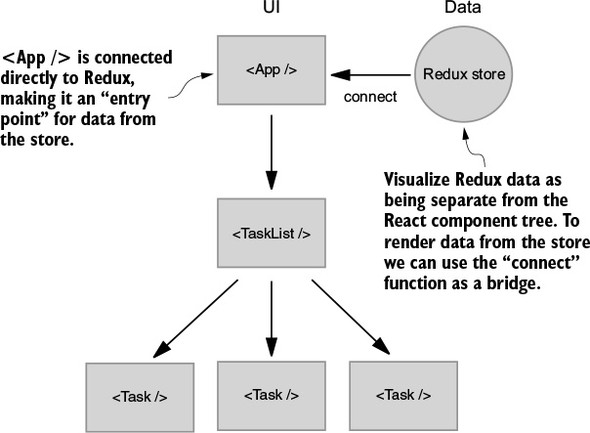
As you can see in figure 2.6, the data used to render your UI is moved entirely out of React and into Redux. The App component will be considered an entry point for data from Redux. As the application grows, you’ll introduce more data, more UI, and as a result, more entry points. This kind of flexibility is one of Redux’s greatest strengths. Your application state lives in one place, and you can pick and choose how you want that data to flow into the application.
Listing 2.11 introduces a couple of new concepts: connect and mapStateToProps. By adding connect to the App component, you declare it as an entry point for data from the Redux store. You’ve only connected one component here, but as your application grows, you’ll start to discover best practices for when to use connect with additional components.
In App.js, you know that App is a connected component and is enhanced with the ability to interact with the Redux store. Do you remember which of the store APIs can be used to send off a new action? Take a moment and log the value of this.props in the render method of App, as shown in the following listing. The resulting console output should match that of figure 2.8.
Listing 2.13. Logging this.props in src/App.js
... render() { console.log('props from App: ', this.props) #1 return ( ... ) } } ... #1 Logs the value of this.props at the top of the render method !@%STYLE%@! {"css":"{\"css\": \"font-weight: bold;\"}","target":"[[{\"line\":2,\"ch\":56},{\"line\":2,\"ch\":58}],[{\"line\":10,\"ch\":0},{\"line\":10,\"ch\":2}]]"} !@%STYLE%@!
Provider is a component that takes the store as a prop and wraps the top-level component in your app—in this case, App. Any child component rendered within Provider can access the Redux store, no matter how deeply it’s nested.
In index.js, import the Provider component and wrap the App component, using the code in the following listing.
Listing 2.10. src/index.js
import React from 'react'; import ReactDOM from 'react-dom'; import { createStore } from 'redux'; import { Provider } from 'react-redux'; #1 import tasks from './reducers'; import App from './App'; import './index.css'; const store = createStore(tasks); ReactDOM.render( <Provider store={store}> #2 <App /> </Provider>, document.getElementById('root') ); #1 Imports the Provider component #2 Provider is now our most top-level React component. It works in conjunction with connect to make the store available to any child component. !@%STYLE%@! {"css":"{\"css\": \"font-weight: bold;\"}","target":"[[{\"line\":3,\"ch\":43},{\"line\":3,\"ch\":45}],[{\"line\":17,\"ch\":0},{\"line\":17,\"ch\":2}],[{\"line\":11,\"ch\":43},{\"line\":11,\"ch\":45}],[{\"line\":18,\"ch\":0},{\"line\":18,\"ch\":2}]]"} !@%STYLE%@!