concept booking grid in category react

This is an excerpt from Manning's book React Hooks in Action.
Let’s start small and just consider the interface for switching between one week and the next. Figure 4.8 shows a possible interface for picking the week to show in the bookings grid. It includes:
So far, the bookables and users pages have had all the attention in the bookings app; it’s about time the bookings page got some love! We need to put the shared-state concepts from chapter 7 into action and decide which components will manage which state as we let users view bookings for different bookables and different weeks. Figure 8.4 shows the layout of the bookings page, with the list of bookables on the left and the bookings info taking up the rest of the page. The bookings info includes a week picker, an area to display a bookings grid and an area to display the details of a selected booking.
Figure 8.4 The bookings page includes components for the list of bookables, week picker, bookings grid and booking details.
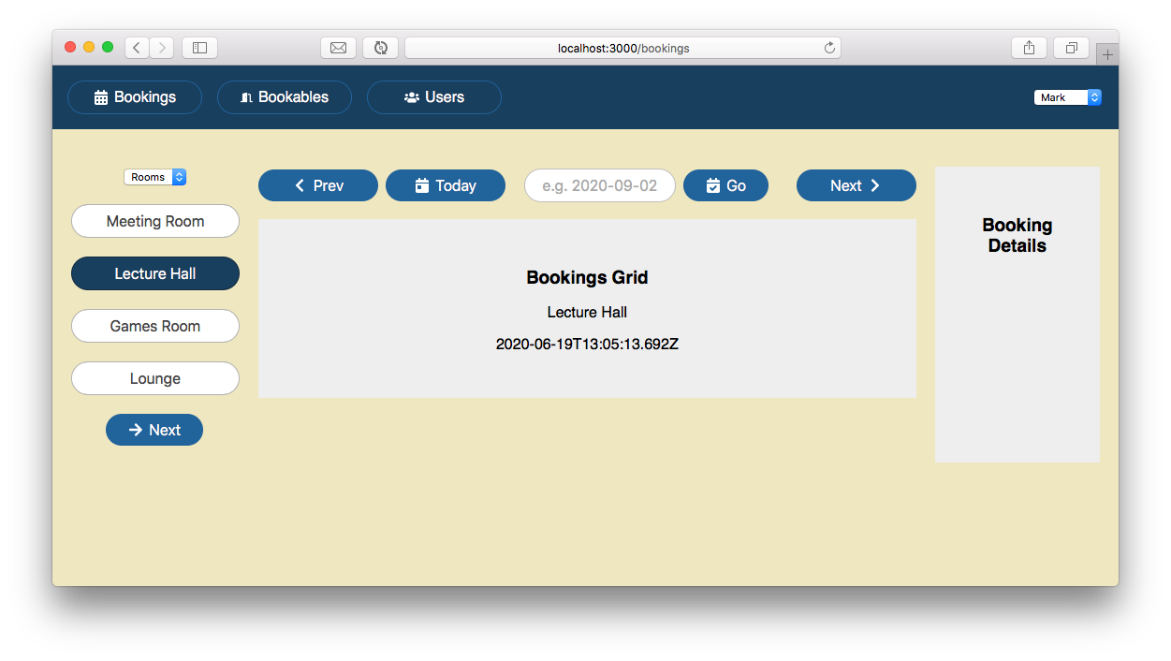
Figure 8.4 has placeholders for the bookings grid and the booking details. We bring the bookings grid to life and introduce the useMemo hook in section 8.4. We populate the booking details and introduce the useContext hook in chapter 9. In this section, we put the pieces into place on the page.