concept button in category react

This is an excerpt from Manning's book React Quickly: Painless web apps with React, JSX, Redux, and GraphQL.
Going back to the examples of a custom radio button and menu, the button can attach event listeners to window (onResize) when the button component is created, and detach them when the component is removed. And the menu can fetch data from the server when the React element is mounted (inserted) into the real DOM.
When you run the code, the counter increases with each click. Visually, nothing has changed from the previous example with the button and the counter (figure 6.10); but internally, there’s an extra component ClickCounterButton (stateless and pretty much logic-less) in addition to Content, which still has all the logic.
ClickCounterButton doesn’t have its own onClick event handler (that is, it has no this.handler or this.handleClick). It uses the handler passed down to it by its parent in a this.props.handler property. Generally, using this approach is beneficial for handling events in a button, because the button is a stateless presentational/dumb component. You can reuse this button in other UIs.
The following listing shows the code for the presentational component that renders the button (ch06/onclick-props/jsx/click-counter-button.jsx); the Content parent that renders this element is shown shortly, in listing 6.8.
This approach for integrating buttons is tightly coupled. Objects depend on each other. Generally, you should avoid tightly coupled patterns. The other, more loosely coupled option, will be implemented for integrating labels after we cover this approach.
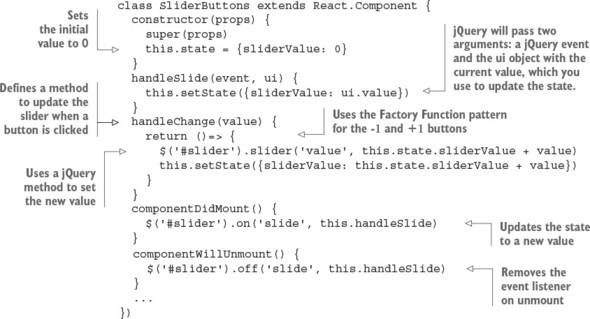
When there’s a slide event on the jQuery slider (meaning there’s a change in that value), you want to update the button values (text on buttons). You can attach an event listener to the jQuery slider in componentDidMount and trigger a method on a React component (handleSlide) when there’s a slide event. With every slide and change in value, you’ll update the state (sliderValue). SliderButtons implements this approach, as shown in the following listing (ch06/slider/jsx/slider-buttons.jsx).
The render() method of SliderButtons has two buttons with onClick events; a dynamic disabled attribute so you don’t set values less than 0 (see figure 6.15) or greater than 100; and Twitter Bootstrap classes for buttons (ch06/slider/jsx/slider-buttons.jsx).