concept componentDidMount() in category react

This is an excerpt from Manning's book React Quickly: Painless web apps with React, JSX, Redux, and GraphQL.
Mounting
- – componentWillMount()—Happens before mounting to the DOM
- – componentDidMount()—Happens after mounting and rendering
To put it differently, under the hood, React calls certain methods during a component’s lifecycle if they’re defined. For example, if you define componentDidMount(), then React will call this method when an element of this component class is mounted. componentDidMount() belongs to the mounting category listed in table 5.1, and it will be called once per instance of the component class:
class Clock extends React.Component {
  componentDidMount() {
  }
  ...
}
If no componentDidMount() method is defined, React won’t execute any code for this event. Thus, the name of the method must match the name of the event. Going forward, I’ll use the terms event, event handler, and method interchangeably in this chapter.
As you might have guessed from its name, the componentDidMount() method is invoked when a component is inserted into the DOM. This method is a recommended place to put code to integrate with other front-end frameworks and libraries as well as to send XHR requests to a server, because at this point in the lifecycle, the component’s element is in the real DOM and you get access to all of its elements, including children.
Let’s go back to the issues I mentioned at the beginning of the chapter: resizing, and fetching data from a server. For the first, you can create an event listener in componentDidMount() that will listen for window.resize events. For the second, you can make an XHR call in componentDidMount() and update the state when you have a response from the server.
Equally important, componentDidMount() comes in handy in isomorphic/universal code (where the same components are used on the server and in the browser). You can put browser-only logic in this method and rest assured that it’ll only be called for browser rendering, and not on the server side. There’s more on isomorphic JavaScript with React in chapter 16.
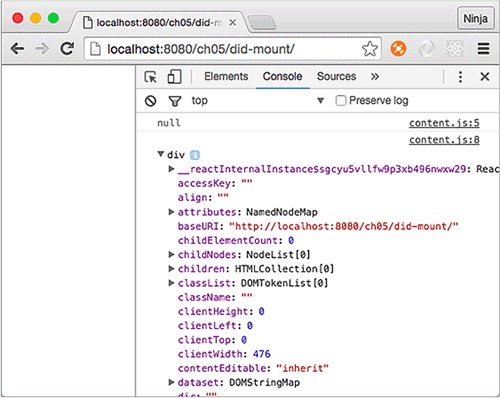
Most developers learn best by looking at examples. For this reason, let’s consider a trivial case that uses componentDidMount() to print the DOM information to the console. This is feasible because this event is fired after all the rendering has happened; thus, you have access to the DOM elements.
The result is this output in the developer console, which reassures you that componentDidMount() is executed when you have real DOM elements (see figure 5.2):
html
null
div