concept React in category react
This is an excerpt from Manning's book React Hooks in Action.
React also provides mechanisms and patterns for passing your app’s data to the components that need them. In fact, that synchronization, of state and UI, goes to the heart of what React is and does.
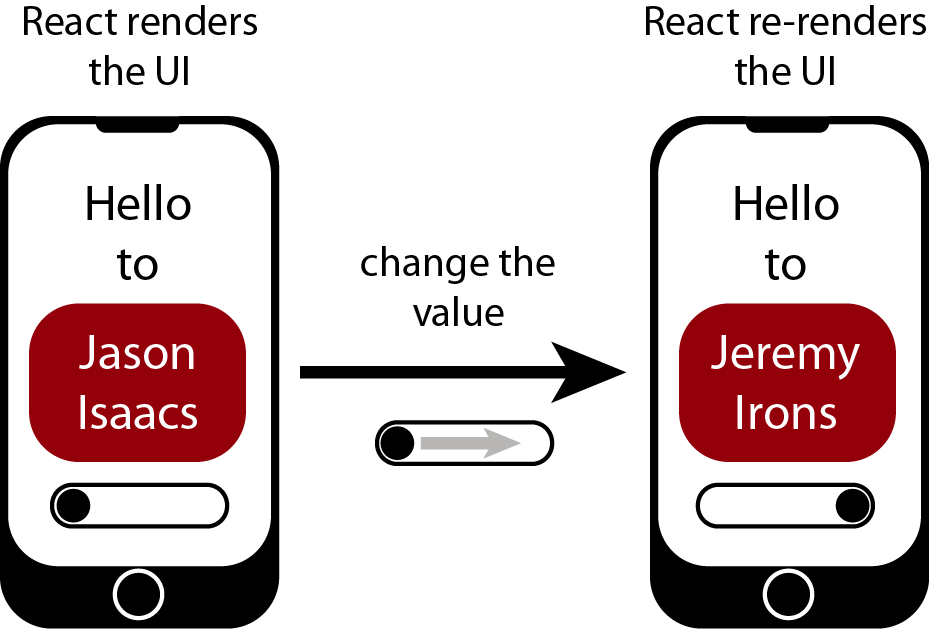
Figure 3.1 shows a very basic illustration of React’s job: it should use the current state to render the UI. If the state changes, React should re-render the UI. The illustration shows a name in a friendly message. When the name value changes, React updates the UI to show the new name in its message. We usually want the state and UI to always be in sync (although we might choose to delay synchronization during state transitions - when fetching the latest data, for example).
Figure 3.1 When you change a value in a component, React should update the UI.
React provides a small number of functions, or hooks, to enable it to track values in your components and keep the state and UI in sync. For single values it gives us the useState hook and that’s the hook we explore in this chapter. We look at how to call the hook, what it returns, and how we use it to update the state, triggering React to update the UI. Components often need more than one piece of state to do their jobs, so we see how we can call useState multiple times to handle multiple values. It’s not just a matter of documenting the useState API - you can go to the official React docs for that - we use the discussion of the useState hook to help us better understand what function components are and how they work. To that end, we finish the chapter with a review of the key concepts met as our code listings have evolved.
If you want to set an initial value for the variable, pass the initial value as an argument to the useState function. When React first runs your component, useState will return the two-element array as usual but will assign the initial value to the first element of the array, as shown in figure 3.12.
Figure 3.12 When the component first runs, React assigns the initial value you pass to useState to the ‘selected’ variable.

The first time the following line of code is executed within a component, React returns the value
“Lecture Hall”as the first element in the array. The code assigns that value to theselectedvariable.const [ selected, setSelected ] = useState("Lecture Hall");Let’s update the
BookablesListcomponent to use the useState hook to ask React to manage the value of the selected item’s index. We pass it1as the initial index. You should see the Lecture Hall highlighted when theBookablesListcomponent first appears on the screen, as shown again in figure 3.13.

This is an excerpt from Manning's book Isomorphic Web Applications: Universal Development with React.

React is one of the pieces that makes building an isomorphic web app possible. React is a library, open sourced by Facebook, for creating user interfaces (the view layer in your app). React makes it easy to express your views via HTML and JavaScript. It provides a simple API that’s easy to get up and running but that’s designed to be composable in order to facilitate building user interfaces quickly and efficiently. Like many other view libraries and implementations, React provides a template language (JSX) and hooks into commonly used parts of the DOM and JavaScript.
Redux can be hooked up to any view, but it works especially well with React. React’s top-down flow of props and state through nested components work well with Redux’s single-direction state update flow.
Listing 6.12. Connect React to Redux—src/components/app.jsx
class App extends React.Component { componentDidMount() {} getSystemNotifications(id) { let items = []; if (this.props.all) { #1 this.props.all.forEach((item, index)=>{ #2 if (item.serviceId == id) { let classes = classnames("ui", "message", item.messageType); items.push( <div className={classes} key={index}> <i className="close icon" onClick={ this.dismiss.bind(this, index) }> </i> <p> {item.message} </p> </div> ) } }) } return items; } render() {} } function mapStateToProps(state) { #3 let { all } = state.notifications; #4 let { refresh } = state.settings; #4 return { #5 all, refresh } } function mapDispatchToProps(dispatch) {} export default connect( mapStateToProps, mapDispatchToProps )(App) #6 #1 Component accesses notifications directly on props. #2 Using notifications array, you build an array of notification items. #3 The function tells connect to pull specific keys out of the store and put them directly on props. #4 Pull out relevant items (notifications and refresh); refresh is required by the child component. #5 Return just the keys the component needs instead of the whole store. #6 Pass mapStateToProps into the connect function; it will be called during render cycle. !@%STYLE%@! {"css":"{\"css\": \"font-weight: bold;\"}","target":"[[{\"line\":4,\"ch\":2},{\"line\":4,\"ch\":30}],[{\"line\":5,\"ch\":4},{\"line\":5,\"ch\":19}],[{\"line\":6,\"ch\":4},{\"line\":6,\"ch\":71}],[{\"line\":7,\"ch\":6},{\"line\":7,\"ch\":71}],[{\"line\":8,\"ch\":8},{\"line\":8,\"ch\":35}],[{\"line\":9,\"ch\":10},{\"line\":9,\"ch\":70}],[{\"line\":10,\"ch\":10},{\"line\":10,\"ch\":21}],[{\"line\":11,\"ch\":12},{\"line\":11,\"ch\":49}],[{\"line\":12,\"ch\":14},{\"line\":12,\"ch\":16}],[{\"line\":13,\"ch\":16},{\"line\":13,\"ch\":38}],[{\"line\":14,\"ch\":16},{\"line\":14,\"ch\":25}],[{\"line\":15,\"ch\":18},{\"line\":15,\"ch\":48}],[{\"line\":11,\"ch\":47},{\"line\":11,\"ch\":49}],[{\"line\":16,\"ch\":16},{\"line\":16,\"ch\":18}],[{\"line\":17,\"ch\":14},{\"line\":17,\"ch\":18}],[{\"line\":18,\"ch\":14},{\"line\":18,\"ch\":17}],[{\"line\":19,\"ch\":16},{\"line\":19,\"ch\":30}],[{\"line\":20,\"ch\":14},{\"line\":20,\"ch\":18}],[{\"line\":21,\"ch\":12},{\"line\":21,\"ch\":18}],[{\"line\":2,\"ch\":20},{\"line\":2,\"ch\":21}],[{\"line\":4,\"ch\":27},{\"line\":4,\"ch\":28}],[{\"line\":6,\"ch\":22},{\"line\":6,\"ch\":23}],[{\"line\":7,\"ch\":41},{\"line\":7,\"ch\":42}],[{\"line\":8,\"ch\":32},{\"line\":8,\"ch\":33}],[{\"line\":9,\"ch\":68},{\"line\":9,\"ch\":69}],[{\"line\":15,\"ch\":47},{\"line\":15,\"ch\":48}],[{\"line\":22,\"ch\":10},{\"line\":22,\"ch\":11}],[{\"line\":24,\"ch\":7},{\"line\":24,\"ch\":8}],[{\"line\":29,\"ch\":9},{\"line\":29,\"ch\":10}],[{\"line\":32,\"ch\":30},{\"line\":32,\"ch\":31}],[{\"line\":41,\"ch\":36},{\"line\":41,\"ch\":37}],[{\"line\":46,\"ch\":15},{\"line\":46,\"ch\":16}],[{\"line\":51,\"ch\":53},{\"line\":51,\"ch\":54}],[{\"line\":2,\"ch\":23},{\"line\":2,\"ch\":24}],[{\"line\":11,\"ch\":35},{\"line\":11,\"ch\":36}],[{\"line\":16,\"ch\":16},{\"line\":16,\"ch\":17}],[{\"line\":19,\"ch\":29},{\"line\":19,\"ch\":30}],[{\"line\":23,\"ch\":8},{\"line\":23,\"ch\":9}],[{\"line\":24,\"ch\":6},{\"line\":24,\"ch\":7}],[{\"line\":25,\"ch\":4},{\"line\":25,\"ch\":5}],[{\"line\":27,\"ch\":2},{\"line\":27,\"ch\":3}],[{\"line\":29,\"ch\":12},{\"line\":29,\"ch\":13}],[{\"line\":30,\"ch\":0},{\"line\":30,\"ch\":1}],[{\"line\":33,\"ch\":12},{\"line\":33,\"ch\":13}],[{\"line\":34,\"ch\":16},{\"line\":34,\"ch\":17}],[{\"line\":38,\"ch\":2},{\"line\":38,\"ch\":3}],[{\"line\":39,\"ch\":0},{\"line\":39,\"ch\":1}],[{\"line\":41,\"ch\":39},{\"line\":41,\"ch\":40}],[{\"line\":24,\"ch\":6},{\"line\":24,\"ch\":8}],[{\"line\":2,\"ch\":23},{\"line\":2,\"ch\":24}],[{\"line\":11,\"ch\":35},{\"line\":11,\"ch\":36}],[{\"line\":16,\"ch\":16},{\"line\":16,\"ch\":17}],[{\"line\":19,\"ch\":29},{\"line\":19,\"ch\":30}],[{\"line\":23,\"ch\":8},{\"line\":23,\"ch\":9}],[{\"line\":24,\"ch\":6},{\"line\":24,\"ch\":7}],[{\"line\":25,\"ch\":4},{\"line\":25,\"ch\":5}],[{\"line\":27,\"ch\":2},{\"line\":27,\"ch\":3}],[{\"line\":29,\"ch\":12},{\"line\":29,\"ch\":13}],[{\"line\":30,\"ch\":0},{\"line\":30,\"ch\":1}],[{\"line\":33,\"ch\":12},{\"line\":33,\"ch\":13}],[{\"line\":34,\"ch\":16},{\"line\":34,\"ch\":17}],[{\"line\":38,\"ch\":2},{\"line\":38,\"ch\":3}],[{\"line\":39,\"ch\":0},{\"line\":39,\"ch\":1}],[{\"line\":41,\"ch\":39},{\"line\":41,\"ch\":40}],[{\"line\":26,\"ch\":4},{\"line\":26,\"ch\":17}],[{\"line\":2,\"ch\":23},{\"line\":2,\"ch\":24}],[{\"line\":11,\"ch\":35},{\"line\":11,\"ch\":36}],[{\"line\":16,\"ch\":16},{\"line\":16,\"ch\":17}],[{\"line\":19,\"ch\":29},{\"line\":19,\"ch\":30}],[{\"line\":23,\"ch\":8},{\"line\":23,\"ch\":9}],[{\"line\":24,\"ch\":6},{\"line\":24,\"ch\":7}],[{\"line\":25,\"ch\":4},{\"line\":25,\"ch\":5}],[{\"line\":27,\"ch\":2},{\"line\":27,\"ch\":3}],[{\"line\":29,\"ch\":12},{\"line\":29,\"ch\":13}],[{\"line\":30,\"ch\":0},{\"line\":30,\"ch\":1}],[{\"line\":33,\"ch\":12},{\"line\":33,\"ch\":13}],[{\"line\":34,\"ch\":16},{\"line\":34,\"ch\":17}],[{\"line\":38,\"ch\":2},{\"line\":38,\"ch\":3}],[{\"line\":39,\"ch\":0},{\"line\":39,\"ch\":1}],[{\"line\":41,\"ch\":39},{\"line\":41,\"ch\":40}],[{\"line\":32,\"ch\":0},{\"line\":32,\"ch\":71}],[{\"line\":33,\"ch\":2},{\"line\":33,\"ch\":71}],[{\"line\":34,\"ch\":2},{\"line\":34,\"ch\":71}],[{\"line\":35,\"ch\":2},{\"line\":35,\"ch\":71}],[{\"line\":36,\"ch\":4},{\"line\":36,\"ch\":8}],[{\"line\":34,\"ch\":8},{\"line\":34,\"ch\":15}],[{\"line\":37,\"ch\":4},{\"line\":37,\"ch\":11}],[{\"line\":51,\"ch\":46},{\"line\":51,\"ch\":53}],[{\"line\":2,\"ch\":23},{\"line\":2,\"ch\":24}],[{\"line\":11,\"ch\":35},{\"line\":11,\"ch\":36}],[{\"line\":16,\"ch\":16},{\"line\":16,\"ch\":17}],[{\"line\":19,\"ch\":29},{\"line\":19,\"ch\":30}],[{\"line\":23,\"ch\":8},{\"line\":23,\"ch\":9}],[{\"line\":24,\"ch\":6},{\"line\":24,\"ch\":7}],[{\"line\":25,\"ch\":4},{\"line\":25,\"ch\":5}],[{\"line\":27,\"ch\":2},{\"line\":27,\"ch\":3}],[{\"line\":29,\"ch\":12},{\"line\":29,\"ch\":13}],[{\"line\":30,\"ch\":0},{\"line\":30,\"ch\":1}],[{\"line\":33,\"ch\":12},{\"line\":33,\"ch\":13}],[{\"line\":34,\"ch\":16},{\"line\":34,\"ch\":17}],[{\"line\":38,\"ch\":2},{\"line\":38,\"ch\":3}],[{\"line\":39,\"ch\":0},{\"line\":39,\"ch\":1}],[{\"line\":41,\"ch\":39},{\"line\":41,\"ch\":40}],[{\"line\":2,\"ch\":23},{\"line\":2,\"ch\":24}],[{\"line\":11,\"ch\":35},{\"line\":11,\"ch\":36}],[{\"line\":16,\"ch\":16},{\"line\":16,\"ch\":17}],[{\"line\":19,\"ch\":29},{\"line\":19,\"ch\":30}],[{\"line\":23,\"ch\":8},{\"line\":23,\"ch\":9}],[{\"line\":24,\"ch\":6},{\"line\":24,\"ch\":7}],[{\"line\":25,\"ch\":4},{\"line\":25,\"ch\":5}],[{\"line\":27,\"ch\":2},{\"line\":27,\"ch\":3}],[{\"line\":29,\"ch\":12},{\"line\":29,\"ch\":13}],[{\"line\":30,\"ch\":0},{\"line\":30,\"ch\":1}],[{\"line\":33,\"ch\":12},{\"line\":33,\"ch\":13}],[{\"line\":34,\"ch\":16},{\"line\":34,\"ch\":17}],[{\"line\":38,\"ch\":2},{\"line\":38,\"ch\":3}],[{\"line\":39,\"ch\":0},{\"line\":39,\"ch\":1}],[{\"line\":41,\"ch\":39},{\"line\":41,\"ch\":40}],[{\"line\":32,\"ch\":9},{\"line\":32,\"ch\":24}],[{\"line\":44,\"ch\":17},{\"line\":44,\"ch\":32}],[{\"line\":53,\"ch\":8},{\"line\":53,\"ch\":23}],[{\"line\":46,\"ch\":69},{\"line\":46,\"ch\":71}],[{\"line\":53,\"ch\":0},{\"line\":53,\"ch\":2}]]"} !@%STYLE%@!

This is an excerpt from Manning's book React in Action.
If you work as a web engineer in the tech industry, chances are you’ve heard of React. Maybe it was somewhere online like Twitter or Reddit. Maybe a friend or colleague mentioned it to you or you heard a talk about it at a meetup. Wherever it was, I bet that what you heard was probably either glowing or a bit skeptical. Most people tend to have a strong opinion about technologies like React. Influential and impactful technologies tend to generate that kind of response. For these technologies, often a smaller number of people initially “get it” before the technology catches on and moves to a broader audience. React started this way, but now enjoys immense popularity and use in the web engineering world. And it’s popular for good reason: it has a lot to offer and can reinvigorate, renew, or even transform how you think about and build user interfaces.
React is a JavaScript library for building user interfaces across a variety of platforms. React gives you a powerful mental model to work with and helps you build user interfaces in a declarative and component-driven way. We’ll unpack these ideas and much more over the course of the book, but that’s what React is in the broadest, briefest sense.
Where does React fit into the broader world of web engineering? You’ll often hear React talked about in the same space as projects like Vue, Preact, Angular, Ember, Webpack, Redux and other well-known JavaScript libraries and frameworks. React is often a major part of front-end applications and shares similar features with the other libraries and frameworks just mentioned. In fact, many popular front-end technologies are more like React in subtle ways now than in the past. There was a time when React’s approach was novel, but other technologies have since been influenced by React’s component-driven, declarative approach. React continues to maintain a spirit of rethinking established best practices, with the main goal being providing developers with an expressive mental model and a performant technology to build UI applications.
What makes React’s mental model powerful? It draws on deep areas of computer science and software engineering techniques. React’s mental model draws broadly on functional and object-oriented programming concepts and focuses on components as primary units for building with. In React applications, you create interfaces from components. React’s rendering system manages these components and keeps the application view in sync for you. Components often correspond to aspects of the user interface, like datepickers, headers, navbars, and others, but they can also take responsibility for things like client-side routing, data formatting, styling, and other responsibilities of a client-side application.
Components in React should be easy to think about and integrate with other React components; they follow a predictable lifecycle, can maintain their own internal state, and work with “regular old JavaScript.” We’ll dive into these ideas over the course of the rest of the book, but we can look at them at a high level right now. Figure 1.1 gives you an overview of the major ingredients that go into a React application. Let’s look at each part briefly:
Components— Encapsulated units of functionality that are the primary unit in React. They utilize data (properties and state) to render your UI as output; we’ll explore how React components work with data later in chapter 2 onward. Certain types of React components also provide a set of lifecycle methods that you can hook into. The rendering process (outputting and updating a UI based on your data) is predictable in React, and your components can hook into it using React’s APIs. React libraries— React uses a set of core libraries. The core React library works with the react-dom and react-native libraries and is focused on component specification and definition. It allows you to build a tree of components that a renderer for the browser or another platform can use. react-dom is one such renderer and is aimed at browser environments and server-side rendering. The React Native libraries focus on native platforms and let you create React applications for iOS, Android, and other platforms. Third-party libraries— React doesn’t come with tools for data modeling, HTTP calls, styling libraries, or other common aspects of a front-end application. This leaves you free to use additional code, modules, or other tools you prefer in your application. And even though these common technologies don’t come bundled with React, the broader ecosystem around React is full of incredibly useful libraries. In this book, we’ll use a few of these libraries and devote chapters 10 and 11 to looking at Redux, a library for state management.
Figure 1.1. React allows you to create user interfaces from components. Components maintain their own state, are written in and work with “vanilla” JavaScript, and inherit a number of helpful APIs from React. Most React apps are written for browser-based environments, but can also be used in native environments like iOS and Android. For more about React Native, see Nader Dabit’s React Native in Action, also available from Manning.

Listing 3.2. Using setState to modify component state
import React from "react"; import { render } from "react-dom"; class Secret extends React.Component{ #1 constructor(props) { super(props); this.state = { name: 'top secret!', #2 }; this.onButtonClick = this.onButtonClick.bind(this); #1 } onButtonClick() { #3 this.setState(() => ({ #3 name: 'Mark' #3 })); } render() { return ( <div> <h1>My name is {this.state.name}</h1> <button onClick={this.onButtonClick}>reveal the secret!</button> #4 </div> ) } } render( <Secret/>, document.getElementById('root') #5 ); #1 Create a React component that will have access to persistent component state over time—don’t forget to bind your class methods to the component instance. #2 Provide an initial state for the component so that attempts to access it in render() don’t return undefined values or throw errors. #3 Our first look at setState, the special API for modifying component state; call setState with a callback function that returns a new state object for React to use. #4 Bind the name-revealing function to the click event emitted by the button. #5 Render top-level components to an HTML element at the topmost level of an application—identify your container however you like, as long as ReactDOM can find it. !@%STYLE%@! {"css":"{\"css\": \"font-weight: bold;\"}","target":"[[{\"line\":2,\"ch\":77},{\"line\":2,\"ch\":79}],[{\"line\":8,\"ch\":77},{\"line\":8,\"ch\":79}],[{\"line\":30,\"ch\":0},{\"line\":30,\"ch\":2}],[{\"line\":6,\"ch\":77},{\"line\":6,\"ch\":79}],[{\"line\":31,\"ch\":0},{\"line\":31,\"ch\":2}],[{\"line\":2,\"ch\":77},{\"line\":2,\"ch\":79}],[{\"line\":8,\"ch\":77},{\"line\":8,\"ch\":79}],[{\"line\":30,\"ch\":0},{\"line\":30,\"ch\":2}],[{\"line\":10,\"ch\":77},{\"line\":10,\"ch\":79}],[{\"line\":11,\"ch\":77},{\"line\":11,\"ch\":79}],[{\"line\":12,\"ch\":77},{\"line\":12,\"ch\":79}],[{\"line\":32,\"ch\":0},{\"line\":32,\"ch\":2}],[{\"line\":10,\"ch\":77},{\"line\":10,\"ch\":79}],[{\"line\":11,\"ch\":77},{\"line\":11,\"ch\":79}],[{\"line\":12,\"ch\":77},{\"line\":12,\"ch\":79}],[{\"line\":32,\"ch\":0},{\"line\":32,\"ch\":2}],[{\"line\":10,\"ch\":77},{\"line\":10,\"ch\":79}],[{\"line\":11,\"ch\":77},{\"line\":11,\"ch\":79}],[{\"line\":12,\"ch\":77},{\"line\":12,\"ch\":79}],[{\"line\":32,\"ch\":0},{\"line\":32,\"ch\":2}],[{\"line\":19,\"ch\":77},{\"line\":19,\"ch\":79}],[{\"line\":33,\"ch\":0},{\"line\":33,\"ch\":2}],[{\"line\":27,\"ch\":77},{\"line\":27,\"ch\":79}],[{\"line\":34,\"ch\":0},{\"line\":34,\"ch\":2}]]"} !@%STYLE%@!

This is an excerpt from Manning's book Redux in Action.
If you hop into any React web application in 2018, there’s a good chance you’ll find Redux there to manage its state. It’s remarkable that we reached this place so quickly, though. A few years ago, Redux had yet to be created and React enjoyed an excited and blossoming user base. Early adopters of React believed that they’d found the best solution yet to the view layer—the “V” of the MVC (Model-View-Controller) front-end framework puzzle. What they couldn’t agree on was how to manage the state of those applications once they became the size and complexity that the real world demands. Eventually, Redux settled the debate.
Throughout the course of this book, we’ll explore Redux and its ecosystem through the lens of a React application. As you’ll learn, Redux can be plugged into JavaScript applications of all flavors, but React is an ideal playground for a few reasons. Chief among those reasons: Redux was created in the context of React. You’re most likely to encounter Redux within a React application, and React is agnostic about how you manage the data layer of your application. Without further ado, let’s jump in.

Listing 2.3. src/components/TaskList.js
import React from 'react'; import Task from './Task'; const TaskList = props => { return ( <div className="task-list"> <div className="task-list-title"> <strong>{props.status}</strong> </div> {props.tasks.map(task => ( <Task key={task.id} task={task} /> ))} </div> ); } export default TaskList;
Libraries such as React are a natural fit for Redux because the surface area is small; it has few opinions about how state should be managed on a macro scale. More opinionated frameworks usually require more consideration of how the Redux pattern fits into their paradigm, but as evidenced by all the binding packages, it can be done and often brings with it an improved quality of life.

This is an excerpt from Manning's book React Quickly: Painless web apps with React, JSX, Redux, and GraphQL.
In contrast, React offers a new approach that streamlines front-end development. React is a powerful UI library that offers an alternative that many big firms such as Facebook, Netflix, and Airbnb have adopted and see as the way forward. Instead of defining a one-off template for your UIs, React allows you to create reusable UI components in JavaScript that you can use again and again in your sites.
Do you need a captcha control or date picker? Then use React to define a <Captcha /> or <DatePicker /> component that you can add to your form: a simple drop-in component with all the functionality and logic to communicate with the back end. Do you need an autocomplete box that asynchronously queries a database once the user has typed four or more letters? Define an <Autocomplete charNum="4"/> component to make that asynchronous query. You can choose whether it has a text box UI or has no UI and instead uses another custom form element—perhaps <Autocomplete textbox="..." />.
This approach isn’t new. Creating composable UIs has been around for a long time, but React is the first to use pure JavaScript without templates to make this possible. And this approach has proven easier to maintain, reuse, and extend.
React is a great library for UIs, and it should be part of your front-end web toolkit; but it isn’t a complete solution for all front-end web development. In this chapter, we’ll look at the pros and cons of using React in your applications and how you might fit it into your existing web-development stack.
Part 1 of the book focuses on React’s primary concepts and features, and part 2 looks at working with libraries related to React to build more-complex front-end apps (a.k.a. React stack or React and friends). Each part demonstrates both greenfield and brownfield development[1] with React and the most popular libraries, so you can get an idea of how to approach working with it in real-world scenarios.
class HelloWorld extends React.Component {
  render() {
    console.log(Object.isFrozen(this.props))
    return React.createElement('div', null, h1, h1)
  }
}