concept request in category react
This is an excerpt from Manning's book React Hooks in Action.
We’ve made our
db.jsonfile JSON data available over http via URL endpoints. Comparing the data from the file to figure 5.8, you can see the server has turned each property from the JSON object into an endpoint. For example, to get the list of users, navigate tolocalhost:3001/usersand to get the user with an id of 1, navigate tolocalhost:3001/users/1. Nice! You can test out the requests in a browser. The results of the two requests just mentioned are shown in figure 5.9: first, the list of user objects in an array, and second, the user object with an id of 1.

This is an excerpt from Manning's book Isomorphic Web Applications: Universal Development with React.
4. The server gathers the data required for the part of our application being requested. If the request is for allthingswesties.com/product/mugs, the app requests the list of gift items for sale through the site. This list of mugs, along with all the information to be displayed (names, descriptions, price, images), is collected before moving on to the render step.
Listing 2.9. Action creators for recipes and featured data—src/action-creators.es6
export const GET_RECIPES = 'GET_RECIPES'; #1 export const GET_FEATURED_RECIPE = 'GET_FEATURED_RECIPE'; #1 export function fetchRecipes() { #2 return dispatch => { return fetch('http://localhost:3000/recipes', { #3 method: 'GET' }).then((response) => { return response.json().then((data) => { #4 return dispatch({ #5 type: GET_RECIPES, #6 data: data.recipes #7 }); }); }) } } export function fetchFeaturedRecipe() { #8 return dispatch => { return fetch('http://localhost:3000/featured', { #3 method: 'GET' }).then((response) => { return response.json().then((data) => { #4 return dispatch({ #9 type: GET_FEATURED_RECIPE, #6 data: data.recipe #10 }); }); }) } } export function getHomePageData() { #11 return (dispatch, getState) => { return Promise.all([ dispatch(fetchFeaturedRecipe()), dispatch(fetchRecipes()) ]) } } #1 Best practice is to create constants for all your actions so action creators (functions listed here) and reducers can use them. Then you won’t have discrepancies between strings. #2 fetchRecipes, the first action creator, handles logic for making a request to the server for recipes data. #3 Implements fetch API for making GET request to appropriate endpoint. #4 On a successful response, get JSON from the response—using a promise to get JSON response is standard with the fetch API. #5 Dispatch action. #6 Type is the only required property of every action, set it using string constants declared at the top of the module. #7 Attach JSON data to action payload on a property called data. #8 The second action creator handles the logic for requesting the featured recipe from the server. #9 Dispatch action. #10 Attach JSON data to action payload on a property called data. #11 This action creator composes the other two action creators—making it easier for view and server to request related data. !@%STYLE%@! {"css":"{\"css\": \"font-weight: bold;\"}","target":"[[{\"line\":0,\"ch\":71},{\"line\":0,\"ch\":73}],[{\"line\":1,\"ch\":71},{\"line\":1,\"ch\":73}],[{\"line\":26,\"ch\":71},{\"line\":26,\"ch\":73}],[{\"line\":33,\"ch\":71},{\"line\":33,\"ch\":73}],[{\"line\":42,\"ch\":0},{\"line\":42,\"ch\":2}],[{\"line\":51,\"ch\":0},{\"line\":51,\"ch\":2}],[{\"line\":52,\"ch\":0},{\"line\":52,\"ch\":2}],[{\"line\":0,\"ch\":71},{\"line\":0,\"ch\":73}],[{\"line\":1,\"ch\":71},{\"line\":1,\"ch\":73}],[{\"line\":26,\"ch\":71},{\"line\":26,\"ch\":73}],[{\"line\":33,\"ch\":71},{\"line\":33,\"ch\":73}],[{\"line\":42,\"ch\":0},{\"line\":42,\"ch\":2}],[{\"line\":51,\"ch\":0},{\"line\":51,\"ch\":2}],[{\"line\":52,\"ch\":0},{\"line\":52,\"ch\":2}],[{\"line\":3,\"ch\":71},{\"line\":3,\"ch\":73}],[{\"line\":43,\"ch\":0},{\"line\":43,\"ch\":2}],[{\"line\":5,\"ch\":71},{\"line\":5,\"ch\":73}],[{\"line\":20,\"ch\":71},{\"line\":20,\"ch\":73}],[{\"line\":44,\"ch\":0},{\"line\":44,\"ch\":2}],[{\"line\":8,\"ch\":71},{\"line\":8,\"ch\":73}],[{\"line\":23,\"ch\":71},{\"line\":23,\"ch\":73}],[{\"line\":45,\"ch\":0},{\"line\":45,\"ch\":2}],[{\"line\":9,\"ch\":71},{\"line\":9,\"ch\":73}],[{\"line\":46,\"ch\":0},{\"line\":46,\"ch\":2}],[{\"line\":10,\"ch\":71},{\"line\":10,\"ch\":73}],[{\"line\":25,\"ch\":71},{\"line\":25,\"ch\":73}],[{\"line\":47,\"ch\":0},{\"line\":47,\"ch\":2}],[{\"line\":11,\"ch\":71},{\"line\":11,\"ch\":73}],[{\"line\":48,\"ch\":0},{\"line\":48,\"ch\":2}],[{\"line\":18,\"ch\":71},{\"line\":18,\"ch\":73}],[{\"line\":49,\"ch\":0},{\"line\":49,\"ch\":2}],[{\"line\":5,\"ch\":71},{\"line\":5,\"ch\":73}],[{\"line\":20,\"ch\":71},{\"line\":20,\"ch\":73}],[{\"line\":44,\"ch\":0},{\"line\":44,\"ch\":2}],[{\"line\":8,\"ch\":71},{\"line\":8,\"ch\":73}],[{\"line\":23,\"ch\":71},{\"line\":23,\"ch\":73}],[{\"line\":45,\"ch\":0},{\"line\":45,\"ch\":2}],[{\"line\":24,\"ch\":71},{\"line\":24,\"ch\":73}],[{\"line\":50,\"ch\":0},{\"line\":50,\"ch\":2}],[{\"line\":10,\"ch\":71},{\"line\":10,\"ch\":73}],[{\"line\":25,\"ch\":71},{\"line\":25,\"ch\":73}],[{\"line\":47,\"ch\":0},{\"line\":47,\"ch\":2}],[{\"line\":26,\"ch\":71},{\"line\":26,\"ch\":74}],[{\"line\":51,\"ch\":0},{\"line\":51,\"ch\":3}],[{\"line\":33,\"ch\":71},{\"line\":33,\"ch\":74}],[{\"line\":52,\"ch\":0},{\"line\":52,\"ch\":3}]]"} !@%STYLE%@!


This is an excerpt from Manning's book Redux in Action.
As JavaScript developers, many of us already spend much time within the Chrome DevTools—inspecting elements, using breakpoints, flipping between panels to check the performance of requests, and so on. Installing the Redux DevTools Chrome plugin adds one more panel, and clicking it reveals the Inspector and other monitors. You don’t miss a beat.
Async action creator— An action creator that does contain async code (the most common example being network requests). As you’ll see later in the chapter, they typically make one or more API calls and dispatch one or more actions at certain points in the request’s lifecycle. Often, instead of returning an action directly, they may return synchronous action creators for readability: export function fetchTasks() { return dispatch => { api.fetchTasks().then(resp => { dispatch(fetchTasksSucceeded(resp.data)); }); }; }
When the request is complete, dispatch an action with the updated object that comes back as part of the server response.
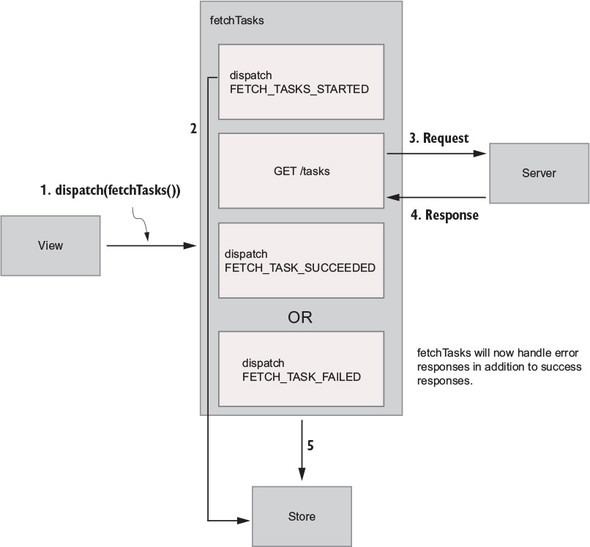
With network requests, there are two moments in time you care about: the request starting and the request finishing. The invoking of the fetchTasks request will always be represented by the FETCH_TASKS_STARTED action, but request completion can trigger one of two dispatches. You’ve handled only the success case so far, but proper error handling is crucial for delivering the best experience possible.
Users are never thrilled when something goes wrong, but having an operation fail and being left in the dark is much worse than seeing an error with some feedback. Taking one last look at the async action diagram in figure 4.5, the second dispatch can now fork depending on the outcome of the request.