concept server - side rendering in category react

This is an excerpt from Manning's book React in Action.
React libraries— React uses a set of core libraries. The core React library works with the react-dom and react-native libraries and is focused on component specification and definition. It allows you to build a tree of components that a renderer for the browser or another platform can use. react-dom is one such renderer and is aimed at browser environments and server-side rendering. The React Native libraries focus on native platforms and let you create React applications for iOS, Android, and other platforms.
This is true for React, too; it supports server-side rendering (SSR) via React DOM’s server APIs. What does that mean? SSR is generally the generation of static HTML markup that can be sent to the browser via HTTP or another protocol; it’s still “rendering,” but in a server context. Integrating SSR in your application can be useful in certain circumstances and unnecessary in others. In this chapter, we’ll explore some of the historical context of server-side rendering, look at when it might make sense to implement, integrate it into your Letters Social app, and replace the router you created in chapters 7 and 8 to better support SSR and allow for future improvements. You’ll implement a simple version of server-side rendering using React to get familiar with the basic concepts.
Listing 12.4. Trying out server-side rendering
//... app.use('/api', backend); app.use(favicon(resolve(__dirname, '..', 'static', 'assets', 'meta', 'favicon.ico'))); app.use('*', (req, res, next) => { #1 const componentResponse = ReactDOMServer.renderToString( #2 React.createElement( #3 'div', #3 null, #3 `Rendered on the server at ${new Date()}` #4 ) ); res.send(componentResponse).end(); #5 }); //... #1 Within request handler, create HTML string and send it down #2 Use renderToString and pass in bare-bones React element #3 Create element with type of div and no props #4 Pass in simple string with timestamp as child content #5 Send response to client !@%STYLE%@! {"css":"{\"css\": \"font-weight: bold;\"}","target":"[[{\"line\":4,\"ch\":69},{\"line\":4,\"ch\":71}],[{\"line\":16,\"ch\":0},{\"line\":16,\"ch\":2}],[{\"line\":5,\"ch\":69},{\"line\":5,\"ch\":71}],[{\"line\":17,\"ch\":0},{\"line\":17,\"ch\":2}],[{\"line\":6,\"ch\":69},{\"line\":6,\"ch\":71}],[{\"line\":7,\"ch\":69},{\"line\":7,\"ch\":71}],[{\"line\":8,\"ch\":69},{\"line\":8,\"ch\":71}],[{\"line\":18,\"ch\":0},{\"line\":18,\"ch\":2}],[{\"line\":6,\"ch\":69},{\"line\":6,\"ch\":71}],[{\"line\":7,\"ch\":69},{\"line\":7,\"ch\":71}],[{\"line\":8,\"ch\":69},{\"line\":8,\"ch\":71}],[{\"line\":18,\"ch\":0},{\"line\":18,\"ch\":2}],[{\"line\":6,\"ch\":69},{\"line\":6,\"ch\":71}],[{\"line\":7,\"ch\":69},{\"line\":7,\"ch\":71}],[{\"line\":8,\"ch\":69},{\"line\":8,\"ch\":71}],[{\"line\":18,\"ch\":0},{\"line\":18,\"ch\":2}],[{\"line\":9,\"ch\":69},{\"line\":9,\"ch\":71}],[{\"line\":19,\"ch\":0},{\"line\":19,\"ch\":2}],[{\"line\":12,\"ch\":69},{\"line\":12,\"ch\":71}],[{\"line\":20,\"ch\":0},{\"line\":20,\"ch\":2}]]"} !@%STYLE%@!
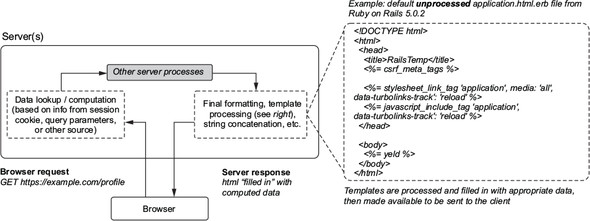
Frameworks like Ruby on Rails, WordPress (a PHP-based content-management framework), and others developed and grew to fill the need of building applications in this manner. This server-centric approach has worked well and still does. But as client-side JavaScript became more robust and browsers became more powerful, developers eventually started using JavaScript for more than just adding basic interactivity to their apps. They started using it to generate and update interfaces with dynamic data. This meant the server was utilized less for templating and more as a source of data. Today you’ll find that many apps (like yours) use a robust client-side application to manage the UI and a remote (usually REST) API to provide dynamic data. This paradigm is the one you’ve been using in the book so far. But this chapter starts to change that slightly as you blend server-rendered and client-rendered patterns. The next section will show a more concrete example of some of what goes into server-side rendering. Figure 12.2 shows an example of this setup as compared to the one in figure 12.1.