concept session in category react
This is an excerpt from Manning's book React Hooks in Action.
The bookables are stored in an array of bookable objects, assigned to the
bookablesproperty. Each bookable hasid,group,titleandnotesproperties. The data in the book’s code repo has slightly longer notes but the structure is the same. Each bookable also specifies the days and sessions for which it can be booked.
With the bookings page structure and hierarchy in place, we’re ready to build up our most complicated component yet, the
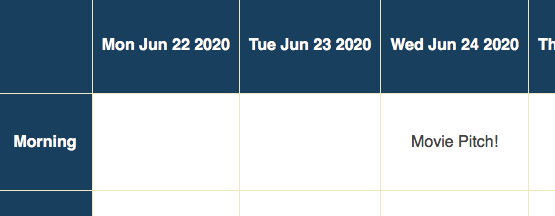
BookingsGrid. In this section, we develop the grid so that it can display booking slots for a bookable in a given week and place any existing bookings in the grid. Figure 8.5 shows the grid with three rows for sessions and six columns for dates. Four existing bookings are in the grid, and the user has selected one of the bookings.
In the data from the database, each bookable specifies the sessions and days for which it can be booked. Here’s the data for the Meeting Room:
"id": 1,
"group": "Rooms",
"title": "Meeting Room",
"notes": "The one with the big table and interactive screen.",
"sessions": [1, 2, 3],
"days": [1, 2, 3, 4, 5]
The
daysrepresent days in the week, where Sunday = 0, Monday = 1, …, Saturday = 6. So, the Meeting Room can be booked for sessions 1, 2 and 3, Monday thru Friday, as we saw in figure 8.6. To get the specific dates for the bookings, rather than just the day numbers, we also need the start date for the week we want to display. And to get the specific session names, we need to import the array of session names from the config file,static.json. The grid generator function,getGrid, is in listing 8.8. The calling code passesgetGridthe current bookable and the start date for the selected week.
Figure 8.12 Cells in the grid represent existing bookings where they exist, or just the underlying grid data for session and date.