concept task in category react

This is an excerpt from Manning's book Redux in Action.
Install and configure json-server, a popular tool for generating REST APIs quickly. This is a Redux book after all, so you don’t want to expend too much energy writing a fully featured back end. json-server allows you to specify a set of resources (such as tasks) and creates a standard set of endpoints to use.
With all this talk around projects and actions, it’s finally time to implement them and see what our store might look like beyond a single tasks reducer. Again, you chose to add projects because it means you now have relational data to manage. Instead of having a standalone tasks resource, tasks now belong to projects.
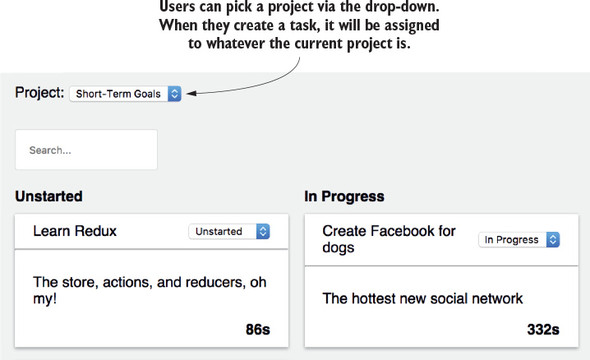
As far as user-facing changes, you’ll add a new drop-down menu where users can choose between projects. Each task will belong to a project. When a user chooses a new project, you’ll render the corresponding list of tasks. An example of what the UI might look like is shown in figure 8.1.
In the interest of time, you won’t implement the ability to create new projects or update existing projects. To compensate for this, you’ll use json-server and db.json to predefine a few projects, and assign them tasks.
Note that tasks is back to being a top-level property in your normalized state tree. This means when you’re creating or editing tasks, you no longer have to dig through a list of projects to find the task you want to update; you can look at each task using its ID.
You’re also no longer storing lists of tasks or projects in arrays. Now you’re using objects with the ID of the resource as a key. Regardless of whether you choose to nest or normalize your data, we usually recommend storing your lists in this way. The reason is simple: it makes lookups roughly a thousand times easier. The following listing shows the difference.
The only things you haven’t ported over to this new normalized structure are creates and updates. You’ll leave updates as an exercise toward the end of the chapter. Creating tasks is an interesting case, because it’s the first example where you have to handle a single action in multiple reducers. When you dispatch CREATE_TASK_SUCCESS, you need to do a few things:
In the tasks reducer, add the new task to the store.
Recall that because you’re tracking related entities in different sections of the store, you need to use IDs to maintain these relationships. Each project has a tasks property that’s an array of tasks belonging to that project. When you create a new task, you have to add the task’s ID to the correct project.
Listing 8.31. Handling CREATE_TASK_SUCCEEDED – src/reducers/index.js
... export function tasks(state = initialTasksState, action) { switch (action.type) { ... case 'CREATE_TASK_SUCCEEDED': { const { task } = action.payload; const nextTasks = { #1 ...state.items, #1 [task.id]: task, #1 }; #1 return { ...state, items: nextTasks, }; } ... } } ... export function projects(state = initialProjectsState, action) { switch (action.type) { ... case 'CREATE_TASK_SUCCEEDED': { const { task } = action.payload; const project = state.items[task.projectId]; #2 return { ...state, items: { ...state.items, [task.projectId]: { ...project, tasks: project.tasks.concat(task.id), }, } }; } ... } } #1 Adds the new task object #2 Finds the project that the task belongs to and adds the task’s ID !@%STYLE%@! {"css":"{\"css\": \"font-weight: bold;\"}","target":"[[{\"line\":9,\"ch\":60},{\"line\":9,\"ch\":62}],[{\"line\":10,\"ch\":60},{\"line\":10,\"ch\":62}],[{\"line\":11,\"ch\":60},{\"line\":11,\"ch\":62}],[{\"line\":12,\"ch\":60},{\"line\":12,\"ch\":62}],[{\"line\":50,\"ch\":0},{\"line\":50,\"ch\":2}],[{\"line\":9,\"ch\":60},{\"line\":9,\"ch\":62}],[{\"line\":10,\"ch\":60},{\"line\":10,\"ch\":62}],[{\"line\":11,\"ch\":60},{\"line\":11,\"ch\":62}],[{\"line\":12,\"ch\":60},{\"line\":12,\"ch\":62}],[{\"line\":50,\"ch\":0},{\"line\":50,\"ch\":2}],[{\"line\":9,\"ch\":60},{\"line\":9,\"ch\":62}],[{\"line\":10,\"ch\":60},{\"line\":10,\"ch\":62}],[{\"line\":11,\"ch\":60},{\"line\":11,\"ch\":62}],[{\"line\":12,\"ch\":60},{\"line\":12,\"ch\":62}],[{\"line\":50,\"ch\":0},{\"line\":50,\"ch\":2}],[{\"line\":9,\"ch\":60},{\"line\":9,\"ch\":62}],[{\"line\":10,\"ch\":60},{\"line\":10,\"ch\":62}],[{\"line\":11,\"ch\":60},{\"line\":11,\"ch\":62}],[{\"line\":12,\"ch\":60},{\"line\":12,\"ch\":62}],[{\"line\":50,\"ch\":0},{\"line\":50,\"ch\":2}],[{\"line\":33,\"ch\":60},{\"line\":33,\"ch\":62}],[{\"line\":51,\"ch\":0},{\"line\":51,\"ch\":2}]]"} !@%STYLE%@!