concept timer in category react
This is an excerpt from Manning's book React Hooks in Action.
Step
What happens?
Discussion
1
React calls the component.
To generate the UI for the page, React traverses the tree of components, calling each one. React will pass each component any props set as attributes in the JSX.
2
The component specifies an event handler.
The event handler may listen for user clicks, timers firing or resources loading, for example. The handler will change the state when it runs later. React will hook up the handler to the DOM when it updates the DOM in step 4.
3
The component returns its UI.
The component uses the current state value to generate its user interface and returns it, finishing its work.
4
React updates the DOM
React compares the description of the UI the component returns with the current description of the app’s UI. It efficiently makes any necessary changes to the DOM and sets up or updates event handlers as necessary.
5
The event handler fires.
An event fires and the handler runs. The handler changes the state.
6
React calls the component.
React knows the state value has changed so must recalculate the UI.
7
The component specifies an event handler.
This is a new version of the handler and may use the newly updated state value.
8
The component returns its UI.
The component uses the current state value to generate its user interface and returns it, finishing its work.
9
React updates the DOM
React compares the description of the UI the component returns with the previous description of the app’s UI. It efficiently makes any necessary changes to the DOM and sets up or updates event handlers as necessary.
In this chapter we start with two examples that explore changing state without updating the UI: first a comparison of managing state with useState and useRef, then a longer example as we manage timers for the
BookablesListcomponent’s new Presentation Mode. The second half of the chapter has two more examples, this time exploring references to DOM elements: automatically setting focus in theBookablesListcomponent and reading the date from a text box for theWeekPickercomponent. The mix of examples will give you a good understanding of how the useRef hook helps you manage state in your components.
Listing 6.3 The BookablesList component using the new reducer, without timers
import React, {useReducer, useEffect, Fragment} from "react";
import {sessions, days} from "../../static.json";
import {FaArrowRight, FaSpinner} from "react-icons/fa";
import reducer from "./reducer";
import getData from "../../utils/api";

const initialState = {
  group: "Rooms",
  bookableIndex: 0,
  bookables: [],
  hasDetails: true,
  isLoading: true,
  error: false,
  isPresenting: false                                                    #A
};

export default function BookablesList () {
  const [state, dispatch] = useReducer(reducer, initialState);

  const {group, bookableIndex, bookables} = state;
  const {hasDetails, isLoading, error, isPresenting} = state;            #B

  const bookablesInGroup = bookables.filter(b => b.group === group);
  const bookable = bookablesInGroup[bookableIndex];
  const groups = [...new Set(bookables.map(b => b.group))];

  useEffect(() => { /* load bookables */ }, []);

  function changeGroup (event) { /* unchanged */ }
  function changeBookable (selectedIndex) { /* unchanged */ }

  function nextBookable () {
    dispatch({
      type: "NEXT_BOOKABLE",
      payload: false                                                     #C
    });
  }

  function toggleDetails () { /* unchanged */ }

  // unchanged UI for error, loading and bookables
}
Figure 6.9 shows some of the key steps involved when the bookables have loaded and the
BookablesListcomponent switches to Presentation Mode. The component uses a timer to repeatedly move the highlight from one bookable to the next. Table 6.2 discusses the steps one by one.Figure 6.9 In Presentation Mode, the component sets up a timer. When the timer fires, it updates the index of the bookable to be shown. That change in state causes the component code to be invoked again, repeating the cycle.
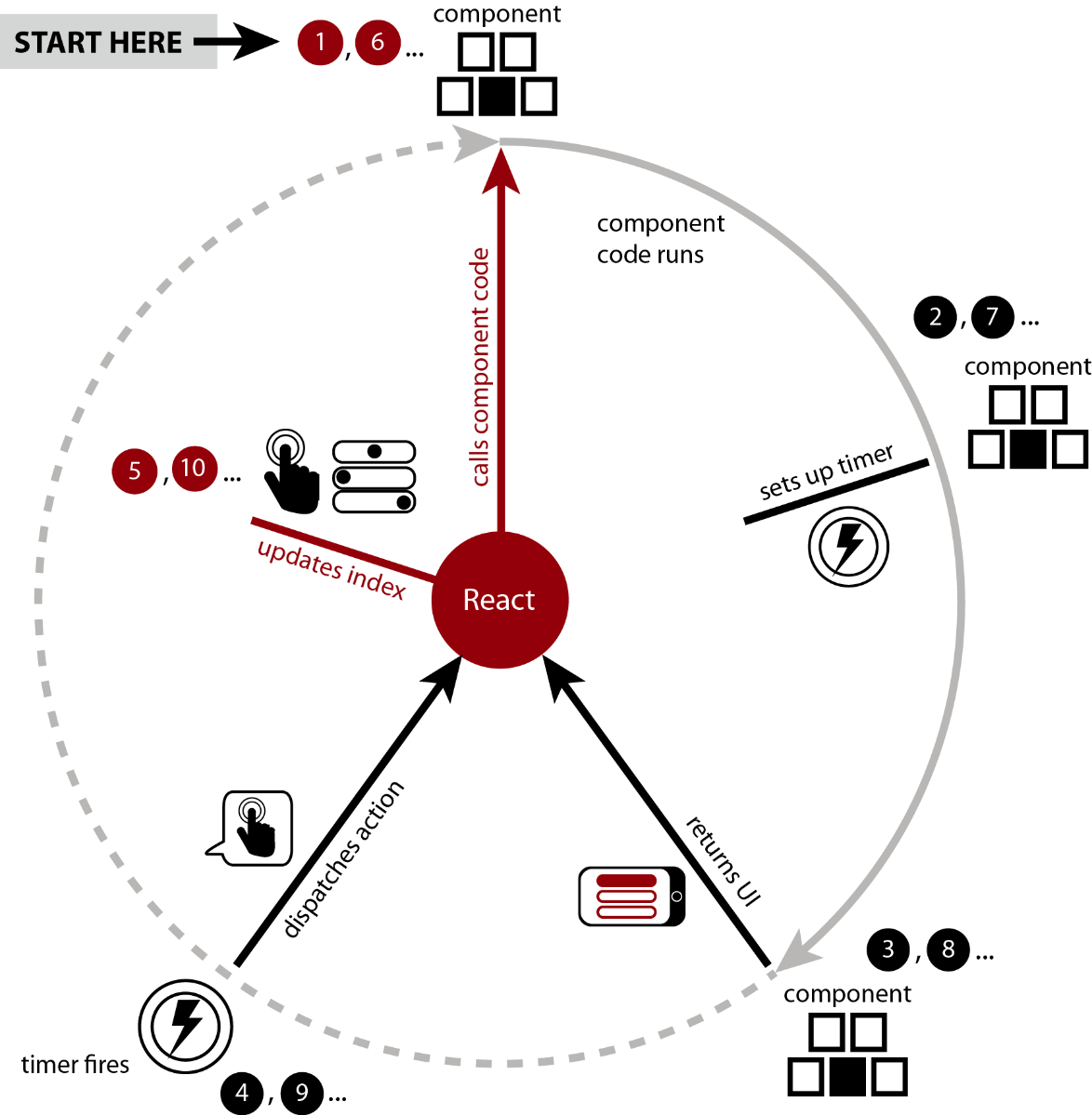
Table 6.2 lists each step and provides a short discussion of what is happening at that point.
Step
What happens?
Discussion
1
React calls the component.
To generate the UI for the page, React traverses the tree of components, calling each one. React will pass each component any props set as attributes in the JSX.
2
The component sets up a timer.
In Presentation Mode, the selected bookable index will be automatically incremented after a set delay. The function to increment the index is set to run using a timer.
3
The component returns its UI.
The component uses the current index value to generate its user interface and returns it, finishing its work. React updates the DOM as required.
4
The timer fires.
The timer will call the function it was given, dispatching an action to increment the index.
5
React passes the action to the reducer, updating the state.
React passes the action to the reducer, updating the state. Because the state has changed, React needs to recalculate the UI, so…
6
React calls the component.
There is a new bookable index value, so React calls the component again to get the UI corresponding to that index.
7
The component sets up a timer.
We need a new timer to increment the index. But that code is already present in the component. Just running the component again will set up a new timer.
8
The component returns its UI.
The component uses the current index value to generate its user interface and returns it, finishing its work. React compares the new UI with the old and updates the DOM as required.
9
The timer fires.
The timer will call the function it was given, dispatching an action to increment the index.
10
React passes the action to the reducer, updating the state.
React passes the action to the reducer, updating the state. Because the state has changed, React needs to recalculate the UI, so…

This is an excerpt from Manning's book Isomorphic Web Applications: Universal Development with React.
The first load on the browser begins as soon as the HTML response from the server is received and the DOM is able to be processed. At this point, single-page application flow takes over, and the app responds to user input, browser events, and timers. The user can add products to their cart, navigate around the site, and interact with forms.
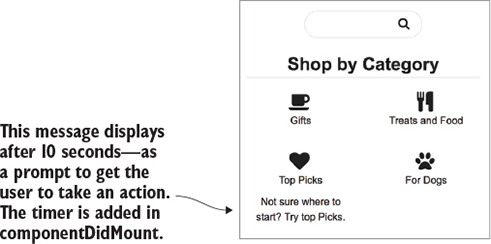
Imagine that you want to add a countdown timer to the Products page. This timer launches a tooltip modal after a set amount of time. Figure 4.6 shows what this looks like. Timers are asynchronous and break the normal flow of user event-driven React updates. But React provides several lifecycle methods that can be used to handle timers within the lifecycle of a React component.
To add a timer to your component, you need to kick it off after the component has mounted. Additionally, you’ll need to handle the cleanup of the timer when the component unmounts or when certain other actions happen. To check out the base code for this section, switch to branch chapter 4.2.2 (git checkout chapter-4.2.2). The following listing shows how to add the timer code to products.jsx. The base component already exists, so update the code in bold.
Listing 4.10. Adding the timer—src/components/products.jsx
import React from 'react'; class Products extends React.Component { constructor(props) { super(props); this.state = { showToolTip: false, searchQuery: '' }; this.updateSearchQuery = this.updateSearchQuery.bind(this); } componentDidMount() { setTimeout(() => { this.setState({ #1 showToolTip: true }); }, 10000); #1 } updateSearchQuery() { #2 this.setState({ searchQuery: this.search.value #3 }); } render() { const toolTip = ( #4 <div className="tooltip ui inverted"> Not sure where to start? Try top Picks. </div> ); return ( <div className="products"> <div className="ui search"> <div className="ui item input"> <input className="prompt" type="text" value={this.state.searchQuery} #5 ref={(input) => { this.search = input; }} #3 onChange={this.updateSearchQuery} #2 /> <i className="search icon" /> </div> <div className="results" /> </div> <h1 className="ui dividing header">Shop by Category</h1> <div className="ui doubling four column grid"> <div className="column segment secondary"></div> <div className="column segment secondary"></div> <div className="column segment secondary"> <i className="heart icon" /> <div className="category-title">Top Picks</div> { this.state.showToolTip ? toolTip : ''} #6 </div> <div className="column segment secondary"></div> </div> </div> ); } } export default Products; #1 In componentDidMount, trigger the timer—the setTimeout callback sets the component state after 10 seconds. #2 Change handler for search input, sets state of searchQuery. #3 Search is set by taking the value from the input element that’s been saved to this.search in the ref callback. #4 The div displays the toolTip (declaring it as a variable makes the ternary statement more readable). It shows only when showToolTip is true (after the timer has triggered). #5 The value for input is tied to state so input uses the component state as its source of truth. #6 The div displays the toolTip (declaring it as a variable makes the ternary statement more readable). It shows only when showToolTip is true (after the timer has triggered). !@%STYLE%@! {"css":"{\"css\": \"font-weight: bold;\"}","target":"[[{\"line\":0,\"ch\":0},{\"line\":0,\"ch\":26}],[{\"line\":2,\"ch\":0},{\"line\":2,\"ch\":40}],[{\"line\":3,\"ch\":2},{\"line\":3,\"ch\":22}],[{\"line\":4,\"ch\":4},{\"line\":4,\"ch\":17}],[{\"line\":5,\"ch\":4},{\"line\":5,\"ch\":18}],[{\"line\":6,\"ch\":6},{\"line\":6,\"ch\":25}],[{\"line\":7,\"ch\":6},{\"line\":7,\"ch\":21}],[{\"line\":8,\"ch\":4},{\"line\":8,\"ch\":6}],[{\"line\":9,\"ch\":4},{\"line\":9,\"ch\":63}],[{\"line\":8,\"ch\":4},{\"line\":8,\"ch\":5}],[{\"line\":10,\"ch\":2},{\"line\":10,\"ch\":3}],[{\"line\":16,\"ch\":6},{\"line\":16,\"ch\":7}],[{\"line\":17,\"ch\":4},{\"line\":17,\"ch\":5}],[{\"line\":18,\"ch\":2},{\"line\":18,\"ch\":3}],[{\"line\":23,\"ch\":4},{\"line\":23,\"ch\":5}],[{\"line\":24,\"ch\":2},{\"line\":24,\"ch\":3}],[{\"line\":39,\"ch\":43},{\"line\":39,\"ch\":44}],[{\"line\":40,\"ch\":53},{\"line\":40,\"ch\":54}],[{\"line\":41,\"ch\":46},{\"line\":41,\"ch\":47}],[{\"line\":54,\"ch\":51},{\"line\":54,\"ch\":52}],[{\"line\":60,\"ch\":2},{\"line\":60,\"ch\":3}],[{\"line\":61,\"ch\":0},{\"line\":61,\"ch\":1}],[{\"line\":12,\"ch\":2},{\"line\":12,\"ch\":23}],[{\"line\":13,\"ch\":4},{\"line\":13,\"ch\":22}],[{\"line\":14,\"ch\":6},{\"line\":14,\"ch\":70}],[{\"line\":15,\"ch\":8},{\"line\":15,\"ch\":25}],[{\"line\":16,\"ch\":6},{\"line\":16,\"ch\":9}],[{\"line\":23,\"ch\":4},{\"line\":23,\"ch\":7}],[{\"line\":17,\"ch\":4},{\"line\":17,\"ch\":70}],[{\"line\":8,\"ch\":4},{\"line\":8,\"ch\":5}],[{\"line\":10,\"ch\":2},{\"line\":10,\"ch\":3}],[{\"line\":16,\"ch\":6},{\"line\":16,\"ch\":7}],[{\"line\":17,\"ch\":4},{\"line\":17,\"ch\":5}],[{\"line\":18,\"ch\":2},{\"line\":18,\"ch\":3}],[{\"line\":23,\"ch\":4},{\"line\":23,\"ch\":5}],[{\"line\":24,\"ch\":2},{\"line\":24,\"ch\":3}],[{\"line\":39,\"ch\":43},{\"line\":39,\"ch\":44}],[{\"line\":40,\"ch\":53},{\"line\":40,\"ch\":54}],[{\"line\":41,\"ch\":46},{\"line\":41,\"ch\":47}],[{\"line\":54,\"ch\":51},{\"line\":54,\"ch\":52}],[{\"line\":60,\"ch\":2},{\"line\":60,\"ch\":3}],[{\"line\":61,\"ch\":0},{\"line\":61,\"ch\":1}],[{\"line\":20,\"ch\":2},{\"line\":20,\"ch\":70}],[{\"line\":14,\"ch\":6},{\"line\":14,\"ch\":21}],[{\"line\":21,\"ch\":4},{\"line\":21,\"ch\":19}],[{\"line\":22,\"ch\":6},{\"line\":22,\"ch\":70}],[{\"line\":16,\"ch\":6},{\"line\":16,\"ch\":9}],[{\"line\":23,\"ch\":4},{\"line\":23,\"ch\":7}],[{\"line\":8,\"ch\":4},{\"line\":8,\"ch\":5}],[{\"line\":10,\"ch\":2},{\"line\":10,\"ch\":3}],[{\"line\":16,\"ch\":6},{\"line\":16,\"ch\":7}],[{\"line\":17,\"ch\":4},{\"line\":17,\"ch\":5}],[{\"line\":18,\"ch\":2},{\"line\":18,\"ch\":3}],[{\"line\":23,\"ch\":4},{\"line\":23,\"ch\":5}],[{\"line\":24,\"ch\":2},{\"line\":24,\"ch\":3}],[{\"line\":39,\"ch\":43},{\"line\":39,\"ch\":44}],[{\"line\":40,\"ch\":53},{\"line\":40,\"ch\":54}],[{\"line\":41,\"ch\":46},{\"line\":41,\"ch\":47}],[{\"line\":54,\"ch\":51},{\"line\":54,\"ch\":52}],[{\"line\":60,\"ch\":2},{\"line\":60,\"ch\":3}],[{\"line\":61,\"ch\":0},{\"line\":61,\"ch\":1}],[{\"line\":26,\"ch\":2},{\"line\":26,\"ch\":12}],[{\"line\":27,\"ch\":4},{\"line\":27,\"ch\":70}],[{\"line\":28,\"ch\":6},{\"line\":28,\"ch\":43}],[{\"line\":29,\"ch\":8},{\"line\":29,\"ch\":47}],[{\"line\":30,\"ch\":6},{\"line\":30,\"ch\":12}],[{\"line\":44,\"ch\":10},{\"line\":44,\"ch\":16}],[{\"line\":46,\"ch\":8},{\"line\":46,\"ch\":14}],[{\"line\":49,\"ch\":52},{\"line\":49,\"ch\":58}],[{\"line\":50,\"ch\":52},{\"line\":50,\"ch\":58}],[{\"line\":53,\"ch\":53},{\"line\":53,\"ch\":59}],[{\"line\":55,\"ch\":10},{\"line\":55,\"ch\":16}],[{\"line\":56,\"ch\":52},{\"line\":56,\"ch\":58}],[{\"line\":57,\"ch\":8},{\"line\":57,\"ch\":14}],[{\"line\":58,\"ch\":6},{\"line\":58,\"ch\":12}],[{\"line\":4,\"ch\":15},{\"line\":4,\"ch\":17}],[{\"line\":9,\"ch\":61},{\"line\":9,\"ch\":63}],[{\"line\":16,\"ch\":7},{\"line\":16,\"ch\":9}],[{\"line\":17,\"ch\":12},{\"line\":17,\"ch\":14}],[{\"line\":23,\"ch\":5},{\"line\":23,\"ch\":7}],[{\"line\":31,\"ch\":4},{\"line\":31,\"ch\":6}],[{\"line\":59,\"ch\":4},{\"line\":59,\"ch\":6}],[{\"line\":39,\"ch\":14},{\"line\":39,\"ch\":70}],[{\"line\":40,\"ch\":14},{\"line\":40,\"ch\":70}],[{\"line\":41,\"ch\":14},{\"line\":41,\"ch\":70}],[{\"line\":54,\"ch\":12},{\"line\":54,\"ch\":70}],[{\"line\":8,\"ch\":4},{\"line\":8,\"ch\":5}],[{\"line\":10,\"ch\":2},{\"line\":10,\"ch\":3}],[{\"line\":16,\"ch\":6},{\"line\":16,\"ch\":7}],[{\"line\":17,\"ch\":4},{\"line\":17,\"ch\":5}],[{\"line\":18,\"ch\":2},{\"line\":18,\"ch\":3}],[{\"line\":23,\"ch\":4},{\"line\":23,\"ch\":5}],[{\"line\":24,\"ch\":2},{\"line\":24,\"ch\":3}],[{\"line\":39,\"ch\":43},{\"line\":39,\"ch\":44}],[{\"line\":40,\"ch\":53},{\"line\":40,\"ch\":54}],[{\"line\":41,\"ch\":46},{\"line\":41,\"ch\":47}],[{\"line\":54,\"ch\":51},{\"line\":54,\"ch\":52}],[{\"line\":60,\"ch\":2},{\"line\":60,\"ch\":3}],[{\"line\":61,\"ch\":0},{\"line\":61,\"ch\":1}]]"} !@%STYLE%@!