concept update in category react
This is an excerpt from Manning's book React Hooks in Action.
React keeps an app’s user interface synchronized with its data. The data held in your app at any moment is called the app’s state and might include, for example, current posts, details about the logged in user, whether comments are shown or hidden, or the contents of a text input field. If new data arrives over the network or a user updates a value via a button or text input, React works out what changes need to be made to the display and efficiently updates it. React intelligently schedules the order and timing of the updates to optimize the perceived performance of your app and improve the user experience. Figure 1.7 represents this idea, that React responds to a change in a component’s state by re-rendering the user interface.
useEffect(() => {
let doUpdate = true;

fetch(url).then(resp => {
  if (doUpdate) {
    // perform update with resp
  }
});

return () => doUpdate = false;
}, [url]);
If the component re-renders with a new
url, the clean-up function for the previous render will set the previous render’sdoUpdatevariable tofalse, preventing the previousthenmethod callback from performing updates with stale data.

This is an excerpt from Manning's book Isomorphic Web Applications: Universal Development with React.
React also takes advantage of functional concepts by adhering to single-direction data flows from the top-level component down to its children. What makes it appealing for isomorphic apps is how it uses a virtual DOM to manage changes and updates to the application.
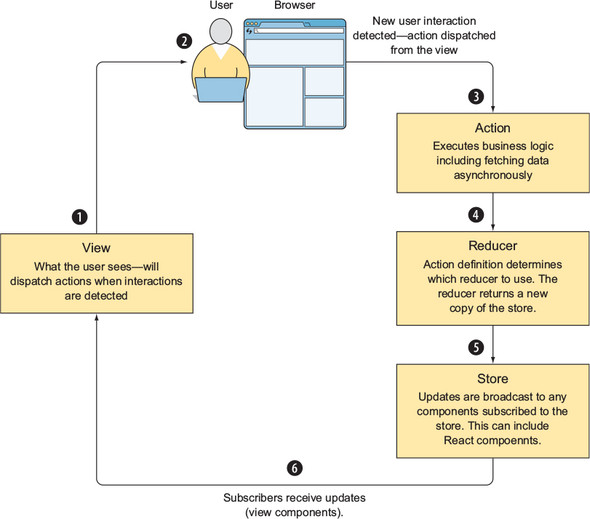
Redux flow relies on the store to dispatch actions. The dispatch function is a hook into the root store that allows you to trigger actions on the store. Sometimes you’ll be triggering synchronous updates to the store and sometimes you’ll be triggering an asynchronous call that will eventually update the store. Additionally, views are able to subscribe to the store and be notified when an update is complete. Figure 6.5 illustrates this flow.
Listing 6.1. An example store object (application state)
{ notifications: { #1 all: [ #2 { serviceId: 1, messageType: "success", message: "Code was pushed!" }, { serviceId: 3, messageType: "error", message: "Service unavailable in region 1" }, { serviceId: 2, messageType: "warning", message: "Warning: build is taking a long time" } ] } settings: { #3 refresh: 30 #4 } } #1 Inside root store, you can set up substores—this app has stores for notifications and settings. #2 The all array holds active notifications for your app. #3 Inside root store, you can set up substores—this app has stores for notifications and settings. #4 The refresh property lets the user set the rate of long polling for updates. !@%STYLE%@! {"css":"{\"css\": \"font-weight: bold;\"}","target":"[[{\"line\":1,\"ch\":48},{\"line\":1,\"ch\":50}],[{\"line\":25,\"ch\":0},{\"line\":25,\"ch\":2}],[{\"line\":2,\"ch\":48},{\"line\":2,\"ch\":50}],[{\"line\":26,\"ch\":0},{\"line\":26,\"ch\":2}],[{\"line\":20,\"ch\":48},{\"line\":20,\"ch\":50}],[{\"line\":27,\"ch\":0},{\"line\":27,\"ch\":2}],[{\"line\":21,\"ch\":48},{\"line\":21,\"ch\":50}],[{\"line\":28,\"ch\":0},{\"line\":28,\"ch\":2}]]"} !@%STYLE%@!Redux provides a way to initialize the state (store). It manages the flow of updates to the store and notifies subscribers (the view). To configure the store in your app, you need to create your reducers and then initialize the store with them. The following listing shows how this works; you can find this code in src/init-redux.es6 in the repo.
Listing 6.2. Initialize Redux—src/init-redux.es6
import { createStore, combineReducers } from 'redux'; #1 import notifications from './notifications-reducer'; #2 import settings from './settings-reducer'; #2 export default function (){ #3 const reducer = combineReducers({ #4 notifications, #4 settings #4 }); return createStore(reducer) #5 } #1 Import helper methods from Redux. #2 Import app reducers. #3 Export function that can be called from other modules (makes it reusable so it can be called from browser and server in isomorphic app). #4 Call combineReducers helper method from Redux; builds map of reducers from multiple reducers. #5 Call createStore, pass in combined reducers—here you’ll have store.notifications and store.settings. !@%STYLE%@! {"css":"{\"css\": \"font-weight: bold;\"}","target":"[[{\"line\":0,\"ch\":58},{\"line\":0,\"ch\":60}],[{\"line\":12,\"ch\":0},{\"line\":12,\"ch\":2}],[{\"line\":1,\"ch\":58},{\"line\":1,\"ch\":60}],[{\"line\":2,\"ch\":58},{\"line\":2,\"ch\":60}],[{\"line\":13,\"ch\":0},{\"line\":13,\"ch\":2}],[{\"line\":1,\"ch\":58},{\"line\":1,\"ch\":60}],[{\"line\":2,\"ch\":58},{\"line\":2,\"ch\":60}],[{\"line\":13,\"ch\":0},{\"line\":13,\"ch\":2}],[{\"line\":4,\"ch\":58},{\"line\":4,\"ch\":60}],[{\"line\":14,\"ch\":0},{\"line\":14,\"ch\":2}],[{\"line\":5,\"ch\":58},{\"line\":5,\"ch\":60}],[{\"line\":6,\"ch\":58},{\"line\":6,\"ch\":60}],[{\"line\":7,\"ch\":58},{\"line\":7,\"ch\":60}],[{\"line\":15,\"ch\":0},{\"line\":15,\"ch\":2}],[{\"line\":5,\"ch\":58},{\"line\":5,\"ch\":60}],[{\"line\":6,\"ch\":58},{\"line\":6,\"ch\":60}],[{\"line\":7,\"ch\":58},{\"line\":7,\"ch\":60}],[{\"line\":15,\"ch\":0},{\"line\":15,\"ch\":2}],[{\"line\":5,\"ch\":58},{\"line\":5,\"ch\":60}],[{\"line\":6,\"ch\":58},{\"line\":6,\"ch\":60}],[{\"line\":7,\"ch\":58},{\"line\":7,\"ch\":60}],[{\"line\":15,\"ch\":0},{\"line\":15,\"ch\":2}],[{\"line\":9,\"ch\":58},{\"line\":9,\"ch\":60}],[{\"line\":16,\"ch\":0},{\"line\":16,\"ch\":2}]]"} !@%STYLE%@!If you aren’t using Redux with React (later in the chapter you’ll learn how to use redux-react to wire the two libraries together), you need to subscribe to store updates manually. The subscribe function works like a standard JavaScript event handler. You pass in a function that gets called every time a store update occurs. But the store doesn’t pass its state to the update handler function; instead, you call getState() to access the current state. The following listing shows an example of this code, which you can find in main.jsx.
Listing 6.3. Subscribe to store, without React Redux—src/main.jsx
const store = initRedux(); #1 store.subscribe(() => { #2 console.log("Store updated", store.getState()); #3 // do something here }); #1 Initialize store (see listing 6.2). #2 Call the subscribe() method on the store and pass in a function to handle updates. #3 Log the current state of the store by calling getState(). !@%STYLE%@! {"css":"{\"css\": \"font-weight: bold;\"}","target":"[[{\"line\":0,\"ch\":58},{\"line\":0,\"ch\":60}],[{\"line\":7,\"ch\":0},{\"line\":7,\"ch\":2}],[{\"line\":2,\"ch\":58},{\"line\":2,\"ch\":60}],[{\"line\":8,\"ch\":0},{\"line\":8,\"ch\":2}],[{\"line\":3,\"ch\":58},{\"line\":3,\"ch\":60}],[{\"line\":9,\"ch\":0},{\"line\":9,\"ch\":2}]]"} !@%STYLE%@!
The functions mapStateToProps and mapDispatchToProps are the two helper callbacks that connect runs. The first one, mapStateToProps, is run every time an update occurs to the store. Inside of it, you’ll define what items from the store should be mapped to React props. The following listing shows this in action.

This is an excerpt from Manning's book Redux in Action.
Provide a way to specify updates to state. The store requires an action be dispatched to modify state. Allow other entities to subscribe to updates (React components in this case). View bindings provided by react-redux will allow you to receive updates from the store and respond to them in your components.
This tool is particularly useful for visually identifying components that are egregiously re-rendering. In figure 10.1, you can see the timeline of react-redux’s Provider component, the connected App component, and each additional component mounting. Each orange-colored bar represents a component process. You’ll find the component name, as well as the lifecycle method taking place, listed within each of the bars. A stacked list of bars indicates one component tree’s sequence of updates.
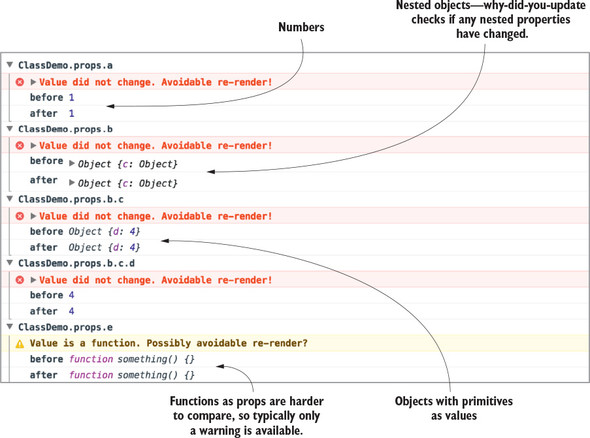
The why-did-you-update package is a diagnostic tool that provides actionable feedback. This tool is specifically valuable for identifying unnecessary component renders. Once it’s installed, console logs will alert you to components that are re-rendered despite having identical props. With that information, you can take appropriate action. Figure 10.2 provides an annotated version of the example in the package’s README.
The why-did-you-update option performs a diff of the props passed to a given component and lets you know if those props are identical or potentially identical. As you can see in figure 10.2, this works for primitives, such as numbers and strings, and objects (including nested objects!). Functions, on the other hand, can’t be diffed with as much confidence, and instead produce a warning. The tool can check each individual property of an object to see if two objects have identical values, but functions, even with identical bound arguments using Function.prototype.bind, will fail an equality check. For installation and usage instructions, see the package README at https://github.com/maicki/why-did-you-update. If this doesn’t do exactly what you’re looking for, Mark Erikson maintains a list of similar tools at https://github.com/markerikson/redux-ecosystem-links/blob/master/devtools.md#component-update-monitoring.