concept url in category react

This is an excerpt from Manning's book React Quickly: Painless web apps with React, JSX, Redux, and GraphQL.
The user types a URL in the browser to open a new page.
function(url, options, ...[error, success]) {
  if (!url) return error(new Error('ooops'))
  // ...
  success(data)
}
In the past, in many single-page applications, the URL rarely, if ever, changed as you progressed through the app. There was no reason to go to the server, thanks to browser rendering! Only the content on part of the page changed. This approach had some unfortunate consequences:
The end goal of this project is to have three pages that change along with the URL when you navigate around. You’ll use hash URLs (#) to keep things simple; non-hash URLs require a special server configuration. These are the pages you’ll create:
Figure 13.1. Navigating from the home page to the Profile page and changing the URL by clicking a link
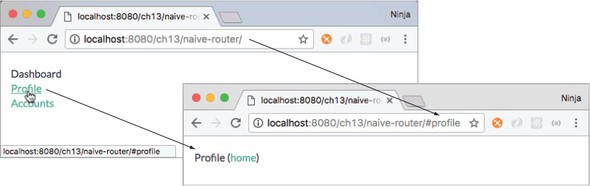
To implement this project, which will demonstrate and use a URL router, you’ll create a router component (router.jsx), a mapping, and an HTML page. The router component will take information from the URL and update the web page accordingly. The implementation of the project breaks down into these steps: