concept time in category redis

This is an excerpt from Manning's book Redis in Action.
When dealing with scores that go down over time, we need to make the posting time, the current time, or both relevant to the overall score. To keep things simple, we’ll say that the score of an item is a function of the time that the article was posted, plus a constant multiplier times the number of votes that the article has received.
In the world of Linux and Unix, there are two common logging methods. The first is logging to a file, where over time we write individual log lines to a file, and every once in a while, we write to a new file. Many thousands of pieces of software have been written do this (including Redis itself). But this method can run into issues because we have many different services writing to a variety of log files, each with a different way of rolling them over, and no common way of easily taking all of the log files and doing something useful with them.
As we monitor our application, being able to gather information over time becomes ever more important. Code changes (that can affect how quickly our site responds, and subsequently how many pages we serve), new advertising campaigns, or new users to our system can all radically change the number of pages that are loaded on a site. Subsequently, any number of other performance metrics may change. But if we aren’t recording any metrics, then it’s impossible to know how they’re changing, or whether we’re doing better or worse.
In an attempt to start gathering metrics to watch and analyze, we’ll build a tool to keep named counters over time (counters with names like site hits, sales, or database queries can be crucial). Each of these counters will store the most recent 120 samples at a variety of time precisions (like 1 second, 5 seconds, 1 minute, and so on). Both the number of samples and the selection of precisions to record can be customized as necessary.
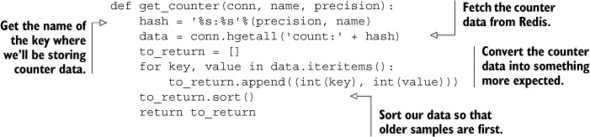
Updating the counter information isn’t so bad; just a ZADD and HINCRBY for each time slice precision. And fetching the information for a named counter and a specific precision is also easy. We fetch the whole HASH with HGETALL, convert our time slices and counters back into numbers (they’re all returned as strings), sort them by time, and finally return the values. The next listing shows our code for fetching counter data.