concept comment in category ruby

This is an excerpt from Manning's book Rails 4 in Action: Revised Edition of Rails 3 in Action.
You have to tell Rails what to do with a request for "/". You can do this easily in config/routes.rb. At the moment, this file has the following content (comments removed).
The comments are good for a read if you’re interested in the other routing syntax, but they’re not necessary at the moment. (We’ve removed them from the code displayed here, but you can keep them if you like.) To define a root route, you use the root method like this in the block for the draw method:
To track the states, you’ll let users leave a comment. Users will be able to leave a text comment about the ticket and may also elect to change the state of the ticket by selecting another state from a drop-down list. But not all users will be able to leave a comment and change the state—you’ll protect both creating a comment and changing the state from unauthorized access. By the time you’re done with all of this, the users of your application will have the ability to add comments to tickets. Some users, depending on their permissions, will be able to change the state of a ticket through the comment interface.
You’ll begin by creating the interface through which a user will create a comment, and then you’ll build the ability for the user to change the state of a ticket. Let’s get into it.
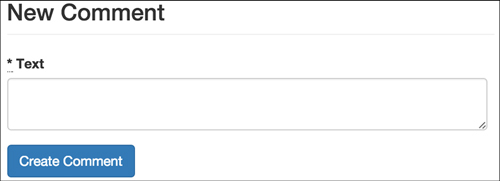
The first step is to add the ability to leave a comment. Once you’ve done so, you’ll have a simple form that looks like figure 10.1.
To get started, you need to write a Capybara feature that goes through the process of creating a comment. When you’re done with this feature, you’ll have a comment form at the bottom of the show view for the TicketsController, which you’ll then use as a base for adding a State select box later on.
Listing 10.1. spec/features/creating_comments_spec.rb
require "rails_helper" RSpec.feature "Users can comment on tickets" do let(:user) { FactoryGirl.create(:user) } let(:project) { FactoryGirl.create(:project) } let(:ticket) { FactoryGirl.create(:ticket, project: project, author: user) } before do login_as(user) assign_role!(user, :manager, project) end scenario "with valid attributes" do visit project_ticket_path(project, ticket) fill_in "Text", with: "Added a comment!" click_button "Create Comment" expect(page).to have_content "Comment has been created." within("#comments") do expect(page).to have_content "Added a comment!" end end scenario "with invalid attributes" do visit project_ticket_path(project, ticket) click_button "Create Comment" expect(page).to have_content "Comment has not been created." end end

This is an excerpt from Manning's book Rails 3 in Action.
The first step fails because you removed the public/index.html file that Rails was originally serving up at the root path, so the task goes to Rails. Rails claims it can’t handle that route and throws an exception. You have to tell Rails what to do with a request for /, or the root route comes in. You can do this easily in config/routes.rb. At the moment, this file has the content seen in the following listing (comments removed).
To track the states, you’ll let users leave a comment. With a comment, users will be able to leave a text message about the ticket and may also elect to change the state of the ticket to something else by selecting it from a drop-down box. But not all users will be able to leave a comment and change the state. You’ll protect both creating a comment and changing the state.
By the time you’re done with all of this, the users of your application will have the ability to add comments to your tickets. Some users, due to permission restriction, will be able to change the state of a ticket through the comment interface.
You’ll begin with creating that interface for a user to create a comment and then build on top of that the ability for the user to change the state of a ticket while adding a comment. Let’s get into it.
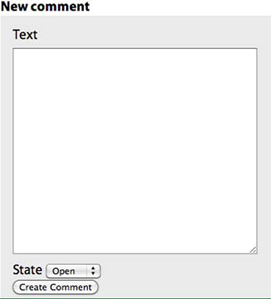
Let’s get started by adding the ability to leave a comment. When you’re done you will have a simple form that looks like figure 10.1.
To get started with this you’ll write a Cucumber feature that goes through the process of creating a comment. When you’re done with this feature, you will have a comment form at the bottom of the show action for the TicketsController which you’ll then use as a base for adding your state drop-down box later on. Put this feature in a new file at features/creating_comments.feature, and make it look like the following listing.
Listing 10.1. features/creating_comments.feature
Feature: Creating comments In order to update a ticket's progress As a user I want to leave comments Background: Given there are the following users: | email | password | | user@ticketee.com | password | And I am signed in as them And there is a project called "Ticketee" And "user@ticketee.com" can view the "Ticketee" project And "user@ticketee.com" has created a ticket for this project: | title | description | | Change a ticket's state | You should be able to create a comment | Given I am on the homepage And I follow "Ticketee" Scenario: Creating a comment When I follow "Change a ticket's state" And I fill in "Text" with "Added a comment!" And I press "Create Comment" Then I should see "Comment has been created." Then I should see "Added a comment!" within "#comments" Scenario: Creating an invalid comment When I follow "Change a ticket's state" And I press "Create Comment" Then I should see "Comment has not been created." And I should see "Text can't be blank"