concept datum in category ruby

This is an excerpt from Manning's book Rails 3 in Action.
The Model-View-Controller (MVC) paradigm is not unique to Ruby on Rails but provides much of the core foundation for a Ruby on Rails application. This paradigm is designed to keep the logically different parts of the application separate while providing a way for data to flow between them.
Great! With this seeds file, you now have data to put in the database so you can bootstrap your application. Let’s run rake db:seed to load this data. Start your application’s server by typing rails server into a terminal, and then go to your server at http://localhost:3000 in your browser. Sign in as the admin user using the same email and password you set up in your seeds file. You should see the display shown in figure 8.6.

This is an excerpt from Manning's book Ruby in Practice.
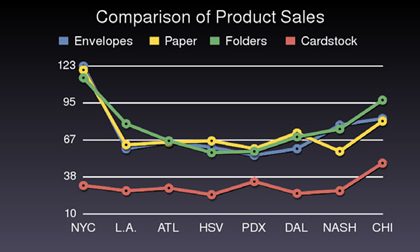
We think the best way to illustrate Ruby’s capabilities and features is by example, and what better way than by diving into some code? Let’s take a fairly typical situation: you need to pull data from a database and create graphs with it. Perhaps you need to trace the sales performance of a range of products across all of your sales locations. Can we keep it simple?
We’ll also stipulate that the stored data has to have some intelligence about itself. A file containing a stream of words—though it may be loaded into a program as a string or an array—will not count as a database, because the file itself does not preserve any information about the structure of the data.
We’re going to use the MySQL database from section 9.3, but this time we’ll address the database with DBI. The goal is to migrate the data to the gdbm-style contacts database. That means we’ll need to load contacts_g.rb, as well as DBI. Loading contacts_g.rb will in turn cause the gdbm driver to be loaded. We also need to create the output directory, if it doesn’t exist already.
require 'dbi'
require 'contacts_g'
Dir.mkdir("migrated_contacts") unless File.exist?("migrated_contacts")
Now we need a ContactList object, which will serve as the receptacle for the data coming in from the MySQL database; the data will be massaged, of course, so as to fit the shape of Contact objects. (Make sure that the directory you use already exists, or add something to the script to create it.) We also need a database connection. And, finally, we need a list of all the tables in the database, except contacts and extras; those two tables require special handling.
We’ll look at a use case for the “pure” MySQL driver here, and in section 9.4 we’ll do something with DBI. Unlike the YAML and gdbm examples, these examples will not involve writing an API for a contact list but, rather, moving contact list data around: to a MySQL database first, and from a MySQL database second. It’s not uncommon to use database tools in situations where you’re moving data from one storage system to another. The nice thing about the facilities available in Ruby is that you can do quite a lot of this at a rather high level of abstraction.