concept email in category ruby

This is an excerpt from Manning's book Rails 4 in Action: Revised Edition of Rails 3 in Action.
Noticing a common pattern yet? Probably. As you can see, Ruby on Rails (and the great community surrounding it) provides code that performs the trivial application tasks for you, from setting up the foundations of your application to handling the delivery of email. The time you save with all of these libraries is immense! And because the code is open source, you don’t have to go to a specific vendor to get support. Anyone who knows Ruby will help you if you’re stuck. Just ask.
commit d1e9b6f398748d3ca8583727c1f86496465ba298
Author: Rebecca Skinner <[email redacted]>
Date:   Sat Apr 4 00:00:33 2015 +0800

    Protect state_id from users who do not have permission
      to change it

commit ceb67d45cfcddbb8439da7b126802e6a48b1b9ea
Author: Rebecca Skinner <[email redacted]>
Date:   Fri Apr 3 23:27:20 2015 +0800

    Only admins and managers can change states of a ticket

commit ef5ec0f15e7add662852d6634de50648373f6116
Author: Rebecca Skinner <[email redacted]>
Date:   Fri Apr 3 23:01:48 2015 +0800

    Auto-assign the default state to newly-created tickets
In the previous chapter, you implemented tagging for your application, which allows users to easily categorize and search for tickets. In this chapter, you’ll begin to send emails to your users. When a user signs up to Ticketee, they use their email address as a way for the system to uniquely identify them. Once you have a user’s validated email address, you can send them updates about important events in the system, such as a ticket being updated.
Before you go about configuring your application to send emails into the real world, you’ll add two more features to Ticketee. The first feature automatically subscribes a user to a watchers list whenever that user creates a ticket. Every time this ticket is updated by another user, the creator of the ticket should receive an email. This is helpful, because it allows users to keep up to date with the tickets they’ve created. The second feature will allow users to add themselves to or remove themselves from the watchers list for a given ticket.
With these features in place, all users who are watching a ticket will be notified via email that a comment has been posted to that ticket, what the comment was, and about any state change that took place. If a user posts a comment to a ticket and they’re not watching it, they’ll automatically be added to its watchers list and receive notifications whenever anybody posts a comment on the ticket. They can unsubscribe later by visiting the ticket page and removing themselves from the watchers list. Email is a tried-and-true solution for receiving notifications of events such as this.

This is an excerpt from Manning's book Rails 3 in Action.
Noticing a common pattern yet? Probably. As you can see, Ruby on Rails (and the great community surrounding it) provides code that performs the trivial application tasks for you, from setting up the foundations of your application to handling the delivery of email. The time you save with all these libraries is immense! And because the code is open source, you don’t have to go to a specific vendor to get support. Anybody who knows Ruby can help you if you’re stuck.
Listing 6.3. features/signing_in.feature
Feature: Signing in In order to use the site As a user I want to be able to sign in Scenario: Signing in via confirmation Given there are the following users: | email | password | | user@ticketee.com | password | And "user@ticketee.com" opens the email with subject "Confirmation instructions" And they click the first link in the email Then I should see "Your account was successfully confirmed" And I should see "Signed in as user@ticketee.com"
In this chapter, you’ll begin to send emails to your users. When a user signs up to Ticketee, they use their email address as a way for the system to uniquely identify them. You then verify that the address is valid by sending the user a confirmation email. With a user’s validated email address, you’re able to send them updates for important events in the system, such as a ticket being updated.
Back in chapter 6, you changed a setting for the authentication engine Devise that would send a confirmation email to a new user when they signed up. To test this setting, you used a gem called email_spec, which only tested that the emails were delivered in a test environment, and not in the real world. This is how Action Mailer (the Rails component responsible for email) acts[1] during a test environment.
1 It defaults to not truly sending out the emails, but rather keeping track of them in a variable that you can access by using ActionMailer::Base.deliveries, or by using the methods found in email_spec.
Before you go about configuring your application to send emails into the real world, you’ll add two more features to Ticketee. The first feature automatically subscribes a user to a watchers list whenever that user creates a ticket. Every time this ticket is updated by another user, the creator of the ticket should receive an email. This is helpful, because it allows users to keep up-to-date with the tickets that they have created. The second feature will allow users to add themselves to or remove themselves from the watching list for a given ticket.
With these features in place, all users who are watching a ticket will be notified via email that a comment has been posted to the ticket, what that comment was, and any state change that took place. This email message will additionally contain a link to the ticket and a link to unsubscribe from further notifications regarding the ticket. If a user posts a comment to a ticket and they’re not watching it, then they will automatically begin to watch it. They can unsubscribe later if they wish by following the unsubscribe link in the email. Email is a tried-and-true solution to receiving notifications of events such as this.
Once that’s all said and done, you’ll work on sending emails through an actual server—Gmail—which will test that your application is able to send out emails into the real world and that you’re doing everything you can to let your users receive them. Gmail is great for low-volume sending,[2] but if you needed something with a larger capacity, other services such as SendGrid[3] and MailChimp[4] are acceptable alternatives. Although we don’t look at how to use large-volume services in this chapter, it’s always great to be aware of alternatives, should you ever need to scale up. To check for the emails on a Gmail account, you’ll be using the (unofficial)[5]gmail gem.

This is an excerpt from Manning's book Ruby in Practice.
So, why is Ruby popular now? This popularity can, for the most part, be traced to developers growing weary of complex, taxing development tools and to the emergence of Rails as a definite, tangible project that shows how Ruby can be used to create production quality software that’s still developer friendly. Once you start working with Ruby, you’ll probably realize this too. It takes about the same amount of effort to work with flat files, produce PDFs, make SOAP requests, and send messages using WebSphere MQ as it does to map objects to databases, send email, or parse an XML file. Wrap that into a nice, natural syntax, and you have a potent tool for software development.
Email is one of the most popular technologies on the web today, but, thanks to spammers, the concept of “automated email dispersion” has bad connotations, even though this sort of mechanism is probably one of the most common internet applications. It’s often used in consumer applications. Purchased a product from an online shop? Chances are you’ve received an automatically generated email message. Signed up for a new service lately? You’ve probably received an activation notice via email.
But these are all business-to-consumer use cases. What about automating email for things like your continuous integration server or process-monitoring software? You can use email as a powerful way to alert or update people about the state of a system. You could also use automated email reception for tasks like creating new tickets in your development ticketing system or setting up autoresponders for email addresses (for example, a user sends an email to autoresponse@yourdomain.com, and then emails are automatically responded to with the message in the body for that address). Email’s ubiquity makes it a powerful tool for communication in your Ruby applications, and in this section we’ll show you how to harness email to do your (Ruby-powered) bidding. We’ll cover the basics, like sending and receiving, and then look at processing email with Ruby.
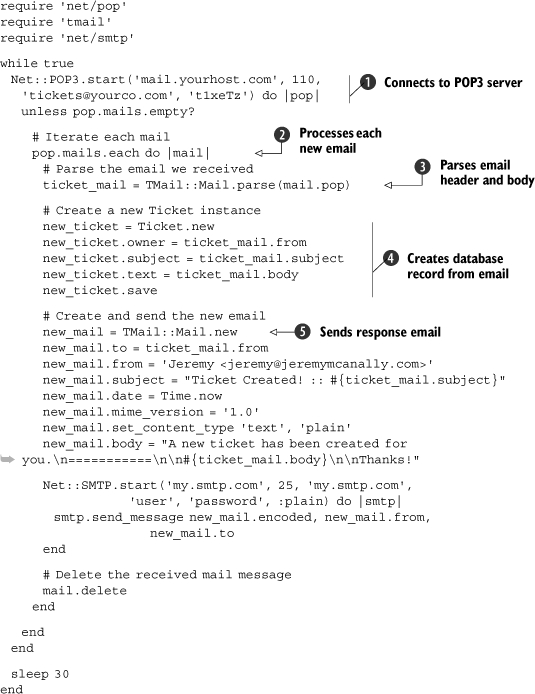
Now that you know how to send and receive email, you can start thinking about how to leverage these techniques to solve bigger problems. In this section, we’ll combine these two techniques and take a look at one subsystem in a production ticketing system.
In this implementation, we first receive our email messages using Net::POP3
. Then we iterate through the messages
and use TMail’s message-parsing abilities to get a usable object with attributes
. We then create a new instance of our ActiveRecord model, Ticket
, and populate it with the data from the email. Finally, we use TMail to build a new email object (notice the API similarities to MailFactory)
, and send that email using Net::SMTP.