concept Rails application in category ruby

This is an excerpt from Manning's book Rails 4 in Action: Revised Edition of Rails 3 in Action.
Ruby on Rails allows for the rapid development of applications by using a concept known as convention over configuration. A new Ruby on Rails application is created by running the application generator, which creates a standard directory structure and the files that act as a base for every Ruby on Rails application. These files and directories provide categorization for pieces of your code, such as the app/models directory for containing files that interact with the database and the app/assets directory for assets such as stylesheets, JavaScript files, and images. Because all of this is already there, you won’t be spending your time configuring the way your application is laid out. It’s done for you.
How rapidly can you develop a Ruby on Rails application? Take the annual Rails Rumble event. This event brings together small teams of one to four developers around the world to develop Ruby on Rails[1] applications in a 48-hour period. Using Rails, these teams deliver amazing web applications in just two days.[2] Another great example of rapid development of a Rails application is the 20-minute blog screencast recorded by Yehuda Katz (http://vimeo.com/10732081). This screencast takes you from having nothing at all to having a basic blogging and commenting system.
The third element represents the response body, the content of the page. In a Rails application, this would be the complete HTML of the page to be rendered by the browser. Rack then compiles everything into a single HTTP response, which is sent back to where the request came from.

This is an excerpt from Manning's book Rails 3 in Action.
Ruby on Rails allows for rapid development of applications by using a concept known as convention over configuration. When you begin writing a Ruby on Rails application, you run an application generator, which creates a basic skeleton of directories and files for your application. These files and directories provide categorization for pieces of your code, such as the app/models directory for containing files that interact with the database and the public/images directory for images. Because all of this is already there for you, you won’t be spending your time configuring the way your application is laid out. It’s done for you.
How rapidly can you develop a Ruby on Rails application? Take the annual Rails Rumble event. This event aims to bring together small teams of one to four developers around the world to develop Ruby on Rails[2] applications in a 48-hour period. Using Rails, these teams can deliver amazing web applications in just two days.[3] Another great example of rapid development of a Rails application is the 20-minute blog screencast recorded by Yehuda Katz.[4] This screencast takes you from a no-application state to having a basic blogging and commenting system.
In this chapter you’ll deploy your Ticketee application to a new Ubuntu install. Ubuntu is the preferred operating system for deploying Rails applications, mainly due to its simplicity of use and easy package management. You don’t need to install another operating system on your computer; you’ll be using a product called Oracle VM VirtualBox.

This is an excerpt from Manning's book Ruby in Practice.
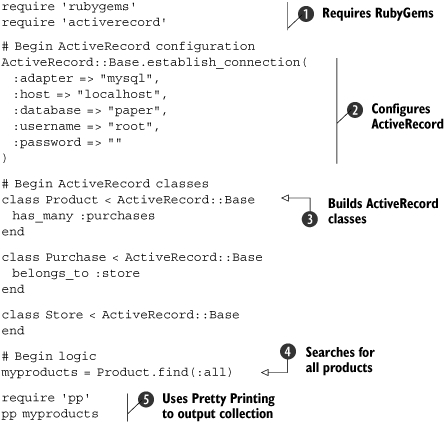
Now, let’s set up ActiveRecord to work with the database. ActiveRecord is typically used inside of a Rails application, and because we’re not using it in that environment, it takes a few more lines of configuration. See our configuration and implementation code in listing 1.2.
As you can see, it doesn’t take a lot of code to get a full object-relationally mapped database connection. First, we import the RubyGems library
, so we can then import ActiveRecord. Next, we establish a database connection with ActiveRecord
. Normally this configuration data would live in a database configuration file in a Rails application (such as database.yml), but for this example we chose to run outside Rails, so we’ve used establish_connection directly. Next, we create ActiveRecord classes and associations to map our database
. Finally, we execute a query
and output its results using Pretty Printing (pp)
.
Listing 7.6. Passing data from a Rails application to a Ruby application
class WorkOrderMessage attr_accessor :requester, :requested_work, :date_due def initialize(params) raise "Invalid arguments provided." unless params.is_a?(Hash) @requester = params[:requester] @requested_work = params[:requested_work] @date_due = params[:date_due] end def unique_id "#{@requester.slice(0,5).strip.upcase}-" + "#{@date_due.strftime('%m%d%y')}-#{@requested_work.hash}" end def report! puts "Order #{unique_id} received." puts "from #{@requester}, due #{@date_due.strftime('%D')}" puts "Work requested:" puts @requested_work puts end end